Author: Praveen

  • Writesonic Alternatives for SEO and AI Search Content

    Writesonic Alternatives for SEO and AI Search Content

    Quick Answer: Which Writesonic Alternatives Fit SEO and AI Search Content?

    The right Writesonic alternatives depend on the job you need done: drafting articles, scoring them for Google, or measuring whether AI engines mention your brand. Writesonic now leads with AI visibility tracking, so many people shopping for Writesonic alternatives want something more writing focused, or something that costs less.

    • Drafting and AI visibility tracking in one account: Spyro AI (from $29 a month) writes and publishes articles, then checks ChatGPT, Claude, Gemini, Perplexity and Google AI Overviews (all five on Pro).
    • An SEO content editor: Surfer starts at $49 a month billed yearly, NeuronWriter at $23 a month, and Frase at $49 a month with separate SEO and GEO scores.
    • Brand voice for bigger teams: Jasper Pro costs $69 per seat a month, or $59 billed yearly.
    • Sales and marketing workflows: Copy.ai now sits closer to workflow automation than to blogging.

    Here’s the thing most lists skip. Writing a draft, optimizing it for search and tracking AI answers are different jobs, and a tool that does one rarely does all three. So the right pick among Writesonic alternatives is whichever one covers the job you’re missing. Want the editing side first? The AI content optimization guide explains how AI engines choose passages to quote.

    I wrote this for SMBs, in house marketing teams, SEO specialists and agencies. Prices come from each vendor’s public pricing page, checked in 2026. SaaS pricing moves fast, so confirm before you pay.

    Why Do Teams Look for Writesonic Alternatives?

    Writesonic isn’t a bad tool, and none of these reasons applies to everyone. They’re just the ones I’d expect to come up when someone starts comparing Writesonic alternatives.

    • Billing and price. Its pricing page lists Starter at $79 a month, Basic at $199 and Growth at $399, all billed annually. A monthly rate isn’t shown.
    • Product direction. The homepage presents Writesonic as an AI search growth engine, with the article writer there to earn citations. If you mainly want a writing environment, that’s a different starting point.
    • Editor depth. The pricing page lists content optimization under Enterprise. Self serve plans list a content strategy agent, an AI article writer and site audits.
    • Engine coverage. Self serve plans track ChatGPT, Gemini and Google AI Overviews. The Enterprise tier lists nine platforms, including Claude and Perplexity.
    • Seats. Starter includes one user. Extra users on Basic and Growth are $50 each.
    • Brand voice. Writing styles run from 1 on Starter to 10 on Growth.

    What Does Writesonic Offer Before You Compare Writesonic Alternatives?

    Fair comparisons need a baseline. Writesonic describes a loop of tracking AI visibility across platforms, ranking fixes by impact, acting on them with content rewrites and technical fixes, then measuring results. Plans include 15, 25 or 50 articles a month, 50 to 200 tracked prompts, site audits, and WordPress and Search Console integrations.

    That’s a real feature set for teams that put AI visibility first. The vendor’s own performance claims aren’t independently verified, and I haven’t tested the product, so I’m leaving them out. Judge it on the plan limits above.

    What Should You Look for in Writesonic Alternatives?

    Start by splitting four jobs that vendors blur together.

    • Generating content. The tool drafts, rewrites or refreshes the article.
    • Optimizing for conventional search. It helps with structure, term coverage, headings and metadata so the page can rank in Google.
    • Optimizing for AI generated answers. It helps with direct answers, evidence and clarity, so a passage is easier to quote.
    • Tracking AI mentions. It asks AI engines your buyers’ questions on a schedule and records whether you were named or cited.

    A writer isn’t automatically a tracker, and a content score doesn’t measure whether ChatGPT cites you. Once you know which job is missing, check six things on each of the Writesonic alternatives you shortlist:

    1. Editorial control. Can you edit the outline before drafting, and see sources?
    2. SEO workflow. Briefs, term guidance, scoring, metadata.
    3. AI search relevance. Real tracking, or only writing tips? Which engines, how often?
    4. Collaboration. Seats, brand voices, approvals.
    5. Publishing. WordPress, Google Docs, Shopify, API.
    6. Cost at your volume. Plan limits matter more than the entry price.

    How Do Writesonic Alternatives Compare Side by Side?

    Here are the Writesonic alternatives covered below, with Writesonic last for reference. Starting price means the lowest published paid plan. On a phone, swipe the table sideways.

    ToolBest forSEO content featuresAI search or GEOStarting priceMain advantageMain limitation
    Spyro AISMBs and agencies wanting content plus trackingAI writer, SEO score panel, content calendarGEO mode drafting; tracking in 2 engines on Starter, 5 on Pro$29/moWriting, publishing and tracking in one accountNo documented SERP term editor
    JasperLarger teams with brand rulesAgents and brand voices; SEO features not listed on ProGEO Hub and agents on the custom Business plan$69/seat/mo ($59 yearly)Brand voices and audiencesPro includes one seat; GEO needs sales
    SurferWriters optimizing against ranking pagesContent Editor, Content ScoreFrom Standard: 25 weekly prompts in ChatGPT; five engines on Pro$49/mo billed yearlyMature SERP based editorFive engines start at $182/mo
    FraseTeams scoring for Google and AI answersSEO score, 10 to 100 articles a monthGEO score; ChatGPT and Google AI on Starter, Claude and Gemini on Scale$49/mo ($39 yearly)Separate SEO and GEO scoresPlan prompt allowances not listed
    NeuronWriterFreelancers and small teams on a budgetTerm suggestions, content score5 to 20 AI monitored questions$23/moLowest entry priceIntegrations start on Gold ($69)
    Copy.aiSales and marketing workflow teamsContent creation is one use case; SEO blog features not listed on plansNot documented$29/mo chat plan; workflow plans from $1,000/moWorkflows and agents across go to market tasksWorkflow plans cost a lot for a blog only team
    WordtuneRewriting and polishing textNone listedNone listedFree; paid from $6.99/moCheap editing helpNot an SEO tool
    RytrShort copy draftsSEO appears only as a writing use caseNone listedFree; paid from $9/moLow priceNow leads with relationship management
    Writesonic (reference)Teams putting AI visibility firstSite audits, AI article writer; content optimization on EnterpriseDaily tracking, 50 to 200 prompts in ChatGPT, Gemini, AI Overviews$79/mo billed yearlyTracking and articles in one planNo monthly price shown

    Read the AI search column twice. “Yes” can mean five monitored questions or 200 prompts a day.

    Which Writesonic Alternatives Belong on Your Shortlist?

    This isn’t a ranking. Each review follows the same format, and I’ve said where every tool falls short. I picked five full reviews of Writesonic alternatives because they cover different needs. The rest get shorter treatment further down.

    1. Spyro AI
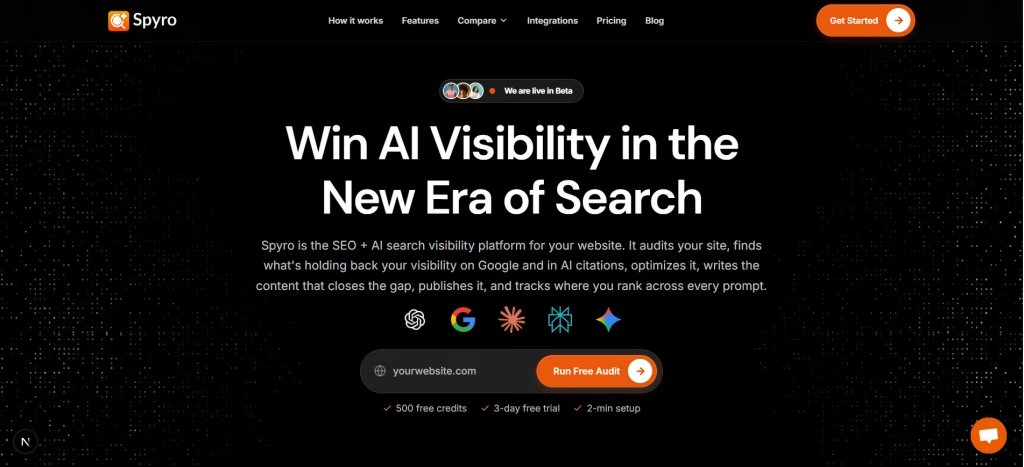
    Spyro-AI

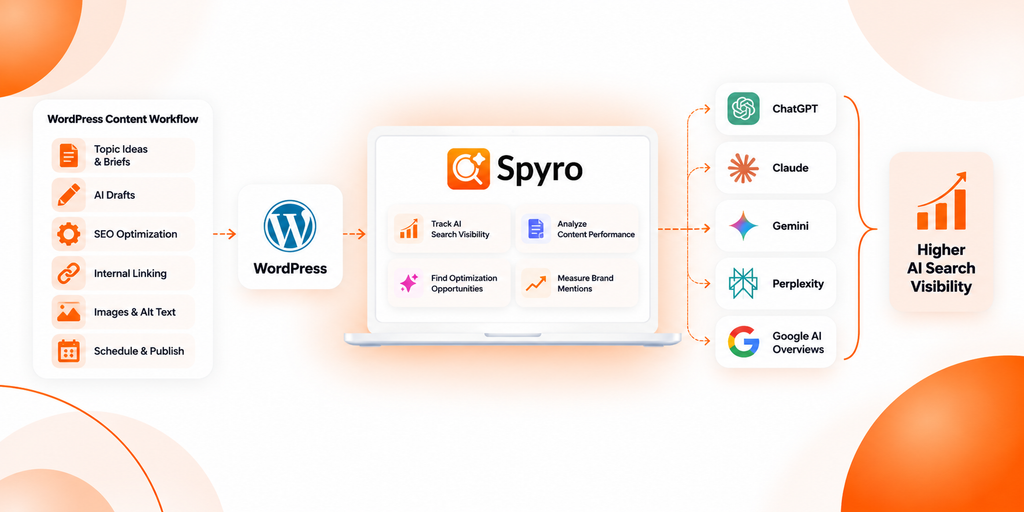
    What it does. Spyro AI is an SEO and AI search visibility platform with keyword rank tracking, site audits, competitor research, an AI writer and AI visibility tracking.

    SEO content workflow. A content calendar suggests topics. Pick one and the writer researches it, drafts a long article with images and shows an SEO score panel beside the target keyword. The documentation doesn’t explain how that score is calculated, and I found no term level editor built on SERP analysis.

    AI search and GEO. GEO mode structures articles with answer first snippets, Q&A blocks and schema. Tracking is a separate piece. It puts buyer questions to ChatGPT, Claude, Gemini, Perplexity and Google AI Overviews, then reports frequency (“mentioned in 3 of 5 checks”), share of voice and competitors. You set checks to daily or weekly.

    Pricing. Starter is $29 a month with 4,000 credits, up to 10 articles, 2 brands and up to 15 prompts per brand on ChatGPT and Google AI Overviews. Pro is $99 with 15,000 credits, up to 30 articles, 10 brands, up to 50 prompts per brand and all five engines. Agency is $399 with 80,000 credits, unlimited brands and up to 250 prompts per brand. Yearly billing saves 20%, and the trial gives you 3 days and 500 credits.

    Strengths. Drafting, publishing and measuring in one place, with unlimited team members on every plan.

    Limitations. It’s not a like for like swap for a SERP based editor. Starter covers two engines only.

    Best fit. SMBs and agencies that want to publish content and then see whether AI engines mention them. Skip it if your writers need term level guidance as the main feature.

    2. Jasper
    Jasper

    What it does. Jasper is an AI platform for marketing teams, built around brand voices, audiences and agents.

    SEO content workflow. The pricing page describes agents for core marketing workflows, but it doesn’t list SEO or AEO features for the Pro plan. If SEO tooling is your reason for switching, ask what’s included before you pay.

    AI search and GEO. The Business plan mentions agents for GEO, translations and deep research, and says GEO Hub and agents run on usage based credits. Business is quoted by sales.

    Pricing. Pro is $69 per seat a month, or $59 per seat billed yearly. It includes one seat, 2 brand voices and 3 audiences, with a 7 day trial. Business adds unlimited users, brand voices and audiences, plus API access.

    Strengths. Brand governance. Teams that care about consistent voice across many writers will like the controls.

    Limitations. More than one user means Business, which means a sales call.

    Best fit. Larger editorial teams with strict brand rules. Consider another option if you’re a solo writer who wants SEO scoring or visible tracking numbers on a public price.

    3. Surfer
    surfer

    What it does. Surfer is a content optimization tool known for its Content Editor, with an AI assistant and AI search tracking added on top.

    SEO content workflow. This is the core strength. The Content Editor scores drafts against pages that already rank, with term guidance, topics and questions. Integrations with WordPress and Google Docs start on Standard.

    AI search and GEO. Standard tracks 25 prompts weekly in ChatGPT. Pro tracks 50 prompts daily in ChatGPT, Perplexity, Google AI Mode, Google AI Overviews and Gemini. Claude isn’t listed.

    Pricing. Billed yearly: Discovery $49 a month, Standard $99, Pro $182 and Peace of Mind $299. A tracking only plan, AI Search Analytics, is $82. Monthly billing prices aren’t listed on the page.

    Strengths. A mature editor that many SEO writers already know.

    Limitations. Discovery has no prompt tracking, and the first plan with five engines is $182 a month.

    Best fit. SEO writers who want to optimize at term level. Consider another option if you need Claude tracking or monthly billing. The Surfer SEO alternatives guide goes deeper on that comparison.

    4. Frase
    Frase

    What it does. Frase scores drafts for both Google and AI answers and produces articles on a monthly allowance.

    SEO content workflow. Starter includes 10 articles a month, Professional 40 and Scale 100. Every plan lists SEO and GEO scores.

    AI search and GEO. AI visibility covers ChatGPT and Google AI on Starter, adds Perplexity on Professional (plus AI crawler monitoring), and adds Claude and Gemini on Scale.

    Pricing. Starter is $49 a month, or $39 billed yearly. Professional is $129 ($103 yearly) and Scale is $299 ($239). Extra seats are $29 a month, and the 7 day trial needs no card.

    Strengths. Two separate scores in one editor, which suits teams writing for both audiences.

    Limitations. The pricing page doesn’t list how many prompts each paid plan includes, so tracking costs are hard to forecast.

    Best fit. Teams that want one scoring tool for Google and AI answers. Consider another option if prompt counts matter to your budget.

    5. NeuronWriter
    What it does. NeuronWriter is a budget SEO content editor.

    SEO content workflow. Term suggestions, a content score and competitor analysis sit at the center. Documents run from 25 on Bronze to 150 on Diamond. Plagiarism checks start on Gold. Integrations with WordPress, Shopify and Search Console also start on Gold.

    AI search and GEO. Plans list 5 to 20 AI monitored questions, plus an AI monitoring add on that extends coverage. That’s tracking on a small scale.

    Pricing. Bronze $23 a month, Silver $45, Gold $69, Platinum $93 and Diamond $117, with yearly billing at ten times the monthly price. The 7 day trial uses Gold terms.

    Strengths. The lowest entry price of any editor here.

    Limitations. Publishing integrations and one click features start at Gold.

    Best fit. Freelancers and small teams that mostly edit. Consider another option if you need heavy tracking.

    Is Jasper AI One of the Writesonic Alternatives Worth Paying For?

    Jasper AI is the name people search for most, so it deserves its own answer. It’s a marketing writing platform with strong voice controls. It isn’t an SEO editor, and on the plan most people can buy online, it isn’t an AI visibility tool either.

    That matters because the two products start from opposite places. Writesonic leads with tracking and uses writing to act on it. Jasper leads with brand consistent writing and routes GEO work through its custom plan. If you’re moving from Writesonic because you want better drafting control, Jasper is a fair candidate among Writesonic alternatives. If you’re moving because you want cheaper tracking or an SEO editor, I’d look at the other Writesonic alternatives first.

    One practical point: Pro includes a single seat. Add writers and you’re in a sales conversation. The Spyro AI vs Jasper vs Surfer comparison shows how the three differ in more detail, and the broader comparison of AI blog writers for SEO and GEO covers eight more tools.

    Do Copy.ai, Wordtune and Rytr Make Sense as Writesonic Alternatives?

    Sometimes, for narrower jobs. Of all the Writesonic alternatives here, these three are the narrowest. They aren’t identical products, and none of them is a tracking tool.

    Copy.ai. Its homepage describes a go to market platform built on workflows, agents and tables, with content creation (including SEO content) as one use case. The chat plan is $29 a month, or $24 billed yearly, with 5 seats. Workflow plans start at $1,000 a month. That’s a sales and marketing operations product. A blog only team will rarely need it.

    Wordtune. It rewrites, summarizes and polishes text. The free plan allows 10 rewrites a day, Advanced is $6.99 a month list price ($4.89 billed annually) and Unlimited is $9.99 ($6.99 annually). I found no SEO features on the plans page. Use it to improve sentences, not to plan or score articles.

    Rytr. The pricing page lists a free plan with 10,000 characters a month, then Lite at $9, Personal at $19 and Pro at $49. Rytr now presents itself first as a relationship manager, with writing under a separate Create product (40 use cases, 22 tones, 38 languages). SEO shows up only as a use case. For long SEO articles, I’d pick something built for them.

    What’s the Difference Between Content Creation, SEO Optimization and AI Search Visibility?

    This table is the one I’d screenshot. Most disappointment with any of the Writesonic alternatives comes from buying one column and expecting another.

    AreaAI content creationSEO optimizationAI search visibility
    Question it answersCan this tool draft the article?Does the draft cover what ranks?Do AI engines name or cite us?
    Data it usesYour brief, sources, voicePages that rank for the keywordAnswers from AI engines on a schedule
    Typical outputA draft, rewrite or refreshA score, term list, outlineMention rates, citations, share of voice
    Measures live AI answers?NoNoYes
    Example tools in this guideJasper, Wordtune, RytrSurfer, NeuronWriter, FraseWritesonic, Spyro AI, Surfer (from Standard)

    Plenty of Writesonic alternatives straddle columns. Spyro AI writes and tracks. Frase scores and tracks. Optimization for AI answers (direct answers, evidence, clear headings) is a writing habit, and tools can nudge it, but none of them can promise a citation.

    How Do You Choose Between Writesonic Alternatives?

    Pick by role and gap, not by feature count.

    • Solo content writers: NeuronWriter Bronze ($23) if you edit a lot, or Wordtune if you only need polish.
    • Small businesses: Spyro AI Starter ($29) if you’d like drafts published for you and a read on AI mentions. Check that two tracked engines is enough.
    • SEO specialists: Surfer or Frase for term level scoring. Surfer’s first multi engine plan is Pro.
    • Content marketing teams: Jasper Business when brand voice is the priority, or Frase when SEO and GEO scoring is.
    • Agencies: Spyro AI Agency (unlimited brands) for content plus tracking, or Writesonic Growth if daily tracking across clients matters more than editing depth.
    • Teams optimizing for AI generated answers: a tracker. Use Spyro AI Pro, Writesonic, Surfer Pro or Frase Scale, then compare engine lists with the answers your buyers actually see.

    Does AI Written Content Rank or Get Cited?

    Not automatically, whichever of the Writesonic alternatives you use. Google doesn’t ban AI content, but its spam policies treat using generative AI to produce many pages without adding value as scaled content abuse. And in 2026 Google updated its generative AI content guidance with a line I’d tape to the monitor. It says it is “critical to manually factcheck and review” AI generated content “for accuracy and trustworthiness before publishing,” according to Search Engine Journal’s report. The review includes metadata.

    There’s data on ranking too. A Graphite analysis of 31,493 keywords found about 14% of ranking articles were AI generated, and only 7% of first place results. In a paired test, human written pages ranked higher. The authors note ranking has many causes, and they didn’t study AI drafts that people heavily edit. So treat it as a warning about unedited output, not a verdict on every tool.

    My takeaway? With any of the Writesonic alternatives, the tool matters less than the edit. Add original examples, open every source and check every price.

    How Were These Writesonic Alternatives Evaluated?

    This is a research based comparison. I didn’t run controlled tests, generate the same article in each tool or benchmark output quality, so nothing here is a measured performance result.

    I used each vendor’s public pricing page and product pages, checked in 2026, plus the independent sources linked above. For Surfer, Frase and NeuronWriter editor features, I relied on the earlier Spyro AI comparisons instead of rechecking each one today. Spyro AI details come from its own pricing page and documentation, held to the same standard as every other tool. Where a vendor didn’t publish a figure, I wrote “not listed.” Where a page didn’t name its currency, I report the dollar figure as shown. Criteria for judging Writesonic alternatives were editorial control, SEO workflow, AI search relevance, collaboration, publishing, price and fit by company size.

    I left out general chatbots, which have no SEO workflow of their own, and tools whose current pricing I couldn’t check on the day of writing, such as the Semrush Content Toolkit and Scalenut. The earlier AI blog writers comparison covers some of those.

    Where Does Spyro AI Fit in an SEO and AI Search Workflow?

    Among Writesonic alternatives, Spyro AI covers the writing, publishing and measuring parts, and it’s built for SMBs, mid sized companies and agencies that want those in one account. It can complement other tools too. A team could keep a term level editor for scoring and use Spyro AI to publish and then watch AI mentions.

    It doesn’t replace everything. Jasper’s brand governance, Wordtune’s sentence polish and a SERP based editor each do things Spyro AI doesn’t document. Spyro AI doesn’t track Microsoft Copilot, Google AI Mode or Grok, while Writesonic’s Enterprise tier lists some of them. And like every tool here, it can’t promise a ranking or a citation.

    Where it helps is the gap after publishing. The WordPress AI SEO automation guide shows a safe draft and review workflow, and the pricing page lists plan limits. To see whether ChatGPT and Google AI Overviews mention your brand today, try the free AI Visibility Checker.

    Key Takeaways

    • The best Writesonic alternatives depend on whether you need drafting, SEO scoring, AI search tracking or a mix.
    • Writesonic now leads with AI visibility, so editor focused writers may prefer Writesonic alternatives like Surfer, NeuronWriter or Frase.
    • Jasper suits brand heavy teams, but Pro includes one seat and GEO features sit behind a sales call.
    • Copy.ai, Wordtune and Rytr are narrower tools, and none of them tracks AI answers.
    • No tool guarantees rankings or citations. Edit, fact check and measure over weeks.

    Frequently Asked Questions

    Which Writesonic alternatives are best for SEO content?

    Which Writesonic alternatives suit you depends on the job. Surfer, NeuronWriter and Frase suit writers who want drafts scored against ranking pages. Spyro AI suits teams that want drafting, publishing and AI mention tracking together. Jasper suits brand heavy teams, though its Pro plan page doesn’t list SEO features.

    Is Jasper AI better than Writesonic?

    Neither wins outright, because they start from different places. Jasper focuses on brand voice and marketing agents, with Pro at $69 per seat monthly and one seat included. Writesonic focuses on AI visibility tracking and article output, with plans from $79 a month billed annually. Pick the one that matches your gap.

    Is Copy.ai suitable for SEO content?

    Partly. Its homepage lists SEO content as one use case, but the product is a go to market platform, and the plans page doesn’t list SEO blog features. For a blog focused team, the workflow plans from $1,000 a month are hard to justify.

    Is Wordtune an AI writing tool or an SEO tool?

    It’s a rewriting and polishing tool. Wordtune handles rewrites, summaries and grammar, and I found no SEO features on its plans page. Pair it with a separate SEO editor if you need scoring.

    Is Rytr suitable for long form SEO articles?

    I wouldn’t pick it for that. Rytr’s writing product covers 40 use cases, SEO is only one of them, and the company now leads with a relationship management product. Short copy drafts fit better than full articles.

    What is the difference between an AI writer and an AI visibility tool, and can either help content appear in AI answers?

    An AI writer produces or improves text. An AI visibility tool asks AI engines your buyers’ questions and records whether you were named or cited. Writing tools can improve structure and clarity, which may help a passage get quoted, but they can’t guarantee it. Only tracking shows what engines actually say.

    Can I use another AI writing tool with Spyro AI?

    Yes. Many teams draft elsewhere and use Spyro AI to publish, schedule and track mentions across five engines on Pro. Test the handoff on one article first, and check the published page with the free SEO and GEO Audit.

    Pick the Gap First, Then Compare Writesonic Alternatives

    Start with the job you’re missing. If drafts are slow, test a writer. If they feel thin, try an editor. If you can’t see whether AI engines name you, try a tracker. Then run two of the Writesonic alternatives on the same brief and time the edit.

    Want a baseline before you spend anything? Run the free SEO and GEO Audit on one important page, or start a free trial of Spyro AI and see the draft, publish and track workflow on one article.
  • WordPress AI SEO Automation: Publish GEO Ready Posts on Autopilot

    WordPress AI SEO Automation: Publish GEO Ready Posts on Autopilot

    Quick Answer: What Is WordPress AI SEO Automation?

    WordPress AI SEO automation is the use of AI and scheduled workflows to handle the repeatable parts of SEO and publishing on a WordPress site, such as briefs, drafts, metadata, link suggestions and scheduled posting, while people keep control of facts, approvals and strategy.

    • What you can automate: research prompts, briefs, first drafts, title and meta description drafts, schema fields, image alt text drafts, scheduling and monitoring.
    • What you shouldn’t: fact checking, statistics, final approval and edits to live pages that already rank.
    • What GEO ready means: a page that answers the question early, backs claims with named sources and is easy to crawl. It improves your chances of being quoted. It doesn’t guarantee a ranking or a citation.
    • The safest setup: drafts or scheduled posts first, a limited WordPress account, backups, and one human sign off before anything goes live.

    Here’s the thing most “autopilot” pitches skip. In WordPress AI SEO automation, publishing automatically and optimizing automatically are two separate jobs, and only one of them is safe to leave alone. I wrote this guide for site owners, in house marketing teams, SEO consultants and agencies that run WordPress sites. If you want the writing side first, the AI content optimization guide explains how AI engines pick passages to quote.

    What Does WordPress AI SEO Automation Actually Cover?

    Three different things get lumped under this label, and mixing them up is how sites end up with unreviewed posts.

    • AI assisted writing. A model drafts or edits text. A chatbot tab counts.
    • SEO tooling inside WordPress. A plugin manages titles, meta descriptions, sitemaps, redirects and schema fields. Most of that is settings and rules, not AI.
    • Workflow automation. Something moves work along by itself: a calendar that queues topics, a service that sends a finished post to your site, a schedule that publishes on Tuesday morning.

    WordPress AI SEO automation joins all three, with checks between the steps. A writing assistant on its own gives you a draft in a chat window. A traditional SEO plugin grades what you typed after you typed it. Automation connects them, so a brief becomes a reviewed draft, the draft becomes a scheduled post, and the published page gets measured.

    Which tasks are safe to hand over? This is the split I’d use.

    TaskAutomate it?Why
    Topic ideas, keyword groups, briefs and outlinesYes, then reviewSuggestions are cheap to reject
    First draftYes, if a person edits itAI drafts can contain invented details
    Title and meta description draftsYes, with reviewGoogle says metadata needs the same fact check as body text
    Internal link and alt text suggestionsSuggest, then reviewWrong links confuse readers, and alt text should describe the image
    Schema fieldsAutomate, then validateMarkup has to match what’s visible on the page
    Scheduling and sitemapsYesNative WordPress features
    Statistics, claims and final approvalNoA person opens every source and signs off
    Changes to live, ranking pagesOnly with review and a backupOne bad bulk edit can undo years of work

    Google doesn’t ban AI content. Its guidance on generative AI content says it can help with research and structure, and also says to manually fact check and review AI output, including titles, meta descriptions, structured data and image alt text. Its spam policies list generating many pages with AI tools without adding value for users as scaled content abuse. That one sentence is why every workflow below has a human checkpoint.

    How Does WordPress AI SEO Automation Work From Brief to Published Post?

    WordPress AI SEO automation runs as a chain. Each link produces something the next one can check.

    StageAutomation taskHuman checkpointOutput
    1. ResearchGroup keywords, pull questions and gapsConfirm the topic fits your businessApproved topic
    2. BriefDraft search intent, outline, sources to citeEdit the angle and the outlineBrief with headings
    3. DraftWrite the first versionAdd original examples, remove fillerEdited draft
    4. On page SEODraft title, meta description, headings, image alt textCheck accuracy and toneMetadata that matches the page
    5. Links and schemaSuggest internal links and sources, generate structured dataOpen every link, validate markup against the visible contentVerified links, valid markup
    6. GEO passCheck answer first openings, headings, passages that stand aloneRead each key passage on its ownQuotable sections
    7. Fact checkFlag claims without a sourceVerify every statistic and product claimCleared draft
    8. Send to WordPressCreate a draft, pending or scheduled postApprove the scheduleDraft or scheduled post
    9. Publish and indexRelease on the chosen date, update the sitemapSpot check the live page, inspect the URL if it isn’t indexedLive, indexed page
    10. Monitor and refreshTrack performance, flag stale postsDecide what to updateRefresh list

    Stage 9 deserves a note. Publishing doesn’t mean indexing. WordPress core has produced an XML sitemap at /wp-sitemap.xml since version 5.5, and Google says a sitemap doesn’t guarantee that everything in it gets crawled and indexed. So you check, you don’t assume.

    Which Parts Come From WordPress, a Plugin, an AI Tool or Custom Code?

    Knowing where each feature lives tells you what to configure and what to trust. Here’s how I’d sort it.

    LayerWhat it handlesWatch out for
    WordPress corePost statuses (draft, pending, scheduled, published, private), user roles, the REST API, application passwords, XML sitemapsCore doesn’t write or optimize content for you
    SEO pluginTitle and meta fields, schema, redirects, breadcrumbs, sometimes AI suggestionsPlugin settings aren’t a content strategy
    AI writing toolBriefs, drafts, rewrites, metadata draftsInvented facts, generic phrasing
    Workflow serviceMoving content between tools on a trigger or scheduleBroad permissions and API keys
    Custom codeAnything specific to your site, built on the REST APIYou own the security and maintenance

    WordPress itself is moving closer to AI. According to InfoQ’s coverage of WordPress 7.0, core now includes an AI Client, an Abilities API and a connectors hub for AI providers. Content generation isn’t part of core. It comes from an optional official AI plugin. The SEO and publishing judgment still sits with you.

    The REST API is the other piece to understand. Its posts reference lists the statuses a created post can have: publish, future, draft, pending and private. Any tool that publishes through the API picks one of those. Draft or pending is the safe default. Future schedules it. Publish sends it live right now.

    What Makes a Post GEO Ready in WordPress AI SEO Automation?

    GEO ready means a page is easy for AI search features to find, understand and quote. Nothing more mystical than that. Google says there are no additional requirements to appear in AI Overviews or AI Mode, only that a page is indexed and eligible to show with a snippet. So GEO readiness is mostly good SEO plus clear writing.

    What I’d check on every post, automated or not:

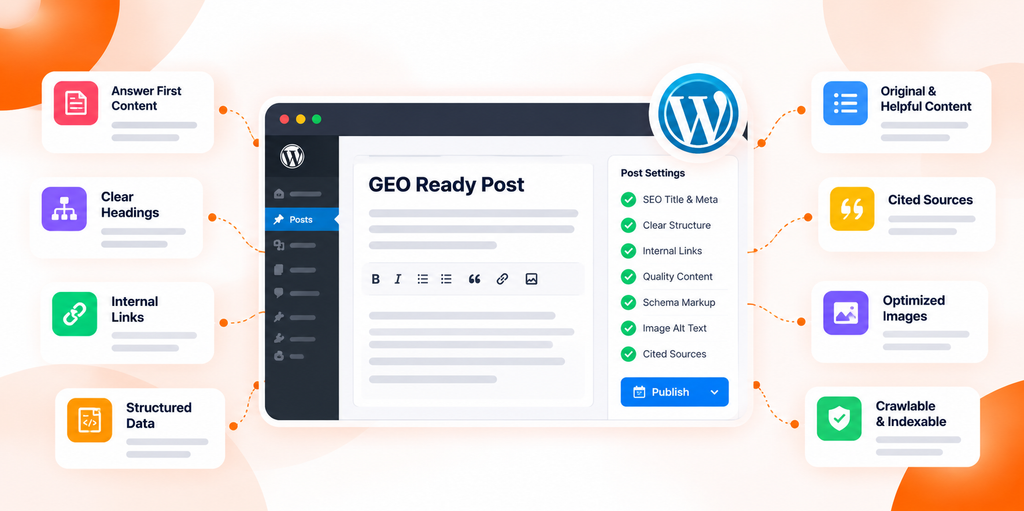
    • A direct answer in the first one or two sentences, then the detail.
    • Headings that state a point or ask a real question. “How much does it cost?” beats “Pricing.”
    • Named, linked sources that a person has opened.
    • Something original. Your numbers, your process, your screenshots.
    • Passages that make sense alone, because an engine may quote one paragraph.
    • Consistent names for your brand, products and people.
    • A visible author and a real update date.
    • Crawlable text, not content hidden in scripts or images.
    • Structured data that matches the page. Schema describes what’s visible. It doesn’t add rankings.

    No file, markup type or formatting trick guarantees a citation. If you want the full picture of what Google documents and what’s still unknown, the guide on how to rank in Google AI Overviews goes through it.

    How Do You Build a WordPress AI SEO Automation Workflow in Seven Steps?

    Start small. One site, one content type, one approval path. Here’s the order I’d follow for WordPress AI SEO automation.

    Step 1. Set the guardrails. Objective: decide what AI may touch. Automate nothing yet. Write down your style guide, banned claims, approved sources and who signs off. The failure case is every draft sounding different.

    Step 2. Turn search intent into a brief. Objective: know the reader’s question before drafting. Automate keyword grouping, question collection and outline drafts with an AI SEO platform or assistant. Check that the outline matches what a searcher wants. The failure case is a fluent article that answers a question nobody asked.

    Step 3. Draft inside your style guide. Objective: a usable first version, fast. Automate the draft in an AI writer that has the brief and your rules. Check for invented statistics and generic phrasing, then add original examples. The failure case is a draft that reads like everyone else’s.

    Step 4. Optimize the page. Objective: headings, metadata, links, images and schema that fit the content. Automate drafts of the title, meta description and alt text, plus link suggestions and schema fields, usually through an SEO plugin. Check by opening the links and validating the markup. Google’s image guidance asks for alt text that is useful, not stuffed with keywords. The failure case is irrelevant internal links.

    Step 5. Review and fact check. Objective: every claim true and current. Automate a checklist that flags numbers and product claims without a source. A person then opens each source. No exceptions. The failure case is a confident wrong number published under your name.

    Step 6. Send it to WordPress as a draft or a schedule. Objective: get the post into the CMS without publishing by accident. Automate the transfer through a plugin, workflow service, the REST API or a connected platform. Check the status is draft, pending or scheduled. The failure case is a post that goes live instantly with a placeholder image.

    Step 7. Monitor and refresh. Objective: know whether the page is indexed, read and still accurate. Automate Search Console reports, rank and AI mention checks, and a quarterly list of stale posts. A person decides what to update. The failure case is a post that quietly goes out of date.

    What Does This Look Like for a Real Team? (Illustrative Example)

    This is a made up scenario, not a customer result.

    Picture a six person marketing team publishing eight posts a month. Before automation, one editor spends most of a week on briefs, metadata and uploading. With a WordPress AI SEO automation workflow, briefs and first drafts come from a tool, the editor spends that time on facts and original examples, and approved posts are queued as scheduled posts for Tuesday and Thursday mornings. Will that raise rankings? Nobody can promise it. It should shorten the path from brief to approved post, and you can measure that.

    Which Tools Does WordPress AI SEO Automation Need?

    Rarely just one. No single plugin handles WordPress AI SEO automation end to end, because a plugin almost never handles research, drafting, optimization, publishing and measurement equally well. Most setups mix a few of these.

    Tool categoryWhat it doesWhat it can’t do
    Traditional WordPress SEO pluginMeta fields, sitemaps, redirects, schema, readability checksDecide your topics or verify your facts
    AI content generation pluginDrafts and rewrites inside the editorJudge accuracy or originality
    AI content optimization toolScores coverage, structure and headingsPredict rankings or citations
    Workflow automation serviceTriggers and moves content between appsReplace editorial review
    Internal linking and image toolsSuggest related posts, compress images, draft alt textJudge which link or image helps the reader
    Analytics and reportingShows clicks, impressions, conversionsProve that automation caused a change

    I haven’t ranked specific plugins here. Features, pricing and compatibility change often, and a ranking that ignores your site’s needs is just an opinion. For AI writing tools, see the guide to the best AI blog writers for SEO and GEO.

    How Do You Choose the Best AI SEO Plugin for WordPress?

    The best AI SEO plugin for WordPress is the one that fits your publishing workflow, budget and technical setup. There’s no universal winner. Whether you’re weighing a WordPress AI SEO plugin that only handles metadata or a broader platform, ask these questions:

    QuestionWhat to look for
    Does it work with your WordPress version, PHP version, theme and editor?Stated compatibility, recent updates
    Which SEO tasks does it cover, and does it generate content or only optimize it?Metadata, schema, links, audits, drafts
    How does it connect, and what triggers an automation?REST API, webhooks, schedules, manual buttons
    Can you require approval?Draft or pending status, a review step
    What does it cost at your volume?Usage limits, credits, seats
    Where does your content go?Privacy policy, model providers
    What permissions does it need?Least access possible, easy to revoke
    Is it maintained, and can you leave?Update history, support, export options
    How does it report results?Search data, not just a score

    If a tool can’t answer the approval and permissions questions, I’d skip it. Those two matter more than any feature list.

    How Do You Keep WordPress AI SEO Automation Secure?

    WordPress AI SEO automation means a tool can write to your site while you’re asleep. Treat that like handing someone a key.

    • Use a dedicated account. WordPress application passwords belong to one user and, per that guide, had no scoping of their own, so requests run with that user’s full access. Never connect an automation with your own administrator login.
    • Match the role to the job. The WordPress roles documentation shows that a Contributor can write posts but can’t publish them or upload files, while an Author can publish and upload. A Contributor can’t publish by accident, which is a useful safety net. An Author can add images, so make sure the integration saves drafts.
    • Use HTTPS. Application passwords are available by default only on sites served over HTTPS, because otherwise the password could be intercepted.
    • Revoke what you don’t use. WordPress shows when each application password was last used. Delete stale ones.
    • Store keys safely. Use a password manager or the tool’s secure settings, never a shared document.
    • Back up before bulk changes, test a restore once, and review any generated HTML for scripts or iframes you didn’t expect.
    • Keep plugins updated and permissions minimal. Never disable a security setting to make an integration work. If a tool needs that, it’s the wrong tool.

    The way content reaches WordPress changes the risk:

    MethodHow it worksBest forMain risk
    PluginRuns inside WordPressEditor based workflowsPlugin quality and updates
    Automation serviceCalls WordPress from outsideConnecting several appsBroad permissions, stored credentials
    REST APIYour own code or a connected platform sends postsCustom controlYou maintain the security
    Custom codeBuilt for your siteUnusual needsBugs and ongoing upkeep

    Where Does Spyro AI Fit in WordPress AI SEO Automation?

    Spyro AI covers part of the chain, not all of it. Everything here comes from its documentation and product pages, checked in 2026.

    • Topics and drafts. A content calendar lays out AI researched topic ideas by day. Spyro AI’s writer researches a topic, drafts the article with images, and gives you an editor where you can change wording, headings, title and description.
    • SEO and GEO checks. An SEO score panel sits beside the target keyword. A GEO mode structures articles with answer first hooks, quotable summaries, Q&A blocks and schema.
    • Publishing to self hosted WordPress. You connect your site once with a WordPress application password, then publish a finished article with one click or schedule it. The integrations documentation walks through the setup. (The Spyro AI homepage also lists WordPress.com, but I found setup instructions only for self hosted WordPress.)
    • Auto publish. There’s a setting that publishes finished articles to your connected site automatically. The docs advise turning it on only once you’re happy with how your articles look. Until then, you review and push each article yourself.
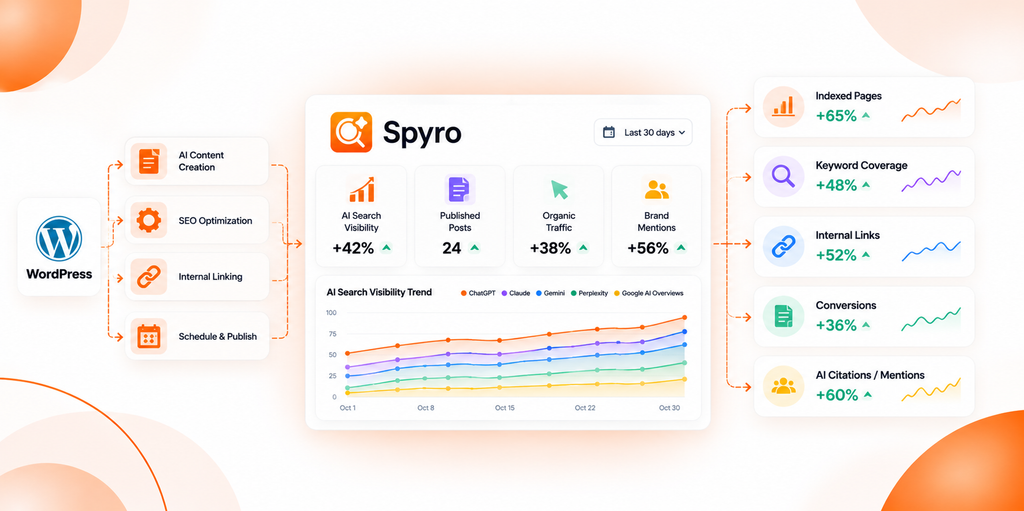
    • Measurement. A Search Console integration shows clicks and impressions, a site audit flags technical issues, and AI visibility tracking checks whether ChatGPT, Gemini, Claude, Perplexity and Google AI Overviews mention your brand, on a daily or weekly schedule you set.

    Now the limits. The documentation doesn’t say whether auto published posts arrive on WordPress as drafts or go live immediately, so test with one article on a staging site first. I didn’t find documentation of Spyro AI editing existing WordPress posts, installing plugins or managing your SEO plugin’s settings, so don’t assume it does. And like every tool used for WordPress AI SEO automation, it can’t promise a ranking or an AI citation.

    My view? Keep auto publish off for the first few articles, read each one, and turn it on only for content types where you’ve stopped finding problems. The free SEO and GEO Audit checks technical readiness, and the Schema Markup Validator checks markup.

    Which Mistakes and Risks Break WordPress AI SEO Automation?

    Most WordPress AI SEO automation failures are boring. Here are the ones I’d guard against, with the fix for each.

    Mistake or riskWhat goes wrongPrevention
    Publishing AI drafts unchecked, or using unsupported statisticsWrong facts under your nameA person opens every source before approval
    Automating volume instead of qualityThin pages that Google’s spam policy calls scaled content abuseCap output at what your editors can review
    Treating an SEO plugin as a strategy, or ignoring search intentGreen scores on pages nobody needsStart from real questions and review the brief
    Repeating keywords unnaturally, or duplicate topicsAwkward text, near copies competingSay it once, plainly, and search your site before approving a topic
    Irrelevant internal links or broken external linksConfused readers, dead sourcesOpen every link before publishing and each quarter
    Invalid or mismatched schemaMarkup that contradicts the pageValidate it and compare with visible content
    Missing metadata, poor alt text or accidental publicationWeak snippets, a half finished post goes liveA pre publish checklist and draft status by default
    Unintended edits to live pagesRankings drop after a bulk changeBackups, rollback and a staging test
    Excess permissions and weak key storageA leaked key writes to your siteDedicated account, least access, revoke old keys
    Assuming schema or GEO formatting guarantees citationsWasted effortTreat them as hygiene, then measure
    No monitoringOutdated or unindexed posts nobody noticesA monthly review and quarterly refresh list

    Google’s FAQPage documentation also notes that the FAQ rich result is no longer shown in Search, which is a good reminder that schema features come and go. For anything sensitive, regulated or high risk, such as health, legal or financial content, use draft first or approval based publishing every time.

    How Do You Measure WordPress AI SEO Automation?

    Split your WordPress AI SEO automation metrics into two piles. Process metrics tell you whether the workflow works. Outcome metrics tell you whether the content performs.

    Process metrics

    • Time from brief to approved post
    • Editorial revision rate (how much editors change)
    • Share of posts with complete metadata, valid schema and checked links

    Outcome metrics

    • Organic impressions and clicks
    • Search query coverage
    • Indexing status
    • Internal link quality
    • Content freshness and conversions
    • Referral traffic from AI assistants, where your analytics can identify it
    • Brand mentions or citations in the AI engines you care about, checked on the same prompts over time

    Be careful with causation. A traffic rise after you automate doesn’t prove automation caused it, because seasonality, new links and Google updates move numbers too. Record a baseline and wait weeks before judging.

    For Google’s side, Search Console’s generative AI report counts impressions in AI Overviews and AI Mode, and the guide on ranking in Google AI Overviews explains how to read it. For a quick read on whether ChatGPT and Google AI Overviews mention your brand today, try the free AI Visibility Checker.

    Key Takeaways

    • WordPress AI SEO automation works best on repeatable tasks like briefs, drafts, metadata drafts, scheduling and monitoring. Facts, approvals and strategy stay with people.
    • Automated publishing and automated optimization are different things. Draft or scheduled status by default beats instant publishing.
    • GEO ready means answer first, sourced, crawlable and consistent. It improves your chances of being quoted and guarantees nothing.
    • No single plugin does WordPress AI SEO automation well on its own. Choose by compatibility, approval controls, permissions, cost and exportability.
    • Use a dedicated low privilege account, HTTPS, backups and rollback, then measure process and outcome metrics separately.

    Frequently Asked Questions

    What is WordPress AI SEO automation?

    WordPress AI SEO automation is using AI and scheduled workflows to handle repeatable SEO and publishing tasks on a WordPress site, such as briefs, drafts, metadata, link suggestions, scheduling and monitoring. People still review facts, approve posts and set strategy.

    Can AI automatically publish blog posts in WordPress?

    Yes, technically. WordPress AI SEO automation tools such as a plugin, a workflow service, the REST API or a connected platform can create posts as drafts, schedule them or publish them live. I’d start with drafts or scheduled posts and a human review.

    What is the best AI SEO plugin for WordPress?

    There isn’t one. WordPress AI SEO automation rarely depends on a single plugin, so the best AI SEO plugin for WordPress is the one that matches your setup, the SEO tasks you need, your approval process, your budget and your privacy needs. Test it on a staging site first.

    Is AI generated content allowed by Google?

    Yes, with conditions, including for WordPress AI SEO automation. Google’s guidance says AI can help with research and structure, and that you should manually fact check and review the output, including metadata. Producing many pages without adding value can violate its scaled content abuse policy.

    Does a WordPress SEO plugin automatically optimize content for AI search?

    Not by itself. A WordPress SEO AI feature can handle metadata, schema and readability checks, but GEO readiness also depends on direct answers, sourced claims, original information and crawlable pages. Google says there are no extra requirements for AI Overviews beyond being indexed and snippet eligible.

    Can WordPress AI SEO automation improve organic traffic?

    It can help indirectly, by letting a team publish and update useful content more consistently. It can’t guarantee traffic, rankings or AI citations, and low quality automation can hurt. Measure against a baseline.

    Can Spyro AI publish WordPress posts automatically?

    Yes, for self hosted WordPress. You connect your site with an application password, then publish a finished article with one click, schedule it, or turn on auto publish. The documentation doesn’t say whether posts arrive as drafts or go live, so test on a staging site first.

    Automate the Repetitive Work, Keep the Judgment

    The goal isn’t a blog that runs without people. It’s a blog where people spend their time on facts, examples and decisions, and tools handle the copying, formatting and scheduling. That’s what WordPress AI SEO automation should give you.

    Want to test it on one article? Start a free trial of Spyro AI, connect your self hosted WordPress site, and publish a single reviewed article before you turn anything on automatically.

  • Free AI Visibility Checker: See If ChatGPT and Google AI Overviews Mention Your Brand

    Free AI Visibility Checker: See If ChatGPT and Google AI Overviews Mention Your Brand

    Quick Answer: What Is a Free AI Visibility Checker?

    • What it is: An AI checker usually means a tool that guesses whether a piece of text was written by AI. A free AI visibility checker does a different job. It tests whether AI assistants mention or cite your brand when people ask buyer questions.
    • What the Spyro AI checker covers: The free report runs 5 buyer style prompts on ChatGPT and Google AI Overviews, then adds competitor gaps and an SEO health check of up to 20 pages. Claude, Gemini and Perplexity are paid plan engines, so they aren’t part of the free report.
    • What it can’t do: A free AI visibility checker gives you a snapshot of 10 checks, not every answer an AI could give. Answers change between runs, so one miss doesn’t prove you’re invisible.
    • What to do next: Read the mentions, the cited sources and the competitor gaps. Improve the pages that should answer those questions. Then run the AI checker again with the same method.

    Searching for an AI checker can send you to a text detector or to a brand visibility tool, and the two have almost nothing in common. I wrote this guide for startups, SMBs, mid sized companies and agencies who want a quick baseline before paying for monitoring. If the GEO and AEO labels are new to you, the SEO vs GEO vs AEO guide sorts them out first.

    What Is an AI Checker? Four Different Tools Share the Name

    “AI checker” is one of those phrases that means whatever the searcher needs. Type it into Google and most results are tools that scan text and guess whether a person or a model wrote it. That’s not what this article is about, and I’d rather say so early than let you read three sections before finding out.

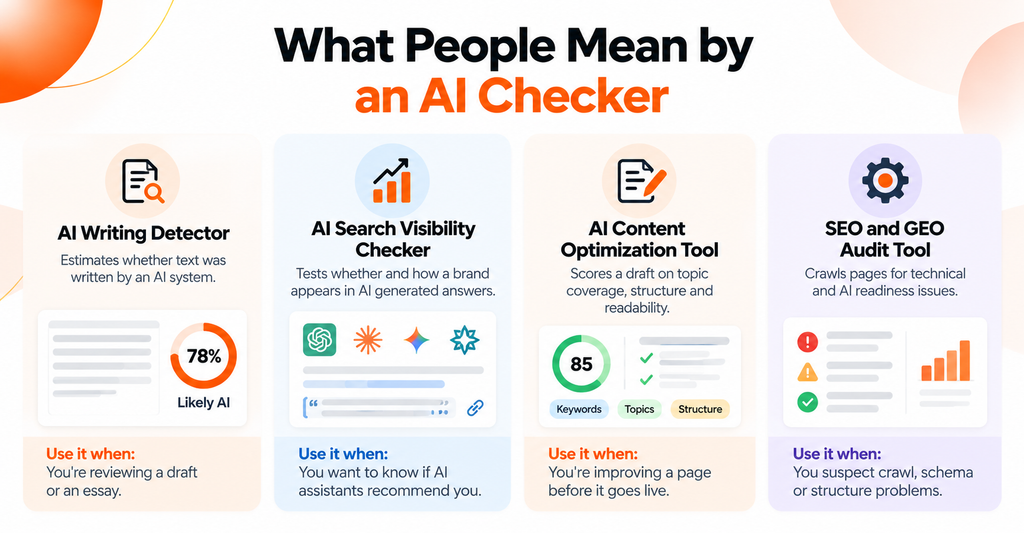
    Here are the four tools people usually mean:

    Type of AI checkerWhat it doesTypical outputUse it when
    AI writing detectorEstimates whether text was written by an AI systemA percentage or a label such as “likely AI”You’re reviewing a draft or an essay
    AI search visibility checkerTests whether and how a brand appears in AI generated answersMentions, citations, competitor presenceYou want to know if assistants recommend you
    AI content optimization toolScores a draft on topic coverage, structure and readabilityA content score and suggestionsYou’re improving a page before it goes live
    SEO and GEO audit toolCrawls pages for technical and AI readiness issuesAn issue list and readiness scoresYou suspect crawl, schema or structure problems

    Is an AI Checker the Same as an AI Detector?

    No. A detector looks at your words. A visibility checker looks at what AI assistants say about you. One reads text you wrote. The other reads answers a model wrote.

    And I wouldn’t treat detector scores as proof of anything. OpenAI retired its own AI text classifier in 2023 because of its low rate of accuracy, according to TechCrunch. A separate research paper found that popular detectors flag writing by non native English speakers as AI generated. A detector can raise a question. It can’t settle authorship.

    A visibility checker has its own limits, which I’ll cover below. But it answers a question you can act on: when someone asks an assistant about your category, does your brand show up?

    Which AI Checker Should You Use?

    Match the AI checker to the question you’re asking:

    • “Does this text sound machine written?” Use an AI detector, and treat the score as a hint.
    • “Does ChatGPT recommend my brand?” Use a free AI visibility checker.
    • “Why isn’t my page getting picked up?” Use an SEO and GEO audit, or a content optimization tool.

    Most confusion comes from picking the wrong AI checker for the job, not from the tools themselves.

    What Is a Free AI Visibility Checker, and What Does It Check?

    An AI search visibility tool sends questions to AI assistants and records what comes back. Does the answer name your brand? Does it link to your pages? Which competitors and sources appear instead? A free AI visibility checker does a small version of that job at no cost, usually as a one time snapshot. It’s the kind of AI checker that reads answers, not text.

    A few terms get mixed up, so here’s how I’d keep them straight:

    TermWhat it means
    Brand mentionAn AI answer names your brand in its text
    CitationAn AI answer links to or lists one of your pages as a source
    AI visibility auditA broader review of mentions, citations, competitors, cited sources and the pages that could improve them
    AI search share of voiceHow often your brand appears compared with competitors across the same prompts
    Ongoing monitoringRepeating the same checks on a schedule so you can see trends

    A mention and a citation aren’t the same thing. Your name can appear with no link, and a link can appear with your name left out. A good AI visibility audit looks at both.

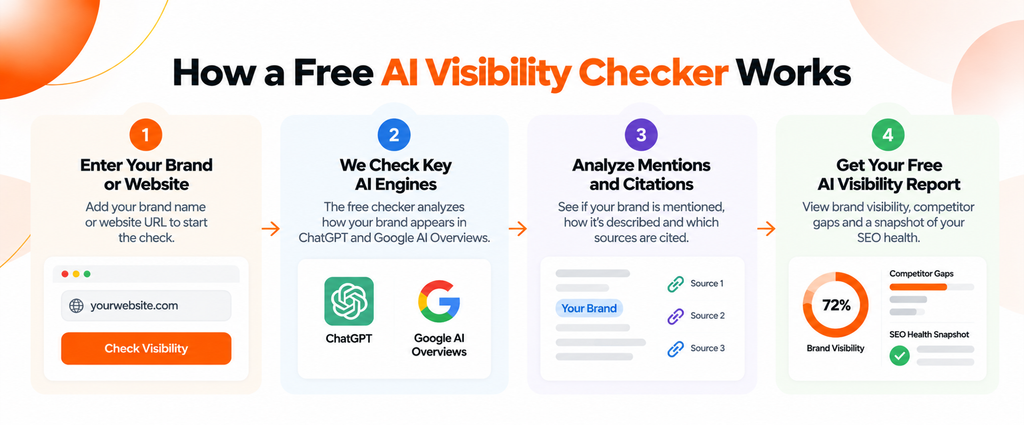
    How Does the Spyro AI Free AI Visibility Checker Work?

    Everything in this section comes from the live tool page for the free AI visibility checker, checked in 2026. Think of it as an AI checker for brand mentions, not for text. Tools change, so confirm the details on the page before you rely on them.

    1. Enter your details. The form asks for your name, email, website and target market. You can add up to 3 competitors or pick from suggested ones.
    2. Confirm your email. A one time code goes to your inbox. No account and no credit card are needed.
    3. The tool writes the prompts. It creates 5 buyer style prompts for your market and runs each one on two engines, ChatGPT and Google AI Overviews. That’s 10 checks.
    4. It crawls your site. The SEO health check covers up to 20 pages.
    5. You open the report. Results fill in as checks finish, usually within a few minutes. According to the tool page, the report is also sent to your email.

    What Does the Free Report Include?

    The tool page lists these parts:

    • An AI visibility score based on the 10 checks, with each check worth 10 points
    • Mentions versus citations, plus the sentiment of answers that mention you
    • Which of your pages were cited, and which other sources the AI cited
    • Competitor gaps and share of voice
    • An SEO health check of up to 20 pages

    What Are the Limits of the Free AI Visibility Checker?

    Know these before you read any score:

    • 5 prompts and 10 checks per report. That’s a sample. It isn’t a full map of how AI talks about your market.
    • Two engines. ChatGPT and Google AI Overviews only.
    • Up to 3 competitors and up to 20 crawled pages.
    • One snapshot per website every 24 hours. Run it again inside that window and the existing report reopens.
    • Failed checks aren’t scored as zero. If a check fails, the score uses the completed checks and says so.

    The tool page doesn’t mention downloadable reports, and it doesn’t say how long reports are stored. So I won’t claim either.

    Which AI Engines Does a Free AI Visibility Checker Cover?

    Plenty of people assume a free checker covers every major assistant. This one doesn’t. It queries ChatGPT and Google AI Overviews, and it would be misleading to suggest otherwise. Here’s the honest split:

    EngineFree AI visibility checkerPaid Spyro AI plansHow to check it yourself
    ChatGPTYesYesIncluded in the free report
    Google AI OverviewsYesYesIncluded in the free report
    ClaudeNoPro and AgencyAsk your prompts in a fresh chat and record the answer
    GeminiNoPro and AgencySame manual method
    PerplexityNoPro and AgencySame manual method, and note the sources it lists

    Paid plan details sit on the Spyro AI pricing page. Starter tracks ChatGPT and Google AI Overviews. Pro and Agency track all five.

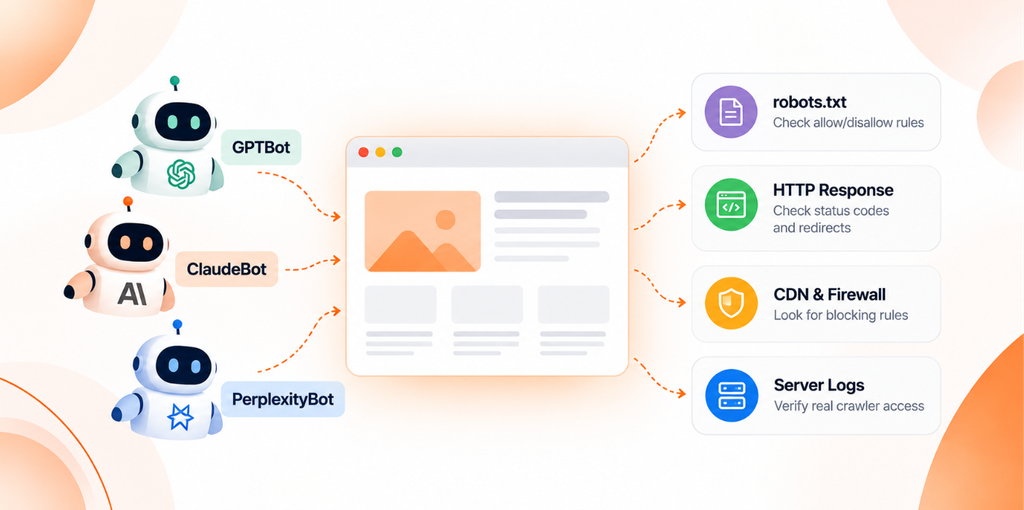
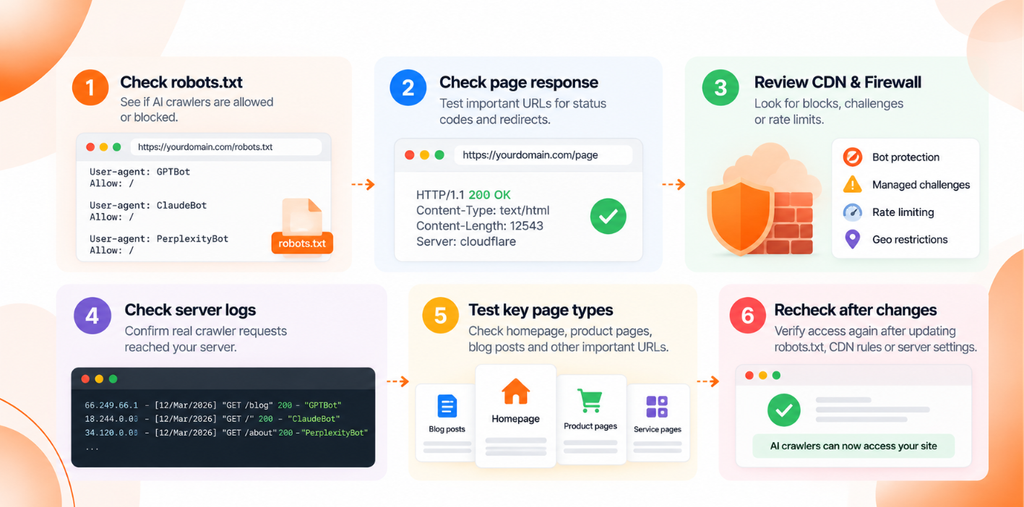
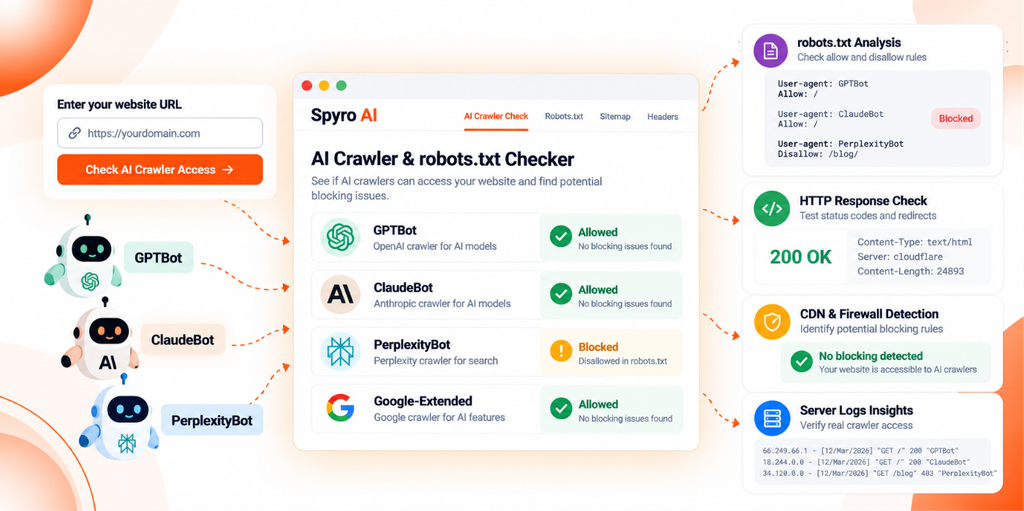
    There’s one more tool that causes confusion. The free SEO and GEO Audit is a separate page. It needs no email, crawls a page or up to roughly 20 pages of a site, and runs a 16 point GEO readiness check that includes whether crawlers such as GPTBot, ClaudeBot and PerplexityBot can reach your pages. That tells you whether those assistants can find you. It doesn’t ask them anything. For actual mentions, the visibility checker is the right tool.

    How Do You Run an AI Visibility Audit Across ChatGPT, Claude, Gemini and Perplexity?

    You can run a useful AI visibility audit with a free AI visibility checker plus about an hour of manual work. Here’s the sequence I’d follow.

    1. Pick one brand and one website. Agencies should audit one client at a time.
    2. Write 5 to 10 buyer questions. Use the words customers use, such as “best project management software for a 20 person agency”, not your product name.
    3. Run the free AI visibility checker. It covers ChatGPT and Google AI Overviews.
    4. Check Claude, Gemini and Perplexity by hand. Paste the same questions into each, in a fresh chat, and save the answers with the date.
    5. Record mentions and citations. For each answer, note whether your brand is named and whether your pages are linked.
    6. Note who shows up instead. Competitors and third party sources both matter. If a review site keeps getting cited, that’s a clue.
    7. List the questions where you’re absent. Those are your gaps.
    8. Match gaps to pages. Do you have a page that answers each question directly? If not, that’s your content backlog.
    9. Fix, then recheck. Use the same questions and the same method.

    Why Do AI Answers Change Between Checks?

    Because they’re generated, not looked up. Prompt wording, location, personalization, model version, retrieval and timing all play a part.

    Researchers at SparkToro and Gumshoe ran 12 prompts nearly 3,000 times across ChatGPT, Claude and Google’s AI. The odds of getting the same list of brands twice were under 1 in 100. Some brands still appeared in 60% to 90% of responses for a given intent. (The study wasn’t peer reviewed, and the researchers sell tracking tools, so read it as a signal rather than a law.)

    What I take from it: don’t obsess over exact position, and don’t trust a single run. Look at how often you appear across many prompts. That’s also why a free AI visibility checker works best as a baseline, not a verdict.

    How Do You Read Your AI Visibility Audit Results?

    Only use the metrics your free AI visibility checker report actually shows, whichever AI checker you pick. For the Spyro AI free report, these are the ones that matter.

    MetricWhat it measuresWhat it doesn’t proveWhat to do next
    AI visibility scoreResults across 10 checks (5 prompts on 2 engines)That you’re visible on other engines or other promptsCompare it with a later run, not with a different tool’s score
    MentionsWhether answers name your brandThat anyone clicked or trusted itFind prompts with no mention and check for a matching page
    CitationsWhether answers link to your pagesThat the answer was accurateSee which pages are cited and why
    Cited sourcesOther sites the AI relied onThat those sites are rivalsConsider whether reviews or directories could list you
    Competitor gaps and share of voiceHow often rivals appear versus you on the same promptsReal market shareStudy the prompts where rivals win
    SentimentThe tone of answers that mention youThe full picture of your reputationFix facts that look wrong or outdated
    SEO health checkTechnical and on page issues across up to 20 pagesThat fixing them guarantees a citationFix the critical items first

    What Does a Result Look Like? An Illustrative Example

    This is a made up scenario, not a customer result.

    A small accounting software company runs the checker. The report shows its brand mentioned in 2 of 10 checks, and cited once. Two competitors appear in most answers. Two prompts cite a comparison site that never mentions the company.

    What would I do? First, check whether the company has a page that answers those two prompts plainly. Second, look at whether the comparison site lists it. Third, rerun the checker later with the same inputs. That’s a plan built from evidence, and it’s a lot more useful than a single number.

    A missing mention doesn’t mean something is broken. It might just mean no page answers the question yet.

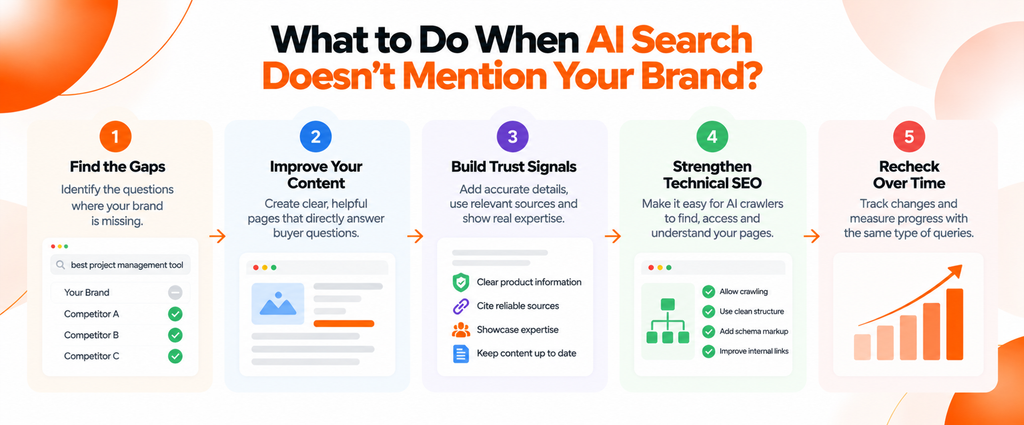
    What Should You Do When AI Search Doesn’t Mention Your Brand?

    Start with the basics. Google says there are no additional requirements to appear in AI Overviews or AI Mode, only that a page must be indexed and eligible to show in Search with a snippet. It also says indexing and serving aren’t guaranteed. So the work looks a lot like good SEO.

    • Make key pages easy to find and crawl. Check robots.txt, redirects and status codes. OpenAI says a site that opts out of OAI-SearchBot won’t be shown in ChatGPT search answers, and PerplexityBot works the same way for Perplexity. Both note that robots.txt changes can take about 24 hours. The AI crawler checker guide walks through this.
    • Explain what you sell in plain words. Say who it’s for, what it costs where you can, and what problem it solves.
    • Answer real buyer questions directly. Put the answer near the top of the page, then add detail. The AI content optimization guide covers how.
    • Keep facts current. Pricing, features and product names should match everywhere.
    • Use descriptive headings and sensible internal links. They help readers and crawlers.
    • Earn mentions on pages other people trust. The guide to getting cited in ChatGPT and Perplexity explains how those engines pick sources.
    • Measure over several checks. One report is a starting line.

    No single step guarantees a citation. Anyone who promises one is guessing.

    Free AI Visibility Checker vs Paid AI Visibility Tools: What’s the Difference?

    A free AI visibility checker answers “where do I stand today?” Paid monitoring answers “is it getting better?” Here’s the comparison, using the Spyro AI free report and published Spyro AI plans.

    DimensionFree AI visibility checkerPaid Spyro AI plans
    Intended useOne time baselineOngoing tracking
    Prompts5 per report15 per brand on Starter, 50 on Pro, 250 on Agency
    EnginesChatGPT and Google AI Overviews2 on Starter, 5 on Pro and Agency
    ScheduleOne snapshot per website every 24 hoursDaily or weekly checks, set by you
    History and trendsNot described on the tool pageScheduled tracking with history
    CompetitorsUp to 3Competitor tracking and gap analysis
    BrandsOne website per reportUp to 2, 10 or unlimited brands by plan
    CostFree, no credit card$29, $99 and $399 a month, with a 3 day free trial

    Prices come from the pricing page in 2026 and can change. If you’re comparing vendors on cost, the AI visibility tools pricing guide lays out what plans include.

    Is a free AI visibility checker enough? For an SMB testing the waters, often yes. For an agency with several clients, probably not. You’ll want history, more prompts and more engines, which means paid tracking.

    How Does a Semrush AI Search Visibility Checker Compare With a Free AI Visibility Checker?

    Plenty of people search for a Semrush AI search visibility checker because they already use Semrush for SEO. It’s a fair place to start. But the two products answer different questions, so let’s separate them. One is a monitoring product inside a larger suite. The other is a quick AI checker for a single brand.

    Semrush sells AI visibility as the AI Visibility Toolkit, which sits beside its keyword and backlink data. According to its help documentation, the toolkit includes a visibility overview, competitor research, prompt research, brand performance, prompt tracking and an AI search site audit. The standalone toolkit starts at $99 a month for one domain with 25 tracked prompts, and prompt tracking updates daily. Semrush AI visibility reporting is built for ongoing work inside a larger SEO suite.

    A free AI visibility checker is built for a different moment. You have no data yet, and you want a fast, no commitment look at one brand.

    A few cautions when you compare any Semrush AI visibility product with other tools, or with a free AI visibility checker:

    • Check the engines. Semrush’s own pages don’t list the same engines in every place. The help article names ChatGPT and Google AI Mode, while the pricing page names more. Confirm the exact list for your plan.
    • Count the prompts. 25 prompts and 5 prompts are very different samples.
    • Ask about refresh rate. Daily, weekly and one time snapshots tell different stories.
    • Look at report detail. Do you get cited URLs, competitor gaps and sentiment, or only a score?

    Semrush also lists a free AI visibility checker in its site navigation. I couldn’t find documentation that describes what it returns, so I won’t compare it feature by feature. Try it yourself, and judge tools by prompts, engines, refresh and report detail rather than by the word “visibility” alone.

    Who Gets the Most Out of a Free AI Visibility Checker?

    • Startups and small businesses checking whether assistants recognize the brand at all.
    • SEO specialists looking for citation gaps and sources that name rivals but not you.
    • Content marketers finding buyer questions with no answer on their site.
    • Agencies building a first baseline for a prospect or a new client before a proposal.
    • Mid sized companies comparing visibility against the three competitors they worry about most.
    • Marketing teams checking whether a round of new content changed anything.

    Keep your expectations proportional. A free AI checker for brand visibility is a starting point for the first five uses. Anything that depends on trends needs repeated checks.

    Key Takeaways

    • An AI checker can be a text detector or a brand visibility tool. A free AI visibility checker tests whether AI answers mention or cite your brand, not who wrote your text.
    • Pick the AI checker that matches your question. Detectors, content tools and audits each answer something different.
    • The Spyro AI free checker runs 5 prompts on ChatGPT and Google AI Overviews. Claude, Gemini and Perplexity need a paid plan or a manual check.
    • In any AI checker report, look at mentions and citations separately, then at cited sources and competitor gaps.
    • AI answers change between runs. Treat a missing mention as a lead to investigate, not proof you’re invisible.
    • A one time audit gives you a baseline. Ongoing monitoring shows whether your fixes work, and no AI checker can guarantee a citation.

    Frequently Asked Questions

    What is an AI checker?

    An AI checker is a tool that analyzes something with AI or about AI. The phrase most often means an AI writing detector that estimates whether text was machine written. It can also mean an AI search visibility checker, which tests whether AI assistants mention your brand. Check which kind you’re opening before you trust the result.

    What is a free AI visibility checker?

    A free AI visibility checker is a tool that tests whether AI assistants mention or cite your brand, at no cost. Think of it as an AI checker for brand mentions. The Spyro AI version runs 5 buyer style prompts on ChatGPT and Google AI Overviews and returns a visibility score, competitor gaps and an SEO health check.

    How is an AI visibility checker different from an AI detector?

    An AI detector reads your text and guesses whether AI wrote it. An AI visibility checker reads AI answers and reports whether your brand appears in them. They solve different problems, and detector results shouldn’t be treated as proof of authorship.

    Can an AI checker show whether ChatGPT, Claude, Gemini and Perplexity mention my brand?

    Partly. The free Spyro AI checker covers ChatGPT and Google AI Overviews. Claude, Gemini and Perplexity are tracked on paid Spyro AI plans (Pro and Agency). You can also check all of them by hand with the same questions and a consistent record, though answers vary between runs.

    What does an AI visibility audit include?

    A good AI visibility audit covers brand mentions, citations and source URLs, competitor presence, the prompts where you’re missing, and the pages that could answer them. The free Spyro AI report includes a visibility score, mentions versus citations, cited sources, competitor gaps and an SEO health check.

    Is a free AI search visibility tool enough for an agency?

    Usually not for ongoing work. A free AI checker is handy for a first baseline on a prospect or client. Regular reporting needs more prompts, more engines, history and multi brand tracking, which paid plans provide.

    How often should I check AI search visibility?

    Run the free checker once to set a baseline, then recheck after you publish or change important pages. Paid tracking can run daily or weekly on a schedule you choose. Whatever you pick, keep the prompts and method the same so trends stay comparable.

    Run Your Baseline, Then Fix What It Shows

    A baseline beats a guess. The free AI visibility checker from Spyro AI is an AI checker for brand mentions, and it takes a few minutes and shows where ChatGPT and Google AI Overviews mention you, who they cite instead and which pages need work. It won’t guarantee a mention. It will tell you where to start.

    If you’d like to look at technical readiness first, run the free SEO and GEO Audit. When you’re ready to track more prompts and all five engines over time, the pricing page lists the plans.

  • How to Rank in Google AI Overviews: What Small and Mid Sized Sites Can Control

    How to Rank in Google AI Overviews: What Small and Mid Sized Sites Can Control

    Quick Answer: Can a Small Site Rank in Google AI Overviews?

    Yes, but nobody can guarantee it. AI search optimization for Google AI Overviews comes down to what Google already rewards: pages it can crawl and index, content that answers a real question well, and evidence a reader can check. Google says there are no additional requirements to appear in AI Overviews or AI Mode.

    • What you control: crawling and indexing, how clearly a page answers the question, the evidence behind it, internal links, structured data that matches the page, and how you measure.
    • What you don’t control: whether Google shows an AI Overview for a query, which sources it picks, and how the answer shifts from one search to the next.
    • How to measure it: Search Console now has a generative AI report showing impressions in AI Overviews and AI Mode. Pair it with your normal search and conversion data.
    • What to skip: special “AI schema”, llms.txt for Google, word count targets, and anyone selling guaranteed citations.

    I wrote this AI search optimization guide for small business owners, in house marketing teams, SEO consultants, agencies and WordPress site owners. For the bigger picture of how classic SEO, generative engine optimization and answer engine optimization fit together, start with the SEO vs GEO vs AEO guide.

    What Is AI Search Optimization?

    AI search optimization is the work of making your pages easy for AI search features to find, understand, trust and cite. On Google, that means AI Overviews and Google AI Mode. Elsewhere, it means assistants like ChatGPT, Perplexity, Gemini and Claude.

    Most of it is plain SEO, the same work that builds organic search visibility. Google says so in its guide to generative AI features in Search: “optimizing for generative AI search is optimizing for the search experience, and thus still SEO.”

    I’d take that at face value. AI SEO optimization isn’t a separate discipline with secret rules. It’s SEO plus one question: when an AI system writes an answer, can it quote your page accurately?

    The labels overlap, and vendors use them loosely:

    TermWhat it focuses onWhere you see results
    Traditional SEOCrawling, indexing, relevance and quality for ranked resultsBlue links, snippets, rich results
    AI search optimizationThe same foundations, plus clear answers and evidence that AI features can quoteAI Overviews, AI Mode, AI assistants
    Generative engine optimization (GEO)Being cited or recommended inside AI generated answersMentions and citations across AI engines
    Answer engine optimization (AEO)Direct answers to specific questionsFeatured snippets, voice answers, AI answers
    AI visibility trackingMeasuring mentions and citations over timeReports, not rankings

    Nobody owns these definitions. Google describes AEO and GEO as terms “you may see used” and doesn’t ask anyone to adopt them or follow a special GEO checklist. More on the label in what is generative engine optimization.

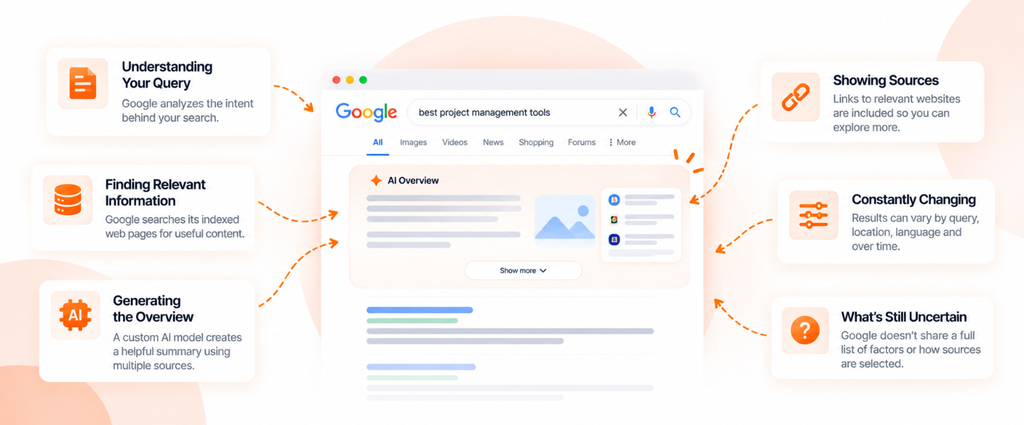
    How Do Google AI Overviews Work, and What’s Still Uncertain?

    Most AI search optimization advice mixes up what Google documents, what researchers have measured and what nobody outside Google knows. Let’s pull them apart.

    What Google Officially Documents

    From Google’s page on AI features and your website:

    • Eligibility is ordinary eligibility. A page has to be indexed and eligible to show in Search with a snippet. “There are no additional technical requirements.”
    • AI Overviews are selective. Google shows them when it decides they’re additive to classic Search. Not on every query.
    • One answer can draw on many searches. Both features may use a query fan out technique, “issuing multiple related searches across subtopics and data sources” to build a response.
    • The controls are the usual ones. Googlebot rules in robots.txt manage crawling. The nosnippet, data-nosnippet, max-snippet and noindex rules limit what Search shows.

    Underneath all of it, Google says these features are “rooted in our core Search ranking and quality systems.” There’s no documented AI Overview ranking score.

    Google also added a Search Console setting in 2026 that lets a site opt out of AI Overviews and AI Mode. Its help page for the Search generative AI control says the setting isn’t a ranking signal for the rest of Search. Most small sites won’t want it, but the switch exists.

    AI Overviews vs AI Mode vs Featured Snippets

    Related features. Not identical ones.

    FeatureWhat it isHow sources show upWhat you can influence
    Classic organic resultA ranked link with a title and snippetOne page per listingRelevance, quality, titles, snippets
    Featured snippetOne page’s snippet shown first, above its linkA single quoted sourceClear answers; Google says you can’t mark up a page to get one
    AI OverviewA generated summary at the top of some resultsSeveral supporting links, often from different sitesBeing indexed, relevant and easy to quote
    AI ModeA conversational search experience for deeper questions and comparisonsLinks beside a longer answer, with follow up questionsSame foundations; Google says it may use different models and techniques

    The two are getting closer. At Google I/O 2026, Google said AI Mode had passed one billion monthly users and that a follow up question asked from an AI Overview now carries into AI Mode. Still, the links each one shows can vary, so a citation in one doesn’t mean a citation in the other.

    What Independent Research Has Observed

    Researchers at Washington University in St. Louis tracked 55,393 trending US queries over 40 days in 2026. Three findings matter for small sites:

    • AI Overviews appeared on 13.7% of those queries. Queries phrased as questions triggered one 64.7% of the time, versus 9.5% for everything else.
    • 29.8% of the domains cited in AI Overviews didn’t appear on the first page of results for the same query.
    • About 89% of the claims they checked were consistent with the cited sources.

    A separate field study from the Indian School of Business and Carnegie Mellon University, covered by Search Engine Journal, followed 1,065 US desktop Chrome users. AI Overviews showed on 42% of their searches, and organic clicks fell 38% on queries where one appeared. It’s a working paper and hasn’t been peer reviewed.

    Notice the gap between 13.7% and 42%. Different samples, very different answers. For AI search optimization on a small site, that’s the real lesson: measure your own queries rather than trust any headline number (these two included).

    What Nobody Outside Google Knows

    Google doesn’t publish how it picks which pages to cite, how much any signal weighs for AI features, or why a source shows up today and vanishes tomorrow. Results vary by query wording, location, device and time, and AI Mode now adds personal context for people who opt in. Anyone claiming to know the AI Overview algorithm is guessing.

    What Can Small and Mid Sized Sites Actually Control?

    More than you’d think. For a small business SEO budget, AI search optimization means working on these eight areas:

    AreaWhat you can controlPractical first stepHow to verify
    Technical accessibilityCrawling, indexing, status codes, canonical tagsCheck your 10 most important URLsSearch Console page indexing report and URL Inspection
    Content usefulnessSpecific, accurate answersImprove your most important page firstCompare the page with what the searcher needs
    Topic coverageRelated questions and supporting pagesMap one topic clusterInternal link and content audit
    Evidence and expertiseSources, examples, author contextBack up every important claimEditorial review
    Page structureDescriptive headings and a logical orderPut the answer where people look firstManual page review
    Internal linksContextual paths between related pagesLink supporting pages to the key pageCrawl or site audit
    Structured dataValid schema that matches visible contentValidate the markup you already haveRich Results Test or a schema validator
    MeasurementSearch performance and dated content changesRecord a baseline before you editSearch Console and analytics

    Start with technical SEO. Every AI search optimization plan starts here. Google lists three technical requirements for Search: Googlebot isn’t blocked, the page returns HTTP 200, and the page has indexable content. Even then, Google says “indexing isn’t guaranteed.” The URL Inspection tool shows whether Google has indexed a URL and runs a live test. If crawlers from OpenAI, Anthropic or Perplexity matter to you as well, the AI crawler checker guide covers robots.txt, firewall and log checks.

    Then internal linking. Google can generally only follow links that are real <a href> elements, and its link best practices say “Every page you care about should have a link from at least one other page on your site.” Orphaned pages are easy to fix. And easy to miss.

    Clean up duplicates. Canonicals matter when you have near copies of a page (tracking parameters, print versions, location pages that differ by one word). Google’s canonicalization guide treats redirects and rel="canonical" as strong signals and sitemap inclusion as a weak one.

    Use structured data where it fits. Google’s structured data policies say “Don’t mark up content that is not visible to readers of the page,” and that Google “does not guarantee” your markup will appear in results. Its AI guide adds that structured data “isn’t required for generative AI search.” Useful for rich results. Not a key to AI Overviews.

    How Do You Improve One Page for AI Search Optimization?

    Start with one page. Not fifty. This sequence works without enterprise software:

    1. Pick a page that matters. A service page that brings in leads, or a guide buyers read before they buy.
    2. Confirm it can be crawled and indexed. Run it through URL Inspection. Fix blocks, noindex tags, wrong canonicals and redirect chains first.
    3. List the real questions. Pull them from Search Console queries, sales calls, support tickets and the People also ask box. Write them in your reader’s words, since that’s the search intent you’re serving.
    4. Answer the main question near the top. One or two plain sentences, before any background.
    5. Add context and evidence. Prices, ranges, steps, exceptions. Link sources for anything a reader might doubt.
    6. Turn questions into headings. “How long does a kitchen remodel take?” beats “Our Process.”
    7. Add what only you know. Your own data, photos and examples. Google’s helpful content guidance asks whether a page provides “original information, reporting, research, or analysis.”
    8. Link to supporting pages. And link back from them, with descriptive anchor text.
    9. Check the trust details. Author name and role, source citations, a real update date, facts that are still true.
    10. Validate any structured data. Make sure it matches what’s visible.
    11. Record a baseline. Clicks, impressions, AI impressions, conversions, and the date you published the changes.
    12. Measure over weeks, then iterate. One good week isn’t a trend.

    A Worked Example (Illustrative)

    This is a made up scenario, not a client result.

    A small bookkeeping firm’s service page opens with “We provide professional, reliable bookkeeping for businesses of all sizes.” No price. No process. Meanwhile, a buyer searches “how much does monthly bookkeeping cost for a small business?”

    The improved page:

    • Opens with the answer: “Monthly bookkeeping for a small business with up to [X] transactions usually costs [your real range] with us. The price depends on transaction volume, the number of accounts and whether payroll is included.”
    • Adds a short table showing the three things that change the price.
    • Answers the next questions under their own headings: what’s included and how the first month works.
    • Shows evidence: the bookkeeper’s name and qualifications, plus [ADD REAL EXAMPLE] of a typical monthly close timeline.
    • Links to a guide on choosing between a bookkeeper and an accountant, and that guide links back.

    Will Google cite it in an AI Overview? Maybe. But it now answers the question someone actually typed. That’s the part of AI search optimization you control.

    Which Content Practices Help, and Which AI SEO Optimization Myths Should You Ignore?

    Practices That Help

    • Answer the reader’s question early, then give details a generic summary can’t: numbers, conditions, local specifics.
    • Back important claims with reliable, linked sources.
    • Keep facts current. Content freshness means updating the content, not just the date, which Google’s helpful content page flags as a warning sign.
    • Use descriptive headings, short sections and tidy internal links.
    • Use the same names for your products, services and people everywhere. That’s entity clarity, and it’s cheap.
    • Cut filler and claims you can’t support.
    • Put important information in crawlable text, not only in images, PDFs or scripts. Content accessibility applies to bots too.

    For a deeper look at writing pages that AI engines quote, see the AI content optimization guide.

    Seven AI Search Optimization Myths to Ignore

    “A special AI Overview schema guarantees citations.” No such schema exists. Google’s AI guide says there’s “no special schema.org markup you need to add.” Schema also changes under your feet: Google stopped showing FAQ rich results for every site in 2026, as Search Engine Journal reported.

    “Every article needs a specific word count.” Google’s helpful content page lists writing to a particular word count as a warning sign and says it has no preferred length.

    “More keywords means more AI visibility.” Stuffing makes pages worse to read. Google’s AI guide warns that overdoing content mainly to manipulate rankings or AI responses goes against its spam policies.

    “Publishing hundreds of AI generated articles is a shortcut.” Google’s spam policies name “using generative AI tools or other similar tools to generate many pages without adding value for users” as scaled content abuse.

    “An llms.txt file is mandatory for Google AI Overviews.” Google says Search ignores llms.txt files, and that keeping one “will neither harm nor help” your visibility in Google Search. Other services may read it. Google doesn’t.

    “A tool’s GEO score predicts whether Google will cite a page.” A score measures a tool’s own checklist. Google’s AI guide warns readers to be wary of tools that promise ranking success or claim to use internal Google metrics. That applies to every scoring tool, the free Spyro AI checkers included. Use scores to find fixes, not to forecast citations.

    “You can pay to guarantee a spot in AI answers.” There’s no documented way to buy an organic citation in AI Overviews. Ads can appear on the same page, but that’s advertising, not a source link.

    Technical SEO Checklist for Small and Mid Sized Sites

    Run it once a quarter as part of your AI search optimization routine. Passing doesn’t guarantee AI Overview visibility. Failing can rule you out.

    • Important URLs return the right status code (200 for live pages)
    • Pages meant for search aren’t blocked by robots.txt, noindex or a login
    • Canonical tags point to the version you want indexed
    • The XML sitemap is valid, current and submitted in Search Console
    • Internal links point to final URLs, not redirects
    • Mobile usability and page speed are reasonable
    • Main content is in the HTML crawlers receive, not loaded only by scripts
    • Meaningful images have descriptive alt text
    • Structured data is valid and matches visible content
    • No important page is orphaned
    • Redirect chains and broken links are fixed
    • Search Console reports get reviewed regularly

    The free SEO and GEO Audit from Spyro AI checks many of these in one pass with no signup, and the Schema Markup Validator tests JSON-LD against schema.org and Google’s rich result requirements. Google’s own Search Console and Rich Results Test stay the reference.

    How Do You Measure AI Search Optimization?

    AI search optimization without a baseline is guesswork. Measure before you change anything, then measure the same things after.

    • Search Console clicks and impressions for the pages you edited, plus their queries.
    • AI impressions. The generative AI performance report in Search Console counts how many times links to your site were shown in AI Overviews and AI Mode, by page, country, date and device. It reached all sites worldwide in 2026, though a site needs enough AI impressions before the report appears.
    • Organic traffic, conversions and indexing issues in your analytics and the Page indexing report.
    • Referral traffic from AI assistants like ChatGPT or Perplexity, where analytics can identify it. Google counts AI feature traffic inside overall Search traffic, so AI Overview clicks won’t show as their own referrer.
    • Mentions and citations in the AI engines you care about, checked repeatedly on the same prompts.

    Read that report carefully, because it’s the one official AI search optimization metric Google gives you. Its help page doesn’t list clicks or average position. Search Engine Journal’s guide to reading AI impressions makes a useful point: AI impressions aren’t the same as organic impressions, so don’t add them together or calculate a blended click through rate.

    Here’s how the main data sources compare for search performance measurement:

    Data sourceWhat it tells youWho produces itMain limitation
    Search Console Performance reportClicks, impressions, CTR and position, with AI feature traffic inside Web totalsGoogleAI features aren’t broken out here
    Search Console generative AI reportImpressions in AI Overviews and AI Mode by page, country, date and deviceGoogleImpressions only; needs enough volume
    AnalyticsVisits, engagement and conversionsYour analytics toolHard to attribute visits to a specific AI answer
    AI visibility trackingWhether AI engines mention or cite you for chosen promptsThird party tools or manual checksA sample of prompts; answers vary between runs

    And remember that AI generated answers change from run to run. One screenshot proves little. Repeat the same prompts on a schedule and track the share of checks where you appear.

    Which AI Search Optimization Tools Do Small Websites Need?

    Fewer than vendors suggest. Start free. Add paid AI search optimization tools when a specific job gets painful.

    Tool categoryWhat it’s forDo you need to pay?
    Google Search ConsoleIndexing, queries, clicks, AI impressionsNo, it’s free
    Website crawler or technical auditStatus codes, canonicals, broken links, orphan pagesFree tools cover small sites; paid helps at scale
    Content research and optimizationQuestions, topic gaps, briefsOptional; your own customer questions are often better
    AnalyticsTraffic, engagement, conversionsFree options exist
    AI visibility trackingMentions and citations across AI engines over timeUsually paid, or done by hand
    Reporting and monitoringTurning data into decisionsA spreadsheet works to start

    Keep two jobs apart. Content optimization improves a page before it goes live. AI visibility tracking tells you afterward whether AI engines mention you. Plenty of AI search optimization tools only do one of those, whatever the homepage says.

    So where does Spyro AI fit? Spyro AI is an SEO and AI search visibility platform. According to its product documentation, it includes a site audit, keyword rank tracking, a Google Search Console integration that shows real clicks, impressions, CTR and average position, and AI visibility tracking. That tracking asks buyer questions in ChatGPT, Gemini, Claude, Perplexity and Google AI Overviews and reports results as frequencies (“mentioned in 3 of 5 checks”) rather than a yes or no. The Spyro AI pricing page lists plans from $29 a month, with ChatGPT and Google AI Overviews on Starter and all five engines on Pro.

    Like any tracker, it samples the prompts you choose. It can’t tell you how Google decides.

    When Are AI Search Optimization Services Worth It?

    Outside help makes sense when:

    • the site has indexing problems you can’t diagnose
    • nobody on the team owns SEO as an ongoing process
    • content is outdated or poorly structured across many pages
    • you don’t have time to monitor results
    • several pages need coordinated fixes, like a migration
    • leadership wants reporting that ties SEO work to leads and revenue

    You can probably begin AI search optimization yourself if you have a manageable set of priority pages, someone with a few hours a week, and access to Search Console. Fix the technical basics, improve three pages, measure for a month. Then decide.

    Shopping for AI search optimization services? Ask every provider:

    • Can they explain the work in plain language?
    • Are recommendations based on evidence from your site, or a generic checklist?
    • Does the proposal separate SEO work from AI visibility monitoring?
    • Are deliverables and measurement periods written down?
    • Are their claims about citations and rankings realistic? (A promise of AI Overview placement is a red flag.)
    • Are they open about tools, costs and limitations?

    A Realistic 30 Day AI Search Optimization Plan

    Thirty days is a practical starting period, not a promise of ranking changes or AI Overview citations.

    Week 1: Establish the Baseline

    • Check Search Console for indexing and crawl problems.
    • Pick 3 to 5 important pages.
    • Review technical issues on those pages.
    • Record clicks, impressions, AI impressions (if you have the report) and conversions.

    Week 2: Improve Content

    • Update 1 to 3 priority pages.
    • Answer the main questions directly.
    • Add evidence, context and real examples.
    • Improve headings and internal links.

    Week 3: Validate and Publish

    • Check structured data where you use it.
    • Fix broken links and canonical issues.
    • Publish the updates and write down the dates.
    • Confirm the pages are still accessible and indexable.

    Week 4: Measure and Prioritize

    • Compare impressions, clicks and conversions with the baseline.
    • Check AI impressions and any AI referral or visibility data.
    • Note what changed and what didn’t.
    • Choose the next pages to improve.

    Key Takeaways

    • Google says there are no extra requirements for AI Overviews or AI Mode, so AI search optimization starts with ordinary SEO: crawlable, indexable, useful pages.
    • You control technical access, clear answers, evidence, internal links, structured data accuracy and measurement. You don’t control when AI Overviews appear or which sources Google picks.
    • Specific, original content beats generic AI filler, and Google’s spam policies treat mass produced pages as scaled content abuse.
    • Measure with Search Console’s AI impressions, your normal search and conversion data, and repeated checks of AI answers over time.
    • No schema, file, score, tool or service guarantees a citation. Pay for help only when a specific gap justifies it.

    Frequently Asked Questions

    What is AI search optimization?

    AI search optimization is the practice of making web pages easy for AI search features, such as Google AI Overviews, AI Mode and AI assistants, to find, understand and cite. It builds on traditional SEO, with extra attention to clear answers, evidence and measuring mentions in AI answers.

    How do you rank in Google AI Overviews?

    You can’t force it, but you can improve your chances. Make sure the page is indexed and eligible to show a snippet, answer the searcher’s question directly near the top, support claims with evidence, link related pages together and keep facts current. Google says there are no additional requirements or special optimizations for AI Overviews.

    Do small websites have a chance of appearing in AI Overviews?

    Yes. Google documents no size threshold, and independent research found that many domains cited in AI Overviews didn’t appear on the first page of results for the same query. A small site with a clear, specific, well supported answer can be cited. It still isn’t guaranteed, and results vary by query and over time.

    Which AI search optimization tools should a small business use?

    Start with Google Search Console, which is free and reports impressions in AI Overviews and AI Mode. Add a technical audit tool, your analytics and a way to check AI answers repeatedly. Paid AI search optimization tools for visibility tracking help once you need regular reports across several AI engines.

    Are AI search optimization services worth the cost?

    They can be when your site has technical problems you can’t diagnose, many pages need coordinated work, or nobody has time to monitor results. If you have a few priority pages and Search Console access, you can start yourself. Avoid any provider that guarantees AI Overview citations.

    Does schema markup help a page appear in Google AI Overviews?

    Not directly. Google says structured data isn’t required for generative AI search and there’s no special markup for it. Valid schema that matches visible content still supports rich result eligibility.

    Can anyone guarantee a citation in Google AI Overviews?

    No. Google decides when to show an AI Overview and which sources to link, and answers change between searches. Anyone promising guaranteed placement is overselling. You can improve eligibility and usefulness, then measure what happens.

    Start With What You Can Control

    There’s no secret route into Google AI Overviews. What works is the same short list: pages Google can crawl and index, clear answers near the top, evidence people can check, sensible internal links, structured data that tells the truth, and steady measurement.

    That’s AI search optimization for a small or mid sized site. Not glamorous. Very doable.

    If you’d like a starting point this week, run the free SEO and GEO Audit on your most important page and fix what it flags. It won’t guarantee a citation. It will show you what to fix first.

  • Best AI Blog Writers for SEO and GEO in 2026

    Best AI Blog Writers for SEO and GEO in 2026

    Quick Answer: What Is the Best AI Writer for Blog Content in 2026?

    The best AI writer for blog content in 2026? Honestly, it depends on the part of the job that’s slowing you down. Maybe it’s topic research or briefs. Maybe it’s long drafts, SEO scoring, publishing, or finding out whether AI engines mention you at all. No tool I looked at does all of it well.

    • If you want writing and AI visibility tracking together: Spyro AI (from $29 a month) writes and publishes the posts, then checks whether ChatGPT, Claude, Gemini, Perplexity and Google AI Overviews mention you (all five on Pro).
    • If you live in an SEO editor: Surfer, Frase and NeuronWriter grade your draft against pages that already rank. NeuronWriter starts lowest, at $23 a month.
    • Teams already inside an SEO suite: Semrush’s Content Toolkit ($60 a month) adds briefs, an AI Article Generator and a Content Optimizer.
    • Big editorial teams with strict brand rules: Jasper, from $69 per seat a month, with GEO tracking on its custom Business plan.

    Here’s the thing most lists skip. A tool can help you write SEO friendly content without ever checking whether ChatGPT or Google AI Overviews cite the page you publish. So the best AI writer for blog posts on your team is the one that covers the job you’re actually missing.

    I wrote this for SMBs, in house marketing teams, SEO folks, bloggers and agencies. Curious how AI engines pick what to quote? The guide to AI content optimization covers that.

    I pulled every price and limit from the vendor’s own pricing page or docs in 2026. SaaS pricing moves fast, so double check before you pay.

    What Makes the Best AI Writer for Blog Content?

    Speed isn’t the test. Ask instead: how much of the draft would you actually keep?

    Here’s my checklist when I look at AI writing tools for SEO:

    CriterionWhat to checkWhy it matters
    Research and search intentDoes it read your site, keywords and the results page?A draft that misses intent won’t rank
    Content briefs and outlinesCan you edit headings before drafting?Fixing an outline beats fixing 2,500 words
    Long form draftingLength, structure, imagesSets how much editing you’ll do
    Fact checking and sourcesDoes it cite sources you can open?AI drafts invent details
    SEO recommendationsTerm coverage, headings, metadataHelps the page match what ranks
    Brand voice and readabilityVoice settings, style controlsGeneric copy reads like everyone else’s
    Entity and topic coverageConsistent names and subtopicsConnects the page to a topic
    Editing, CMS and team featuresEditor, WordPress or Shopify, seatsCuts copy and paste work
    Cost per usable articlePrice divided by drafts you’d publishThe cost figure that counts

    Take fact checking seriously. In a 2025 study, the Tow Center for Digital Journalism tested eight AI search tools on 1,600 queries and found they answered more than 60% incorrectly when asked to identify a news article’s source. AI content writing software runs on similar models. Treat every statistic in a draft as unverified until you’ve opened the source. A fast tool that leaves you hours of checking is rarely the best AI writer for blog teams.

    Three Jobs That Get Mixed Up

    Vendors slap “AI SEO” or “GEO” on almost everything. Before you pick the best AI writer for blog work, split it into three jobs:

    • AI blog writing. The tool writes, edits or refreshes the article.
    • SEO and GEO content optimization. It helps you fix structure, coverage, clarity and crawl access, so the page is easier to rank and quote.
    • AI visibility tracking. It asks AI engines your buyers’ questions on a schedule and logs whether you got mentioned or cited.

    A writer isn’t automatically a tracker. And an SEO score doesn’t measure whether AI engines cite you.

    How Do the Best AI Blog Writing Tools Compare?

    Eight contenders for the best AI writer for blog content, side by side. Starting price is the lowest published paid plan. (On a phone you’ll need to swipe the table.)

    ToolVerified starting priceBest forBlog draftingSEO optimizationGEO or AI search featuresActual AI visibility trackingPublishing and integrationsMain limitation
    Spyro AI$29/moSMBs and agencies wanting content plus trackingResearched 2,500+ word drafts with images and brand voiceSEO score panel in the editorGEO mode: answer first snippets, Q&A blocks, schema, internal linksYes: 2 engines on Starter, 5 on ProWordPress, Shopify, webhooks; scheduling and auto publishNo documented SERP term editor or brief builder
    Surfer$49/mo, billed yearlyWriters optimizing against ranking pagesSurfer AI drafts of about 2,000+ words from SERP dataContent Editor and Content ScoreContent guidance for searchFrom Standard: 25 weekly prompts in ChatGPT; 5 engines on ProWordPress and Google Docs from StandardYearly billing; no tracking on Discovery
    Semrush Content Toolkit$60/moTeams already using SemrushAI Article Generator; 5 SEO boosted articles a monthContent Optimizer, SEO Brief Generator, Topic FinderOptimizer advice for Google and AI platforms like ChatGPTNot in the toolkit; prompt tracking on SEO plans from $199/moWordPress (up to 100 sites), Google DocsTracking is a separate purchase
    Jasper$69/seat/mo ($59 yearly)Large teams with brand rulesChat, Canvas and marketing agentsPlan tier not clearly documentedGEO Agent creates and optimizes contentGEO Hub, with credits tied to the custom Business planBrowser extension, Google Docs, Webflow; API on BusinessTracking and API need a sales call
    Frase$49/mo ($39 yearly)Teams scoring for Google and AI answers10 to 100 articles a monthSEO scoreGEO score on every planChatGPT and Google AI on Starter; 5 engines on ScaleWordPress, MCPPrompt allowances not published
    Writesonic$79/mo, billed yearlyTeams putting AI visibility first15 to 50 articles a monthSite audits; Content Optimization listed for EnterpriseAI article writer and SEO agentDaily: 50 to 200 prompts in ChatGPT, Gemini, AI OverviewsWordPress, Search ConsoleNo monthly price shown
    Scalenut$59/mo list priceSMBs wanting GEO articles cheaply5 to 75 GEO articles a month at list termsContent scoring, keyword clusters, content auditGEO article creationWeekly: 10 to 100 prompts; Perplexity on ProfessionalWordPress and Shopify auto publish from PlusWeekly refresh by default
    NeuronWriter$23/mo ($19 yearly)Freelancers on a budgetOne click articles from Gold ($69)Term suggestions, content score, competitor analysisNot clearly documented beyond monitoringLimited: 5 to 20 monitored questions; add on for more enginesWordPress, Shopify, Search Console from GoldIntegrations start on Gold

    Read the tracking column twice. A “yes” there can mean 5 questions a month or 200 prompts a day. Only care about the best AI writer for blog drafting? Skip that column. Need proof your brand shows up in AI answers? Then it’s the only column that matters.

    Which AI Blog Writers Are Worth a Look in 2026?

    Don’t read the numbers as a ranking. Every review follows the same pattern, and I’ve called out where each tool comes up short. Short on time and just want the best AI writer for blog content for your situation? Jump to the “Best fit” lines.

    1. Spyro AI

    Spyro-AI

    Overview. Spyro AI is an SEO and AI search visibility platform: an AI writer and content calendar alongside rank tracking, site audits and AI visibility tracking.

    Blog writing capabilities. The calendar suggests topics from your site and market. Pick one and the writer does the research, writes 2,500+ words, drops in images, and matches a brand voice it picked up from your site.

    SEO optimization. An SEO score panel sits beside the target keyword. The docs don’t explain how the score is calculated, and there’s no documented term level editor built on SERP analysis.

    GEO and AI search capabilities. Turn on GEO mode and you get answer first snippets, quotable summaries, Q&A blocks, JSON schema and links to your own indexed pages. Tracking is a separate piece. It puts buyer questions to ChatGPT, Claude, Gemini, Perplexity and Google AI Overviews, then shows how often you came up (“mentioned in 3 of 5 checks”), your share of voice, and who beat you. You decide if that runs daily or weekly.

    Where it publishes. Publish or schedule to self hosted WordPress, Shopify or webhooks, or switch on auto publish. Search Console and GA4 connect too. Wix and Framer are listed as coming soon.

    Pricing and limitations. Starter $29 a month (4,000 credits, up to 10 articles, 2 brands, 15 prompts per brand on ChatGPT and Google AI Overviews). Pro $99 (15,000 credits, up to 30 articles, all five engines). Agency $399 (80,000 credits, unlimited brands). An article costs 250 credits from one shared pool. Yearly billing saves 20%, and the trial runs 3 days with 500 credits.

    Strengths. Writing, publishing and AI visibility tracking in one AI content publishing workflow, with unlimited team members.

    Weaknesses. No documented fact checking, plagiarism checks or SERP term guidance.

    Best fit. SMBs and agencies looking for the best AI writer for blog publishing that also measures AI visibility after launch. See the Spyro AI pricing page.

    2. Surfer

    surfer

    Overview. Surfer is a content optimization tool known for its Content Editor, with an AI writer and AI Tracker on top.

    Blog writing capabilities. Surfer AI takes about 20 minutes to build a long draft. Expect 2,000 words or more and as many as 30 headings, and you can tweak the outline before it starts writing.

    SEO optimization. The core strength. The Content Editor scores drafts against top ranking pages, with term guidelines, topics and questions.

    GEO and AI search capabilities. Standard tracks 25 prompts weekly in ChatGPT only. Pro tracks 50 daily prompts across ChatGPT, Perplexity, Google AI Mode, Google AI Overviews and Gemini.

    Where it publishes. WordPress and Google Docs from Standard. API access only on Peace of Mind.

    Pricing and limitations. Discovery $49, Standard $99, Pro $182 and Peace of Mind $299 a month, billed yearly.

    Strengths. A mature, SERP based editor many writers already know.

    Weaknesses. Multi engine tracking starts at $182 a month, and Claude isn’t listed.

    Best fit. SEO writers who want the best AI writer for blog optimization at term level. The Surfer SEO alternatives guide covers other options.

    3. Semrush Content Toolkit

    Semrush AI Visibility Toolkit

    Overview. The Content Toolkit is the content side of the Semrush suite, sold as its own plan.

    Blog writing capabilities. The AI Article Generator writes from scratch or from briefs. You get unlimited standard articles and 5 SEO boosted articles a month, with 10 more for $30.

    SEO optimization. You get Topic Finder for ideas, a brief generator that lists keywords and subtopics, and the Content Optimizer for drafts.

    GEO and AI search capabilities. Semrush says the optimizer helps content show on Google and in AI search, with advice for platforms like ChatGPT. That’s optimization advice. Prompt tracking sits in the SEO and AI Search plans, starting at $199 a month for 50 daily prompts.

    Where it publishes. One click WordPress export (up to 100 sites), Google Docs and up to 50 brand voices.

    Pricing and limitations. $60 a month with a 7 day trial. Extra Semrush users start at $45 a month.

    Strengths. Keyword data, content briefs and AI content generation inside a suite many teams already pay for.

    Weaknesses. Only 5 SEO boosted articles, and tracking means another plan.

    Best fit. Teams that want the best AI writer for blog briefs and SERP analysis inside Semrush.

    4. Jasper

    Jasper

    Overview. Jasper is an AI content platform for marketing teams, built around brand controls and agents.

    Blog writing capabilities. Drafting happens in Chat and Canvas. Pro includes 2 brand voices and 3 audiences. Business makes both unlimited.

    SEO optimization. Jasper markets SEO and AEO features. Which plan gets which one? The pricing page doesn’t really say.

    GEO and AI search capabilities. Real tracking. The GEO Hub monitors brand presence, citation rate, sentiment and share of voice, running each tracked prompt five times per AI provider. The GEO Agent then creates or improves content. Pricing ties GEO Hub credits to the Business plan.

    Where it publishes. A browser extension, Google Docs, Webflow and Slack. WordPress isn’t a named publishing integration. API access is Business only.

    Pricing and limitations. Pro $69 per seat a month, or $59 billed yearly, with a 7 day trial. Business is custom.

    Strengths. Brand governance for large teams, with tracking connected to content work.

    Weaknesses. The GEO features sit behind a sales conversation.

    Best fit. Large editorial teams that judge the best AI writer for blog content by brand consistency.

    5. Frase

    Frase

    Overview. Frase scores drafts for both search and AI answers, with an agent that drafts and publishes.

    Blog writing capabilities. Starter gives you 10 articles a month. Professional bumps that to 40, and Scale to 100.

    SEO optimization. An SEO score on each draft, plus 50 to 1,000 audit pages a month.

    GEO and AI search capabilities. A GEO score on every plan. Tracking covers ChatGPT and Google AI on Starter, adds Perplexity on Professional, and Claude and Gemini on Scale. Base prompt counts aren’t published.

    Where it publishes. WordPress publishing and MCP access on every plan.

    Pricing and limitations. Starter costs $49 a month, or $39 if you pay yearly. Professional is $129 ($103 yearly) and Scale is $299 ($239). Extra seats are $29. The 7 day trial needs no card.

    Strengths. Separate SEO and GEO scores in one AI content editor.

    Weaknesses. Tracking costs are hard to forecast without prompt allowances.

    Best fit. Writers who want the best AI writer for blog scoring across Google and AI answers.

    6. Writesonic

    Writesonic

    Overview. Writesonic leads with AI search visibility, with an article writer and site audits alongside.

    Blog writing capabilities. 15, 25 or 50 articles a month, plus 20 more for $100 on Growth.

    SEO optimization. Site audits with automatic fixes. The pricing page lists Content Optimization under Enterprise.

    GEO and AI search capabilities. It checks 50, 100 or 200 prompts every day in ChatGPT, Gemini and Google AI Overviews. Enterprise covers more platforms.

    Where it publishes. WordPress and Search Console on every plan. GA4 is Enterprise only.

    Pricing and limitations. You’ll pay $79 (Starter), $199 (Basic) or $399 (Growth) a month, and those are yearly billing prices.

    Strengths. Daily tracking and article output in one plan.

    Weaknesses. Claude and Perplexity aren’t on standard plans, and editing features are gated.

    Best fit. Teams that want AI visibility tracking more than the best AI writer for blog editing depth.

    7. Scalenut

    Scalenut

    Overview. Scalenut combines keyword planning, GEO article creation and AI visibility tracking.

    Blog writing capabilities. At list terms, 5 GEO articles a month on Starter, 30 on Plus and 75 on Professional.

    SEO optimization. Content scoring, keyword clusters and a GEO content audit.

    GEO and AI search capabilities. ChatGPT and Google AI Overviews on all plans, Perplexity on Professional. Weekly refresh unless you upgrade.

    Where it publishes. WordPress and Shopify auto publishing from Plus.

    Pricing and limitations. List prices are $59, $89 and $199 a month. When I checked, a 60% discount offer was showing, so your price may differ. 7 day trial.

    Strengths. Low entry price for writing and basic tracking.

    Weaknesses. Weekly data, and the offer makes long term pricing hard to read.

    Best fit. Budget conscious SMBs hunting for the best AI writer for blog GEO articles.

    8. NeuronWriter

    Overview. NeuronWriter is a budget SEO content editor.

    Blog writing capabilities. AI credits on every plan. One click articles through Content Designer start on Gold.

    SEO optimization. Term suggestions, a content score and competitor analysis, with 25 to 150 analyses a month. Plagiarism checks from Gold.

    GEO and AI search capabilities. 5 to 20 AI monitored questions. An Advanced add on covers Google AI Overviews, AI Mode, ChatGPT and Perplexity.

    Where it publishes. WordPress, Shopify and Search Console from Gold, plus unlimited team members.

    Pricing and limitations. Bronze $23, Silver $45, Gold $69, Platinum $93 and Diamond $117 a month, 20% off yearly. 7 day trial on Gold terms.

    Strengths. The cheapest serious editor here.

    Weaknesses. Integrations and one click articles start at $69.

    Best fit. Freelancers who want the best AI writer for blog editing on a small budget.

    Which Is the Best AI Writer for Blog Work Like Yours?

    There’s no universal best AI writer for blog teams. These matches come from the features and limits above.

    • Bloggers and solo creators: NeuronWriter Bronze ($23) if you mostly edit. Spyro AI Starter ($29) if you’d rather the drafts get written and published for you.
    • SEO writers who need content scoring: Surfer or Frase.
    • Agencies with multiple clients: Spyro AI Agency (unlimited brands and team members) or Scalenut Professional (unlimited workspaces).
    • Teams publishing to WordPress: Spyro AI, Frase, Writesonic and Semrush publish from their entry plans. Surfer starts on Standard, NeuronWriter on Gold.
    • Teams that need detailed briefs and SERP analysis: Semrush Content Toolkit or Surfer.
    • Businesses prioritizing GEO and AI search optimization: Frase for GEO scoring, Spyro AI for GEO mode articles.
    • Teams measuring AI visibility after publishing: Writesonic for daily data on three engines, Spyro AI Pro for five engines at $99.
    • Budget conscious users: if the best AI writer for blog work is simply the cheapest one that’s good enough, look at NeuronWriter, Spyro AI Starter, or Scalenut at its current offer.
    • Large editorial teams with brand voice rules: Jasper Business, or Semrush with up to 50 brand voices.

    Still torn? Run the same brief through two tools and time the edit.

    How Do You Use an AI Blog Writer for SEO?

    An AI blog writer for SEO gets you to a first draft faster. That’s it. It won’t run your blog content workflow for you. Whatever you end up calling the best AI writer for blog posts in your stack, I’d run it in this order:

    1. Settle on one intent and one reader. Someone searching “best payroll software for agencies” wants a shortlist. Someone searching “how payroll software works” wants an explainer.
    2. Gather sources first. Do it before the draft exists, not after.
    3. Look at what already ranks. Note the format, and note the gaps.
    4. Outline with the answer up top. The direct answer goes right under the H1.
    5. Draft with the AI writer. Give it your outline, sources and voice settings.
    6. Open every source. A stat you can’t trace back gets deleted. No exceptions.
    7. Add original examples and experience. Your data, screenshots and opinions.
    8. Fix the boring stuff. Headings, internal links, title tag, meta description, paragraph length.
    9. Edit hard. Is it right? Is it useful? AI drafts also love making the same point twice, so trim.
    10. Publish and watch. Rankings, clicks and AI mentions, over weeks.

    Even the best AI writer for blog posts only handles step 5 well. SEO optimized blog writing happens in steps 6 to 9, and Google is clear about skipping them. Its spam policies list “using generative AI tools or other similar tools to generate many pages without adding value for users” as scaled content abuse. Its guidance on helpful content says producing large amounts of text “without manual oversight or curation” represents little to no effort.

    So AI generated content for SEO works when a person shapes it. No word count, content score or heading pattern guarantees a ranking.

    How Do You Optimize AI Written Blogs for GEO?

    GEO content optimization makes a page easier for AI search engines to read, trust and quote. It overlaps heavily with good SEO. Google’s AI features documentation says there are “no additional requirements to appear in AI Overviews or AI Mode, nor other special optimizations necessary.” A page needs to be indexed and eligible to show a snippet.

    What helps, for both content optimization for ChatGPT and content optimization for Google AI Overviews:

    • Direct answers in the first sentence or two under each question heading.
    • Descriptive headings phrased the way buyers search.
    • Evidence from named, linked sources.
    • The same name every time for a product, person or concept.
    • Internal links that send readers somewhere deeper.
    • Original information like your own data and examples.
    • Current facts and dates, updated when prices or features change.
    • Crawlable pages that AI bots aren’t blocked from reading.
    • Structured data that matches the page. Google’s structured data policies say markup “must be a true representation of the page content”, and that markup doesn’t guarantee rich results.
    • Clear author and organization details.
    • Monitoring of mentions and citations after publishing.

    Is there research behind this? Some. The GEO paper from Princeton researchers, presented at KDD 2024, found optimization could boost visibility “by up to 40%” in generative engine responses on its benchmark, varying by domain. Useful. Not a promise.

    Citation readiness raises your odds. It doesn’t guarantee inclusion in AI answers, and no tool (not even the best AI writer for blog content) can promise one. The SEO vs GEO vs AEO guide explains how generative engine optimization and answer engine optimization fit with classic SEO. To check one page quickly, run the free SEO and GEO Audit.

    AI Blog Writing vs AI Visibility Tracking: What’s the Difference?

    This is the distinction that matters most when you shop for the best AI writer for blog growth in AI search.

    AreaAI blog writingAI visibility tracking
    PurposeProduce or improve an articleMeasure whether AI engines mention or cite a brand
    Input dataTopic, keywords, sources, brand voiceBuyer questions (prompts) and a list of engines
    OutputA draft, outline, score or published postMention rates, citations, share of voice, competitors
    How success is measuredRankings, traffic, editing time savedMentions and citations across many runs
    Typical workflow stageBefore and at publishingAfter publishing, ongoing
    Measures actual AI answers?NoYes

    Picture this. Your AI writer turns out a solid guide on a buyer question, say “what’s the best AI writer for blog posts at a small agency?” Then a tracker types that exact question into ChatGPT, Gemini, Perplexity, Claude and Google AI Overviews each week. Did your brand come up? Which pages got cited? That’s what it writes down.

    So why can a great article still get zero mentions? AI engines draw on many sources, answers change between runs, and competitors publish too. Clicks are shrinking as well. Pew Research Center looked at real browsing data and found people clicked a regular result on just 8% of Google visits that showed an AI summary. Without a summary, it was 15%. Being named inside the answer counts for more now, and you have to measure that on its own.

    What Does an AI Blog Writer Really Cost per Article?

    Cheap plans can cost more than they look, so the best AI writer for blog budgets isn’t always the lowest sticker price. Watch these:

    • Billing term. Surfer and Writesonic show yearly prices. Jasper, Frase, NeuronWriter and Spyro AI discount annual plans.
    • Article limits. Semrush stops at 5 SEO boosted articles a month. On Writesonic you get somewhere between 15 and 50, on Frase 10 to 100.
    • Credits. Spyro AI and NeuronWriter use credit pools, so heavy tracking leaves less for articles.
    • Seats. Spyro AI includes unlimited team members. Jasper charges per seat, Frase $29 per extra seat.
    • Projects and allowances. Scalenut allows one workspace on Starter. NeuronWriter caps analyses at 25 to 150 a month.
    • Publishing and API. Integrations start on Surfer Standard, NeuronWriter Gold and Scalenut Plus. API access needs Surfer Peace of Mind or Jasper Business.
    • Tracking add ons. Semrush sells tracking in separate plans, NeuronWriter as an add on.
    • Human editing time. Usually the biggest cost, and no pricing page shows it.

    Here’s a rough illustration of what each contender for the best AI writer for blog output costs per post. It isn’t a vendor quote. I divided each entry price by the published article allowance and assumed you use every article.
    Entry planMonthly priceArticles includedSubscription cost per article
    Spyro AI Starter$29Up to 10$2.90
    Frase Starter (monthly)$4910$4.90
    Writesonic Starter (billed yearly)$7915About $5.27
    Semrush Content Toolkit$605 SEO boosted$12.00

    Now add editing. At a hypothetical 90 minutes per draft and $40 an hour, that’s $60 an article, more than any figure above. And these plans do different things, so matching prices never mean matching capability. The AI visibility tools pricing guide breaks down tracking costs on their own.

    How Do You Check the Quality of AI Generated Content?

    Whichever tool you pick as the best AI writer for blog content, run every draft through this checklist:

    • Is the article accurate?
    • Does it answer the query directly, near the top?
    • Are claims supported by reliable, linked sources?
    • Does it include meaningful examples?
    • Is it written for the intended audience?
    • Does it repeat itself?
    • Are product capabilities and prices current?
    • Are the internal links relevant?
    • Does it offer something beyond a generic summary?
    • Has a human reviewed the final article?

    What about AI detectors? Use them as a rough signal, never as proof. Stanford researchers found that detectors flagged 61.22% of essays by non native English speakers as AI generated, even though people wrote them. A low score doesn’t make a draft good. Human editing does.

    How These AI Blog Writers Were Compared

    This is a research based comparison of features and pricing, checked in 2026. I didn’t run controlled tests, generate the same article in each tool, benchmark output quality or interview users. Nothing here is a measured performance result. The goal is to help you choose the best AI writer for blog work like yours, not to crown a winner.

    I reviewed each tool’s official product pages, pricing pages and help docs, plus Google Search Central, the Tow Center for Digital Journalism, Pew Research Center, Stanford HAI and the Princeton GEO research. This comparison appears on the Spyro AI blog, so Spyro AI details come from its own pricing page and product documentation, held to the same standard as every other tool.

    Where a vendor didn’t publish a figure, I wrote “not clearly documented” or “custom.” Where a vendor’s pages disagreed, I used the pricing page. I left out Copy.ai, because its current plans focus on chat and sales workflows rather than SEO blog writing, and general chatbots without a blog publishing workflow.

    Key Takeaways

    • There’s no best AI writer for blog content in general, only the one that fixes your gap (research, drafting, SEO scoring, publishing or tracking).
    • Useful SEO features are briefs, SERP based term guidance, metadata help and a real editor.
    • GEO support means clearer structure, direct answers, evidence and schema. It doesn’t guarantee citations.
    • Writing a draft and tracking AI answers are different jobs, so check which one your best AI writer for blog content actually does.
    • Every AI draft needs human editing and fact checking, and plan limits decide the real cost.

    Frequently Asked Questions

    What is the best AI writer for blog content in 2026?

    There’s no single best AI writer for blog content in 2026. Surfer, Frase and NeuronWriter suit writers who want SEO content scoring. Semrush suits teams already using its suite, and Jasper suits large brand teams. Spyro AI, Writesonic and Frase pair writing with AI visibility tracking.

    Which AI blog writer is best for SEO?

    Surfer and NeuronWriter are the ones to look at if you want drafts graded against top ranking pages. Semrush’s Content Toolkit throws in briefs and topic research. Honestly, the right AI blog writer for SEO is whichever one’s briefs and scoring fit how you already work (and what you can spend). You’ll still need to edit.

    Can AI write SEO friendly blog posts?

    Yes. It handles headings, keywords and structure just fine. But Google’s spam policies call mass produced pages that add nothing for users scaled content abuse. So have a person check the facts, add real insight and edit before anything goes live.

    What is the difference between SEO and GEO for blog writing?

    Think of it this way. SEO gets a post onto page one. GEO (generative engine optimization) gets ChatGPT, Google AI Overviews and other engines to pick it up and quote it. Both reward the same habits, like answering early and backing claims up. You just keep score differently: rankings for one, mentions and citations for the other.

    Do AI blog writers track ChatGPT citations?

    Mostly no. Even the best AI writer for blog drafting tends to stop the moment a post goes live. Knowing whether ChatGPT names or cites you takes AI visibility tracking, which is a separate feature. Spyro AI, Surfer, Frase, Writesonic, Scalenut, NeuronWriter and Jasper have some version of it. Coverage isn’t equal, though. Engines, prompt counts and plan tiers vary.

    Is an AI writer enough for a complete SEO workflow?

    Rarely. You’ll still need keyword research, a technical audit, internal links and rank tracking, plus visibility tracking if AI search matters to you. Some platforms bundle a few of these. Read the plan page before assuming yours does.

    Should AI generated blog posts be edited before publishing?

    Every time. AI drafts can invent sources, get prices wrong and make one point four different ways. Google’s helpful content guidance says text produced without manual oversight or curation is little to no effort. So edit, check and add real examples before anything goes out.

    Choose the Best AI Writer for Blog Work by the Gap You Need to Close

    Start with the gap. If drafts take too long, test a writer. Drafts feel thin? Try an SEO content editor. No idea whether AI engines mention your brand? Get a tracker. Need all three? Then do the math: one combined plan versus two separate tools, at the number of posts you really ship.

    Thinking about Spyro AI as the best AI writer for blog publishing plus tracking? The Spyro AI pricing page lays out the plans. Or get a baseline first. The free AI Visibility Checker shows whether ChatGPT and Google AI Overviews mention your brand today. It won’t guarantee a citation. It will show you where you stand.

  • Can AI Crawlers Read Your Site? How to Check GPTBot, ClaudeBot and PerplexityBot Access

    Can AI Crawlers Read Your Site? How to Check GPTBot, ClaudeBot and PerplexityBot Access

    Quick Answer: How Do You Know If AI Bots Can Read Your Site?

    An AI crawler checker tells you whether bots like GPTBot, ClaudeBot and PerplexityBot are allowed to read your site, and where they might get stopped. Check five layers: robots.txt rules, the HTTP response each key page returns, CDN and firewall settings, server logs, and whether pages load without a login or heavy scripts.

    No single check proves every bot can read every page. Access depends on the bot, the URL, your network rules, the server’s response and what that bot is for.

    • Why it matters: if a search or retrieval bot can’t fetch a page, that service can’t quote it from a fresh visit.
    • robots.txt is one layer: a bot your rules allow can still hit a 403 from a web application firewall or a CDN challenge.
    • Access isn’t visibility: an open door doesn’t mean ChatGPT or Perplexity will cite you. Measure mentions separately.
    • User agents can be faked: anyone can send a request that says “GPTBot”. Verify identity with the vendor’s published method.
    • No guarantees: allowing a crawler makes a citation possible. Never certain.

    Written for site owners, SEO teams, developers and agencies. For the bigger picture of how AI answers differ from Google rankings, see the SEO vs GEO vs AEO guide.

    What Is an AI Crawler Checker?

    An AI crawler checker is a tool or process that tests whether named AI bots are allowed to fetch your pages, and whether anything on the way blocks them. A useful one looks at:

    • whether robots.txt is reachable and which status code it returns
    • the user agent groups that apply to each AI bot
    • wildcard rules, and which rule wins when Allow and Disallow overlap
    • sitemap declarations
    • HTTP status codes and redirect chains for important URLs
    • access denied responses such as 403 and 429
    • signs of CDN or firewall blocking, when it can see enough evidence

    Here’s the catch. A typical AI crawler checker works from the outside. It can read your rules and request your pages, but it can’t open your firewall dashboard or prove the real GPTBot visited.

    What Can Each Type of Test Prove?

    AI crawler testing comes in four forms, and each proves something different.

    Test typeWhat it doesWhat it can tell youWhat it can’t tell you
    robots.txt analysisParses your rules for each user agentWhether a bot is allowed by policyWhether your server actually lets it in
    HTTP fetch testRequests a URL, sometimes with a bot’s user agent stringStatus code, redirects, headers and bodyHow your firewall treats the bot’s real IP addresses
    Server log auditReads requests that reached your originWhich URLs got which responsesRequests stopped earlier at the CDN
    Verified crawler visitA log entry confirmed against the vendor’s IP list or DNSThat the genuine bot fetched the pageWhether that page will ever be cited

    I’d treat a clean robots.txt result as step one. Not the finish line.

    What Are GPTBot, ClaudeBot and PerplexityBot?

    They’re the best known crawlers from OpenAI, Anthropic and Perplexity. They do different jobs, and each company runs several bots.

    CrawlerDocumented purposeUser agent identifierWhat website owners should verifyImportant caveats
    GPTBot (OpenAI)Crawls content that may be used to train OpenAI’s generative AI foundation modelsToken GPTBot; the full string contains GPTBot/ plus a version numberYour GPTBot group, and that requests come from OpenAI’s published IP listBlocking GPTBot doesn’t block OAI-SearchBot, the crawler behind ChatGPT search
    ClaudeBot (Anthropic)Collects web content that could contribute to model trainingToken ClaudeBotYour ClaudeBot group, any Crawl-delay line, and source IPs against Anthropic’s listClaude-SearchBot and Claude-User are separate bots with separate rules
    PerplexityBot (Perplexity)Surfaces and links websites in Perplexity search results; Perplexity says it isn’t used to crawl content for AI foundation modelsMozilla/5.0 AppleWebKit/537.36 (KHTML, like Gecko; compatible; PerplexityBot/1.0; +https://perplexity.ai/perplexitybot)Your PerplexityBot group, and firewall rules against Perplexity’s published IP rangesPerplexity-User, which fetches pages for user questions, generally ignores robots.txt according to Perplexity

    Sources: OpenAI’s crawler overview, Anthropic’s help article on its crawlers and Perplexity’s bot documentation. Version numbers change, so match on the token.

    Training Crawlers, Search Crawlers and User Triggered Fetchers

    Training crawlers collect content that may train models. Search crawlers handle AI search indexing, so a product can show and link pages. User triggered fetchers visit a page because a person asked a question. The other bots from these three companies:

    BotJobrobots.txt note from the vendor
    OAI-SearchBot (OpenAI)Surfaces websites in ChatGPT searchSites that opt out won’t be shown in ChatGPT search answers, though they can still appear as navigational links
    ChatGPT-User (OpenAI)Visits pages when a user asks ChatGPT or a custom GPTBecause the action is user initiated, robots.txt rules may not apply
    Claude-SearchBot (Anthropic)Improves the quality of Claude’s search resultsBlocking it may reduce visibility in search results
    Claude-User (Anthropic)Fetches pages when a Claude user asks a questionBlocking it may reduce visibility in user directed web search
    Perplexity-User (Perplexity)Supports user actions inside PerplexityGenerally ignores robots.txt, since a user requested the fetch

    So you can block training and still allow search. OpenAI says each setting is independent: a site can allow OAI-SearchBot and disallow GPTBot. A good AI crawler checker reports each bot separately for that reason.

    Where Does Google-Extended Fit?

    Google-Extended isn’t a crawler. It’s a robots.txt product token. Google’s crawler documentation says it controls whether content Google crawls may be used to train future Gemini models and for grounding in Gemini Apps and Vertex AI. It has no separate user agent string, and Google says it doesn’t affect inclusion in Google Search or act as a ranking signal. If an AI crawler checker lists Google-Extended, read it as a policy token, not a visiting bot.

    For AI Overviews and AI Mode, Google’s page on AI features in Search points to robots.txt rules for Googlebot plus snippet controls like nosnippet and noindex. Not to Google-Extended.

    How Do You Check Whether AI Crawlers Can Access Your Website?

    Six steps. Run them in order, because each one rules out a layer.

    Step 1: Check robots.txt

    Open https://example.com/robots.txt with your own domain. (example.com is a placeholder throughout.)

    Check the status code first. Under RFC 9309, the robots.txt standard behind search engine crawlers, a 4xx response lets crawlers act as if no rules exist. A 5xx response tells them to assume everything is disallowed. So a broken robots.txt can quietly block your whole site.

    Then read the User-agent, Allow, Disallow and Sitemap lines. RFC 9309 sets the matching logic:

    • A crawler follows the group that names its product token (case doesn’t matter). It falls back to the * group only when no group names it.
    • Several groups naming the same bot are combined.
    • Inside the group, the longest matching path wins. If an Allow and a Disallow match equally, Allow should win.

    File order doesn’t decide the outcome. Specificity does.

    text

    # Illustrative example only. Not a recommended policy.
    User-agent: *
    Disallow: /admin/
    Disallow: /cart/
    
    User-agent: GPTBot
    Disallow: /
    
    User-agent: OAI-SearchBot
    User-agent: PerplexityBot
    Allow: /
    Disallow: /admin/
    
    Sitemap: https://example.com/sitemap.xml

    How to read it:

    • GPTBot is explicitly disallowed across the whole site.
    • OAI-SearchBot and PerplexityBot are explicitly allowed except /admin/. Notice /cart/ is open to them, because a named group doesn’t inherit wildcard rules.
    • ClaudeBot isn’t named, so the * group applies and it can fetch everything except /admin/ and /cart/.

    Precedence inside one group:

    text

    # Illustrative example only
    User-agent: ClaudeBot
    Disallow: /blog/
    Allow: /blog/guides/

    Here /blog/guides/robots-basics/ is allowed, since the Allow path is longer. /blog/news/ stays blocked.

    For each bot, note one verdict: explicitly allowed, explicitly disallowed, or covered by a broader rule. An AI crawler checker does this in seconds, but read the file once yourself.

    Before you open everything up, pause. Allowing AI bots is a business, legal, privacy and content licensing decision. And robots.txt is a request, not a lock. RFC 9309 says the rules “are not a form of access authorization”, so private content belongs behind authentication.

    Step 2: Check the Actual Page Response

    Rules are policy. Responses are reality. This is where an AI crawler checker and a real crawler can disagree, so test important URLs directly:

    bash

    # Status code and final URL after redirects
    curl -s -o /dev/null -L -w "%{http_code} %{url_effective}\n" https://example.com/pricing/
    
    # Headers for every hop, sent with PerplexityBot's published user agent string
    curl -s -L -D - -o /dev/null \
      -A "Mozilla/5.0 AppleWebKit/537.36 (KHTML, like Gecko; compatible; PerplexityBot/1.0; +https://perplexity.ai/perplexitybot)" \
      https://example.com/pricing/

    Check the status code, redirect chain, headers such as X-Robots-Tag, and whether the body is your real page or a challenge screen.

    CodeCommon meaningWhat it suggests
    200Request succeededGood sign, but confirm the body is your content
    301 or 302RedirectThe final URL must also return 200
    403ForbiddenThe server or a security layer refused the request
    404Not foundWrong URL or missing page
    429Too many requestsRate limiting; check for a Retry-After header
    5xxServer side failureOrigin, proxy or hosting problem

    MDN’s HTTP status reference explains each code in detail.

    Treat these codes as clues. Your laptop sending a PerplexityBot user agent isn’t PerplexityBot, and firewalls often judge requests by IP address or behavior. A 200 in your browser doesn’t prove a crawler gets a 200.

    Step 3: Inspect CDN and WAF Rules

    Between a bot and your app there might be a CDN, a bot management product, a web application firewall, a reverse proxy or a hosting security plugin. Any of them can say no through managed challenges, CDN bot protection scores, IP reputation rules, rate limiting, geo restrictions, custom security rules or access control like password protected staging.

    Nobody has to touch robots.txt for this kind of AI bot blocking to happen. In 2025, Cloudflare announced that new domains would be asked whether to allow AI bots, with blocking as the default. And Anthropic says its bots won’t try to bypass CAPTCHAs, so a challenge page works as a block.

    If your AI crawler checker says a bot is allowed but your tests fail, open your security events. Filter by user agent and path, and note which rule fired.

    Want that traffic? Confirm it’s genuine, then create the narrowest exception you can: the specific verified bot, public paths only, rate limits still on. Cloudflare’s verified bots documentation shows one approach, validating bots through IP lists, reverse DNS or cryptographic signatures. Don’t switch off bot protection site wide, and never allowlist by user agent string alone.

    Step 4: Check Server Logs

    Logs show what reached your server, which no outside AI crawler checker can see. For each request attributed to an AI bot, check the timestamp, requested URL, status code, user agent string, request frequency and response size. Watch for repeated failures. A tiny 403 response often means a block page.

    bash

    # Illustrative: count status codes for requests claiming to be AI bots.
    # Field $9 is the status in the common "combined" log format; adjust for yours.
    grep -E "GPTBot|OAI-SearchBot|ClaudeBot|Claude-SearchBot|PerplexityBot" access.log \
      | awk '{print $9}' | sort | uniq -c | sort -rn

    text

    # Illustrative log line. 203.0.113.0/24 is a documentation range, not a crawler IP.
    203.0.113.24 [2026-01-10T08:14:02+00:00] "GET /blog/guides/ HTTP/1.1" 403 1520 "<user agent containing ClaudeBot>"

    No entries at all? Either the bot hasn’t come by, or something upstream stopped it. Check CDN logs too.

    Now the part people skip. A user agent string is a label, and labels can be faked. Before you treat a request as a real crawler visit, verify it the vendor’s way:

    • OpenAI publishes IP lists for GPTBot, OAI-SearchBot and ChatGPT-User.
    • Anthropic publishes its crawler IP addresses and says a source IP on that list indicates Anthropic.
    • Perplexity publishes IP ranges for PerplexityBot and Perplexity-User as JSON files.
    • Google recommends a reverse DNS lookup followed by a forward DNS lookup, or matching against its published ranges (Google’s verification guide).

    Always pull current lists from the vendor, never from a blog post.

    Why so strict? In 2025, Cloudflare alleged that undeclared crawlers it linked to Perplexity posed as ordinary browsers to get past blocks, and Perplexity disputed it (TechRepublic). Either way, a user agent alone doesn’t tell you who’s visiting.

    Anthropic also advises against blocking its bots by IP, since that stops them reading robots.txt. Use robots.txt for opt outs.

    Step 5: Check Important Page Types

    Your homepage passing tells you about one URL. Treat this step as a small crawlability audit and sample main service pages, top blog articles, product pages, category pages, key landing pages and docs. Disallow rules often target directories, firewall rules often target paths, and templates render differently.

    Feed that sample to your AI crawler checker and record each URL, page type, robots.txt verdict per bot, status code and notes.

    Then view the raw HTML with curl. If the main text only appears after scripts run, some crawlers may never see it. Rendering support varies and isn’t always documented, so test the specific service, and server render key content where you can.

    Step 6: Recheck After Changes

    Changed robots.txt, a CDN rule or a server setting? Rerun the AI crawler checker and the same manual tests on the same URLs. Record the URL, crawler, response, date and change made.

    Expect a lag. OpenAI and Perplexity both cite about 24 hours for robots.txt updates, and RFC 9309 lets crawlers cache the file that long. AI answers may take much longer to change. Or not change at all.

    AI Crawler Access Checker Checklist

    Use this alongside any AI crawler checker, once per site:

    • robots.txt is reachable
    • Relevant crawler specific directives are understood
    • Important URLs return expected HTTP responses
    • Redirects don’t lead to inaccessible destinations
    • CDN and WAF rules have been reviewed
    • Server logs have been checked
    • Crawler identity has been verified where possible
    • Important page types have been sampled
    • Sitemap and canonical behavior are consistent where relevant
    • Access has been rechecked after changes
    • AI visibility is measured separately from technical accessibility

    Why Can’t AI Bots Read a Site? 12 Common Causes

    When an AI crawler checker flags a problem, it’s usually one of these.

    CauseHow to investigateSafe next step
    Explicit robots.txt DisallowRead the bot’s group, then the * groupChange it only if your policy wants that bot in
    Incorrect bot specific directivesCompare tokens with vendor docs (ChatGPT isn’t a crawler token; GPTBot is)Fix the token and repeat any wildcard rules the group needs
    Login required or private contentTest in a logged out browserKeep it private; publish a public summary if you want it citable
    HTTP 403 responsesCompare browser and bot user agent requests, then check security eventsAdd a narrow exception for verified bots
    CDN managed challengesThe body shows a challenge pageExempt verified bots on public paths
    WAF rules and rate limitsLook for 429s and rate limit eventsAdjust limits for verified crawlers
    Server errorsLook for 5xx codes, especially on robots.txtFix the origin, then monitor
    Redirect loops or inaccessible destinationsFollow the chain with curl -LOne redirect to a URL that returns 200
    Incorrect DNS or TLS configurationCheck records and certificates from outside your networkFix records or renew certificates
    Content only after client side renderingCompare raw HTML with the rendered pageServer render key content
    Regional or network restrictionsReview geo and network blocksNarrow exceptions for verified crawler ranges
    A crawler fetching a different URLLogs show http vs https, www vs non www or old URLsAlign canonicals, redirects and sitemap URLs

    Does Allowing AI Crawlers Improve AI Search Visibility?

    Sometimes it removes a barrier. Think of access as AI search accessibility: needed, but not enough on its own.

    • Access can be a prerequisite. OpenAI says sites that opt out of OAI-SearchBot won’t be shown in ChatGPT search answers, apart from navigational links. Anthropic says blocking Claude-SearchBot may reduce visibility.
    • Training isn’t search. Allowing or blocking GPTBot is a training decision. It doesn’t control OAI-SearchBot.
    • Blocking one bot doesn’t block all AI access. User triggered fetchers may not follow robots.txt, and AI Overviews rely on Googlebot controls rather than Google-Extended.
    • Content still decides. Once a page is reachable, relevance, quality, trust and each product’s own systems decide whether it’s used. See how AI search engines cite sources and the guide to getting cited in ChatGPT and Perplexity.
    • Different policies are reasonable. A publisher might block training and allow search, while a software company allows everything public.

    An AI crawler checker can’t measure citations. That takes prompt tracking over time, because AI answers change from run to run.

    robots.txt vs llms.txt vs sitemap.xml: What’s the Difference?

    These files get lumped together, but they do different jobs.

    FilePurposeStatusWhat it can’t do
    robots.txtCrawler access directivesStandardized as RFC 9309 in 2022It isn’t access control, and user triggered fetchers may not follow it
    sitemap.xmlURL discovery and site structure signalsWidely supported sitemaps protocolIt doesn’t grant or deny access
    llms.txtProposed Markdown file giving language models context and links to key contentA proposal published at llmstxt.org in 2024It doesn’t override robots.txt, and not every AI bot reads it

    Google updated its guide to generative AI features in Search in 2026 to say Google Search doesn’t use llms.txt. Its changelog adds that these files won’t help or hurt Google rankings, and that keeping them for other services is fine. So treat llms.txt as optional. For access, robots.txt and server responses matter far more.

    How Can Spyro AI’s AI Crawler Checker Help?

    The free AI Crawler & robots.txt Checker from Spyro AI is a quick first pass. According to the tool page, you enter a domain and the AI crawler checker:

    • fetches your robots.txt, sitemap and llms.txt
    • resolves the exact rule that allows or blocks each AI user agent it tests, including GPTBot, ClaudeBot, PerplexityBot and Googlebot
    • flags bots that seem to be turned away by your server or firewall even though robots.txt allows them
    • suggests robots.txt rules you can review before pasting

    Know its limits. It doesn’t crawl every page, the tool page doesn’t describe how it detects silent blocks, and it doesn’t claim to read server logs, verify crawler IPs or confirm a real bot visit. Steps 3 and 4 still happen on your side.

    For a wider view, the free SEO and GEO Audit covers up to 20 pages, including AI crawler access, llms.txt presence and technical issues like robots rules, sitemaps and redirects. To measure visibility itself, the free AI Visibility Checker shows whether ChatGPT and Google AI Overviews mention your brand.

    What Do AI Bot Access Problems Look Like? Three Examples

    These are illustrative scenarios, not real customer cases.

    Example 1: HTTP 200 in a Browser, 403 for Automated Requests

    The guide page loads in a browser. An AI crawler checker run from outside gets a 403, and so does a plain curl request. The body is a short challenge page, and security events show a bot management rule matching automated traffic on that path.

    text

    # Illustrative output only
    $ curl -s -o /dev/null -w "%{http_code}\n" https://example.com/guides/
    403

    Likely next step: decide whether you want that bot. If yes, confirm real crawler requests in your logs against the vendor’s IP list, then add a narrow exception for that verified bot on public paths.

    Example 2: robots.txt Allows PerplexityBot, but a CDN Challenge Stops It

    The AI crawler checker shows PerplexityBot allowed by robots.txt. Origin logs show no PerplexityBot requests at all. CDN logs show challenges issued to requests from Perplexity’s published ranges.

    Likely next step: allow the verified bot category or the vendor’s current ranges for public paths, then recheck after 24 hours.

    Example 3: The Homepage Works, but the Articles Directory Is Blocked

    The homepage passes every AI crawler checker test. A sample of article URLs shows “disallowed” for every AI bot, because robots.txt still carries a rule left over from a migration:

    text

    # Illustrative example only
    User-agent: *
    Disallow: /resources/

    Likely next step: narrow the rule to what really needs blocking, such as Disallow: /resources/drafts/, then retest the sample.

    Key Takeaways

    • An AI crawler checker is a starting point. It reads policy and sends test requests, but it can’t prove a real crawler visit.
    • GPTBot and ClaudeBot are training crawlers. Search and user triggered bots have different names and rules.
    • Google-Extended controls Gemini training and grounding, not Google Search or AI Overviews.
    • CDN challenges, firewall rules and 5xx errors can block bots that robots.txt allows.
    • Allowing a crawler never guarantees a citation, so measure AI visibility separately.

    Frequently Asked Questions

    What is an AI crawler checker?

    An AI crawler checker is a tool or process that tests whether AI bots such as GPTBot, ClaudeBot and PerplexityBot are allowed to read your site. It usually reads robots.txt rules for each bot and requests key URLs to check status codes and redirects. It can’t prove a genuine crawler visit without server log evidence.

    How do I check whether GPTBot or ClaudeBot can access my website?

    Run an AI crawler checker or open robots.txt and find the groups for GPTBot and ClaudeBot, or the wildcard group if they aren’t named. Then request important URLs and confirm they return 200. Finally, search your server logs for those user agents and verify source IPs against the lists OpenAI and Anthropic publish.

    How do I know whether PerplexityBot is blocked?

    Check the PerplexityBot group in robots.txt, then test key URLs for 403, 429 or challenge pages. Review CDN and firewall events for requests from Perplexity’s published IP ranges. An AI crawler checker can flag rule level blocks, but firewall blocks often only show up in security logs.

    Does robots.txt control all AI bots?

    No. robots.txt only works for bots that choose to follow it. OpenAI says robots.txt rules may not apply to ChatGPT-User because its visits are user initiated, and Perplexity says Perplexity-User generally ignores robots.txt. It also isn’t access control, so private content needs authentication.

    Can a website allow Googlebot but block GPTBot?

    Yes. Each bot reads its own robots.txt group, so you can allow Googlebot and add a separate group that disallows GPTBot. Blocking GPTBot doesn’t affect Google Search. OpenAI also lets you allow OAI-SearchBot for ChatGPT search while disallowing GPTBot for training.

    Does allowing AI crawlers guarantee citations in AI answers?

    No. Allowing a crawler removes one barrier. Whether a page is indexed, cited or mentioned depends on relevance, quality, trust and each AI product’s own systems. Track citations and mentions across many prompts over time.

    What should I do if an AI crawler receives a 403 response?

    Find out which layer returned the 403 by checking CDN, firewall and server logs. Confirm the request came from the vendor by checking its IP against the published list. If you want that bot, add a narrow exception for the verified crawler on public paths, then rerun your AI crawler checker.

    Start With an AI Crawler Checker, Then Verify What It Can’t See

    The full process in one place:

    1. Inspect robots.txt.
    2. Test representative URLs.
    3. Review CDN and firewall controls.
    4. Examine server logs.
    5. Verify crawler identity where possible.
    6. Recheck access after changes.
    7. Measure AI visibility separately.

    An AI crawler checker covers the first two steps fast. The rest needs your own logs.

    For a quick baseline, run the AI Crawler & robots.txt Checker on your domain and fix anything it flags before moving on to logs. It won’t guarantee a single citation. It will tell you whether the door is open.

  • Surfer SEO Alternatives That Also Optimize for AI Search

    Surfer SEO Alternatives That Also Optimize for AI Search

    Quick Answer: Which Surfer SEO Alternatives Also Help With AI Search?

    The best Surfer SEO alternatives in 2026 depend on the job you need done: scoring drafts in a content editor, planning topics, writing at volume or measuring whether AI engines actually mention your brand. Most tools now touch all four. Very few do all four well.

    • Content workflow plus AI visibility tracking on five engines: Spyro AI (from $29 a month) pairs an AI writer and direct publishing with prompt tracking in ChatGPT, Claude, Gemini, Perplexity and Google AI Overviews.
    • A cheaper SEO content editor: NeuronWriter starts at $23 a month, with a small AI visibility allowance for Google’s AI answers.
    • Already paying for an SEO suite: Semrush bundles AI visibility reports into its SEO plans. Its Content Toolkit is $60 a month.
    • Grading drafts across a big team: Clearscope ($129 a month, unlimited users) or Frase (from $49 a month, with SEO and GEO scores).

    Here’s the thing. A content score tells you how a draft compares with pages that already rank. It doesn’t tell you whether ChatGPT names your brand when a buyer asks for a recommendation. Those are two different measurements, so the right Surfer SEO alternatives for you depend on which one you’re missing.

    This guide compares eight tools on content editing, SERP analysis, content briefs, AI writing, AI visibility tracking, team features and real cost. It’s written for SEO agencies, in house marketing teams, content leads and SMBs. New to the AI side? The guide to AI content optimization explains how AI engines decide what to cite.

    Prices and plan limits come from each vendor’s public pricing page and documentation, checked in 2026. They change often, so confirm before you pay.

    Why Do Teams Look for Surfer SEO Alternatives?

    Surfer isn’t a bad tool. Its editor is one of the best known in SEO, and most paid plans now include AI visibility tracking. Teams still compare Surfer SEO alternatives for practical reasons:

    • Budget. Yearly billing is the default, and the cheapest plan with prompt tracking (Standard) covers ChatGPT only, weekly.
    • Engine coverage. Daily tracking on five engines starts on Pro. Claude isn’t listed on any plan card.
    • Workflow fit. Some teams want briefs and planning more than term scores. Others want drafts published straight to WordPress or Shopify.
    • Seats and clients. Standard includes 3 seats and one brand space.
    • Suite overlap. If you already pay for Semrush, a second content tool is hard to justify.

    None of that makes Surfer the wrong choice. It’s a reason to compare before you renew.

    Surfer SEO Pricing and Features: The Benchmark

    You can’t judge Surfer SEO competitors without a baseline. Here’s current Surfer SEO pricing from Surfer’s own pricing page, billed yearly.

    PlanPrice (billed yearly)AI prompts trackedAI engines on plan cardDocumentsSeats
    Discovery$49/moNoneNone1201
    Standard$99/mo25, refreshed weeklyChatGPT3603
    Pro$182/mo50, refreshed dailyChatGPT, Perplexity, Google AI Mode, Google AI Overviews, Gemini3605
    Peace of Mind$299/mo100, refreshed dailySame fiveUnlimited (fair use)10
    AI Search Analytics (tracking only)$82/mo50, refreshed dailySame fiveNone listed5
    EnterpriseCustomCustomCustomCustomCustom

    Surfer’s FAQ says annual plans save up to 17% compared with monthly payments, so expect a higher figure month to month. WordPress and Google Docs integrations start on Standard, API access on Peace of Mind, and white label only on Enterprise.

    The Content Editor gives you a Content Score, term guidelines, competitor selection, topics and questions, and export to your CMS. The AI Tracker reports whether your brand appears in AI answers as a citation, source or quote, and which sources the engines used.

    So Surfer already covers both jobs. The real question is whether its limits, engines and price fit you better than other Surfer SEO alternatives.

    What Should You Look for in Surfer SEO Alternatives?

    Write your requirements down before comparing any content optimization software. This is the checklist I’d use.

    CriterionWhat to verifyWhy it matters
    Content optimizationEditor, content scoring, SERP analysisHelps improve on page relevance
    Keyword researchResearch limits and dataSupports topic planning
    AI writingGeneration and editing featuresAffects the writing workflow
    AI visibility trackingActual prompt and response monitoringMeasures brand visibility in AI answers
    Citation analysisSource URLs and cited pagesShows which pages engines trust
    Team and agency supportProjects, seats, workspacesAffects multi client work
    IntegrationsCMS, analytics, APICuts manual copying
    PricingLimits and billing termsReveals the true operating cost

    Don’t assume overlap. “AI SEO” or “GEO” on a vendor page might mean a writing mode, a scoring checklist or real prompt tracking. Ask what the tool measures, on which engines and how often.

    How Do the Best Surfer SEO Alternatives Compare?

    Eight Surfer SEO alternatives in one table, plus Surfer for reference. Starting prices are the lowest published plan. On a phone, swipe sideways.

    ToolStarting priceContent optimizationAI writingAI visibility trackingAI enginesTeam or agencyMain advantageMain limitationBest fit
    Spyro AI$29/moSEO score panel in the writer2,500+ word articles, scheduled publishingYes: mentions, share of voice, citations2 on Starter; ChatGPT, Claude, Gemini, Perplexity, AI Overviews on ProUnlimited users; unlimited brands on AgencyTracking and publishing in one accountNo documented SERP term editorContent plus AI tracking
    Semrush$60/mo (Content Toolkit)Content Optimizer, briefsAI Article GeneratorYes, 50 to 200 daily prompts on Semrush OneGoogle, ChatGPT, Perplexity, Gemini and moreExtra users from $45/moFull SEO suitePieces priced separatelySemrush users
    NeuronWriter$23/moTerm suggestions, content scoreOne click articles from GoldYes, 5 to 20 questions a monthAI Overviews, AI Mode; more via add onUnlimited members from GoldLowest entry priceSmall question allowanceBudget editing
    Scalenut$59/mo listContent scoring, auditsGEO articlesYes, 10 to 100 promptsChatGPT, Google AI; Perplexity on ProfessionalUnlimited workspaces on ProfessionalLow entry for both jobsWeekly refresh by defaultSMB content teams
    Clearscope$129/moContent grade, term recommendations20 drafts a monthYes, query trackingChatGPT, GeminiUnlimited usersEasy team adoptionTwo enginesEditorial teams
    Frase$49/moSEO and GEO scoresAgent drafts and publishesYes2 on Starter; up to 5 on Scale1 to 5 seatsGEO score on every planPrompt counts not listedSEO plus GEO scoring
    MarketMuseFree plan; paid not publicly listedContent score, topic modelNot mentioned on pricing pageNot mentioned on pricing pageNot applicable1 to 5 usersTopic research and briefsNo public priceContent strategists
    Writesonic$79/mo billed yearlyEditor not clearly documented15 to 50 articles a monthYes, daily, 50 to 200 promptsChatGPT, Gemini, AI Overviews; 8 on Enterprise1 to 3 usersDaily trackingYearly prices onlyAI visibility first
    Surfer (reference)$49/mo billed yearlyContent Editor, Content ScoreAI drafts, Surfy assistantFrom Standard: 25 weekly promptsChatGPT on Standard; five from Pro1 to 10 seatsMature editorClaude not trackedEditor focused writers

    Look hard at the tracking column. “Yes” hides a lot. Five monitored questions a month and 200 daily prompts aren’t the same product.

    Which Surfer SEO Alternatives Belong on Your Shortlist?

    This isn’t a ranking. Every review follows the same format, and I’ve said plainly where each tool falls short.

    1. Spyro AI

    Spyro-AI

    Overview. Spyro AI is an SEO and AI search visibility platform with keyword rank tracking, site audits, competitor research and an AI writer that publishes to WordPress, Shopify or any system through webhooks.

    Content optimization capabilities. The writer researches a topic, drafts the article, adds images and shows an SEO score panel beside the target keyword. You can edit before publishing or scheduling. The documentation doesn’t explain how the score is calculated or describe a term level editor with SERP analysis like Surfer’s.

    AI search or GEO capabilities. This is the stronger side. Spyro AI asks ChatGPT, Claude, Gemini, Perplexity and Google AI Overviews buyer style questions and reports a frequency, such as “mentioned in 3 of 5 checks,” with a share of voice trend and a ranked competitor table. Citation checks show where a site is used as a source. Prompt checks run daily or weekly, your choice.

    Agency and team features. Unlimited team members on every plan. Starter covers 2 brands, Pro 10 and Agency unlimited.

    Pricing and plan restrictions. Starter $29 a month, Pro $99 and Agency $399, with a 3 day trial and 500 credits. Starter tracks 2 engines and up to 15 prompts per brand. Pro and Agency track all five. One credit pool covers everything: an article is 250 credits, a prompt 10 credits per engine. Yearly billing saves 20%.

    Strengths. Writing, publishing and AI visibility tracking in one account at a published price.

    Limitations. It isn’t a like for like replacement for Surfer’s editor. Writers who depend on term level guidance should keep a dedicated editor.

    Best fit. Among Surfer SEO alternatives, Spyro AI suits SMBs and agencies that want to publish content and measure AI visibility together. See the Spyro AI pricing page and the Spyro AI vs Jasper vs Surfer comparison.

    2. Semrush

    Semrush AI Visibility Toolkit

    Overview. Semrush is a full SEO suite whose 2026 plans combine classic SEO data with AI search reporting.

    Content optimization capabilities. The Content Toolkit includes Topic Finder, an SEO Brief Generator, an AI Article Generator and a Content Optimizer that checks drafts for Google and AI platforms such as ChatGPT. It publishes to WordPress.

    AI search or GEO capabilities. The SEO plan includes AI visibility reports and custom prompts. Semrush One tracks 50, 100 or 200 prompts daily across Google, ChatGPT, Perplexity, Gemini and others. That’s real tracking, separate from the optimizer’s advice.

    Agency and team features. Extra users from $45 a month.

    Pricing and plan restrictions. Content Toolkit $60 a month with 5 SEO boosted articles. SEO plan $139 a month ($117.33 billed yearly). Semrush One runs $199, $299 and $549 a month. There’s a 7 day trial.

    Already have a Semrush login? Open the Subscription Info tab first. It shows which toolkits and limits your account includes, so you don’t pay twice for content or AI visibility features.

    Strengths. Keyword research, backlinks, audits, content and AI tracking under one login.

    Limitations. Each piece is priced separately, so the full workflow gets expensive.

    Best fit. Teams already running SEO in Semrush. The Spyro AI vs Semrush comparison covers the differences.

    3. NeuronWriter

    Overview. NeuronWriter is a budget content optimization tool built around an editor.

    Content optimization capabilities. Term suggestions, a content score, analysis of competitors winning in Google, internal link suggestions and AI term insertion.

    AI search or GEO capabilities. Every plan includes AI Visibility Standard, reporting mentions, citations, competing sources, share of voice and sentiment for Google AI Overviews and AI Mode. ChatGPT and Perplexity need the Advanced add on. The included allowance is 5 monitored questions a month on Bronze, up to 20 on Diamond.

    Agency and team features. 2 to 50 projects. Gold and above allow unlimited team members.

    Pricing and plan restrictions. Bronze $23 a month ($19 yearly), Silver $45, Gold $69, Platinum $93 and Diamond $117. WordPress, Shopify and Search Console integrations start on Gold, as does the 7 day trial.

    Strengths. A capable SEO content editor at a fraction of Surfer’s price.

    Limitations. Too few monitored questions for serious tracking without the add on.

    Best fit. Among cheaper Surfer SEO alternatives, NeuronWriter suits freelancers and small teams who mainly need an editor.

    4. Scalenut

    Scalenut

    Overview. Scalenut combines keyword planning, GEO article creation and AI visibility tracking.

    Content optimization capabilities. Starter includes GEO article creation, keyword clusters and content scoring. Plus adds an advanced content audit, internal linking, topic gaps and auto publishing to WordPress and Shopify.

    AI search or GEO capabilities. All plans track ChatGPT and Google AI, and Professional adds Perplexity. Data refreshes weekly unless you upgrade to daily.

    Agency and team features. One workspace on Starter, two on Plus, unlimited on Professional.

    Pricing and plan restrictions. List prices are $59, $89 and $199 a month, tracking 10, 25 or 100 prompts. The pricing page showed a 60% discount offer when I checked, so your price may differ. There’s a 7 day trial.

    Strengths. Content creation and tracking at a low entry price.

    Limitations. Perplexity needs Professional, and weekly data feels slow during a launch.

    Best fit. Of these Surfer SEO alternatives, Scalenut fits SMBs that want AI written GEO content with basic tracking.

    5. Clearscope

    Clearscope

    Overview. Clearscope is a content grading tool for editorial teams.

    Content optimization capabilities. Drafts get a letter grade from A++ to F, with term recommendations, suggested headings and related questions inside Google Docs or WordPress. Content inventory flags pages that need a refresh.

    AI search or GEO capabilities. Every plan includes query tracking across ChatGPT and Gemini, plus query fan out awareness showing the web searches AI platforms run to build answers.

    Agency and team features. Unlimited users and projects on every plan.

    Pricing and plan restrictions. Essentials $129 a month (50 tracked queries), Business $399 (300 tracked queries), Enterprise custom. 14 day trial.

    Strengths. Easy for large writing teams to adopt.

    Limitations. Two tracked engines and a higher entry price.

    Best fit. Among Surfer SEO alternatives for editorial teams, Clearscope works when many writers need one grading standard.

    6. Frase

    Frase

    Overview. Frase is a content platform focused on AI search, with an agent that drafts and publishes.

    Content optimization capabilities. Drafts get an SEO score and a GEO score. WordPress publishing and MCP access are on every plan.

    AI search or GEO capabilities. Starter tracks ChatGPT and Google AI. Professional adds Perplexity, and Scale adds Claude and Gemini. Paid plans don’t list prompt counts, and overage runs $0.25 a prompt on Professional.

    Agency and team features. 1, 3 or 5 seats, extra seats $29 a month. Scale covers up to 10 domains.

    Pricing and plan restrictions. Starter $49 a month ($39 yearly), Professional $129 ($103) and Scale $299 ($239). 7 day trial, no card.

    Strengths. Separate SEO and GEO scores for teams writing for both.

    Limitations. Without published prompt counts, tracking costs are hard to forecast.

    Best fit. Of the Surfer SEO alternatives here, Frase suits teams that want one editor scoring for Google and AI answers.

    7. MarketMuse

    Overview. MarketMuse focuses on content planning, topic modeling and site inventory.

    Content optimization capabilities. A topic model and content score show gaps. Paid plans include 5, 10 or 20 content briefs a month.

    AI search or GEO capabilities. The pricing page doesn’t mention AI visibility tracking or AI writing.

    Agency and team features. 1, 3 or 5 users by plan.

    Pricing and plan restrictions. A free plan gives 10 queries a month. Paid prices aren’t publicly listed, and every paid plan routes to a demo.

    Strengths. Strong topic research for planning clusters.

    Limitations. No public pricing and no documented AI tracking.

    Best fit. Content strategists building topic clusters, paired with a separate tracker.

    8. Writesonic

    Overview. Writesonic now leads with AI search visibility, with article generation and site audits alongside.

    Content optimization capabilities. Plans include 15, 25 or 50 articles a month plus site audits. A Surfer style term editor isn’t clearly documented on the pricing page.

    AI search or GEO capabilities. Daily tracking of 50, 100 or 200 prompts across ChatGPT, Gemini and Google AI Overviews. Enterprise covers 8 platforms, including Claude and Perplexity.

    Agency and team features. 1 to 3 users, with extra seats at $50 each on Basic and Growth.

    Pricing and plan restrictions. Starter $79, Basic $199 and Growth $399 a month, billed yearly. No monthly billing price is listed. A free trial is offered.

    Strengths. Daily tracking and content output in one plan.

    Limitations. Perplexity and Claude need Enterprise.

    Best fit. Among Surfer SEO alternatives, Writesonic suits teams putting AI visibility first and content second.

    Which Surfer SEO Alternatives Fit Each Use Case?

    There’s no universal winner among Surfer SEO alternatives. These matches rest on the features and prices above.

    • Writers who mainly need a content editor: NeuronWriter on a budget, Clearscope for larger teams. Surfer itself is still strong here.
    • Agencies producing content at scale: Spyro AI Agency (unlimited brands and team members) or Scalenut Professional (unlimited workspaces).
    • Teams that need briefs and topic research: MarketMuse, or Semrush’s SEO Brief Generator.
    • Teams focused on AI search visibility: Writesonic for daily data, Spyro AI for five engines from $99 a month.
    • Agencies that need content and tracking together: Spyro AI or Frase.
    • Businesses already paying for an SEO suite: Semrush.
    • Strict budgets: NeuronWriter (from $23) or Spyro AI Starter ($29).

    When should you stay with Surfer? If your writers live in its editor, ChatGPT and Google’s AI answers cover your buyers, and yearly billing suits you. Switching costs time. Switch only for a gap you can name.

    Can Surfer SEO Alternatives Optimize Content for AI Search?

    They can help. They can’t promise anything. Content optimization for ChatGPT and content optimization for Google AI Overviews mostly come down to the same habits:

    • Answer first structure. Answer in the first sentence or two under each heading.
    • Clear explanations. Plain words survive being quoted.
    • Evidence. Named sources make claims easier to trust and repeat.
    • Helpful headings. Write them as the questions buyers ask.
    • Entity optimization. Name products, places and concepts consistently so engines connect your page to the right topic.
    • Freshness. Update facts when they change, not dates for show.
    • Crawlability. Cloudflare began blocking AI crawlers by default for its customers in 2025, so check that the bots you want can reach your pages (MIT Technology Review).
    • Internal linking. Connect related pages so readers and crawlers find depth.
    • Measurement. Track citations and mentions over weeks, not single screenshots.

    Google says there are no additional requirements or special optimizations needed to appear in AI Overviews or AI Mode, and that SEO best practices still apply (Google Search Central). That’s why the better Surfer SEO alternatives still help with AI search optimization: a good SEO content editor improves the same basics.

    What no tool can do is turn citation readiness into guaranteed citations. Word count, content score, heading pattern or schema markup won’t secure a mention. The guide to getting cited in ChatGPT and Perplexity covers what you can control.

    Content Optimization vs AI Visibility Tracking: What’s the Difference?

    This is the distinction most Surfer SEO alternatives blur on their landing pages.

    AreaContent optimizationAI visibility tracking
    Primary purposeImprove a page before or after publishingMeasure whether AI answers mention or cite a brand
    Data analyzedYour draft vs top ranking pagesLive or scheduled answers from AI engines
    Typical outputScore, term list, outline, briefMention rate, citations, share of voice, competitors
    How success is measuredHigher score, better rankingsMore mentions and citations across many runs
    When it’s usefulWriting and refreshing contentBenchmarking, reporting, finding gaps
    Measures live AI answers?NoYes

    Here’s a made up example. Say a content editor helps you lift a guide on “best payroll software for agencies” from a score of 62 to 91 in an afternoon. A tracker then runs that buyer question through ChatGPT, Gemini and Perplexity every week and shows whether your brand appears at all.

    A high score doesn’t mean high AI visibility. And AI answers move around. In a study reported by Search Engine Land, SparkToro and Gumshoe ran 12 prompts nearly 3,000 times through ChatGPT, Claude and Google’s AI and found under a 1 in 100 chance of getting the same brand list twice (Search Engine Land). The researchers suggest measuring how often a brand appears across many runs, not its position. Good AI search visibility tools report results that way.

    Want the bigger picture on generative engine optimization and answer engine optimization? The SEO vs GEO vs AEO guide maps how they fit together.

    How Do You Choose Between Surfer SEO Alternatives?

    Use this process before you sign up for any of these Surfer SEO alternatives.

    1. Find the bottleneck. Writing speed, quality, planning, tracking or reporting?
    2. Pick one priority. Don’t buy for five jobs at once.
    3. List must have integrations. WordPress, Shopify, Google Docs, Search Console, API.
    4. Check limits on the actual plan, not the top tier on the landing page.
    5. Calculate cost at your real numbers. Writers, projects, clients and prompts.
    6. Test two options with the same brief. Same topic, keyword and writer.
    7. Compare the workflow and the reports, not the marketing claims.

    What Do Surfer SEO Alternatives Really Cost?

    Entry prices for Surfer SEO alternatives tell you little. These levers decide the real bill:

    • Billing term. Surfer, Frase, Semrush, NeuronWriter and Spyro AI discount yearly plans. Writesonic lists only yearly prices.
    • Seats. Clearscope and Spyro AI include unlimited users. Frase charges $29 per extra seat, Semrush from $45, Writesonic $50.
    • Content credits. Surfer counts documents, NeuronWriter counts analyses, Spyro AI uses a shared credit pool.
    • AI generation limits. Semrush’s Content Toolkit allows 5 SEO boosted articles a month. Frase allows 10 to 100 articles, Writesonic 15 to 50.
    • AI visibility add ons. NeuronWriter charges extra for ChatGPT and Perplexity. Frase bills prompt overages.
    • Sales calls. MarketMuse and every Enterprise tier need one.

    A quick illustration with example numbers, not vendor quotes: a $99 editor plus a separate $99 tracker costs $198 a month. A combined $99 plan covers both only if its editor is good enough for your writers. Price the content editor and the AI visibility tracker separately, because they solve different problems. The AI visibility tools pricing guide breaks down tracking costs vendor by vendor.

    How We Compared These Surfer SEO Alternatives

    This is a research based feature and pricing comparison, checked in 2026. I didn’t run controlled tests, score the same draft in each tool or interview users, so nothing here is a measured performance result.

    I reviewed each vendor’s official pricing page, help documentation and product pages, plus independent sources from Google Search Central, Search Engine Land and MIT Technology Review. This comparison appears on the Spyro AI blog, so Spyro AI details come from its own pricing page and documentation. Where a vendor didn’t publish a figure, I wrote “not publicly listed” or “not clearly documented.” Where a vendor’s pages disagreed, I used the pricing page.

    I left out SE Ranking, Dashword and several AI writers. They’re valid options, but I couldn’t verify enough about their current AI search features to compare them fairly.

    Key Takeaways

    • The best Surfer SEO alternatives depend on whether you need a content editor, AI writing, AI visibility tracking or a mix.
    • A content score measures a draft. AI visibility tracking measures live answers.
    • Most of these tools now track AI answers, but engines, prompt counts and refresh rates vary widely.
    • Price the whole workflow, including seats, credits, add ons and billing term.
    • No tool can guarantee a citation in ChatGPT or Google AI Overviews. Measure trends over time.

    Frequently Asked Questions

    What are the best Surfer SEO alternatives in 2026?

    The best Surfer SEO alternatives in 2026 include Spyro AI, Semrush, NeuronWriter, Scalenut, Clearscope, Frase, MarketMuse and Writesonic. NeuronWriter and Clearscope focus on content editing, MarketMuse on planning, and Spyro AI, Writesonic and Frase combine content work with AI visibility tracking.

    Which Surfer SEO alternatives also track AI search visibility?

    Spyro AI, Semrush, NeuronWriter, Scalenut, Clearscope, Frase and Writesonic all list AI visibility tracking, but coverage varies. Spyro AI tracks five engines on Pro, Writesonic tracks three daily, Clearscope tracks ChatGPT and Gemini, and NeuronWriter’s included plan covers Google’s AI answers only.

    Is Semrush a good alternative to Surfer SEO?

    Yes, if you also need keyword research, backlinks and site audits. Semrush’s Content Toolkit costs $60 a month and includes a Content Optimizer for Google and AI platforms. AI visibility reports come with its SEO plans, which start at $139 a month.

    Is NeuronWriter better than Surfer SEO?

    NeuronWriter is cheaper, from $23 a month, and its editor covers term suggestions, scoring and competitor analysis. Surfer offers a more mature editor and more AI tracking on higher plans. NeuronWriter suits tight budgets, while Surfer suits teams that want daily tracking on five engines.

    Is Scalenut a good Surfer SEO alternative?

    Scalenut is a good Surfer SEO alternative for SMBs that want AI written GEO content plus basic AI visibility tracking. Plans list at $59, $89 and $199 a month with 10 to 100 tracked prompts. Data refreshes weekly unless you upgrade, and Perplexity needs Professional.

    Does Surfer SEO track AI visibility?

    Yes. Surfer’s Standard plan tracks 25 prompts weekly in ChatGPT, and Pro tracks 50 prompts daily across ChatGPT, Perplexity, Google AI Mode, Google AI Overviews and Gemini. Its AI Tracker shows whether your brand appears as a citation, source or quote. Claude isn’t listed among the tracked models.

    Can content optimization tools guarantee citations in ChatGPT or Google AI Overviews?

    No. Content optimization tools can improve clarity, structure and coverage, but no score, word count or schema markup guarantees a citation. AI answers vary between runs, so measure mentions and citations across many prompts over time.

    Choose Surfer SEO Alternatives by the Gap You Need to Close

    Start with the gap. If drafts are weak, test a content editor. If you can’t see where your brand appears in AI answers, test a tracker. If you need both, compare a combined plan with two separate tools at your real volume.

    If Spyro AI is on your shortlist, compare plans on the Spyro AI pricing page. Want a quick baseline first? Run the free SEO and GEO Audit on one important page to see how ready it is to be cited.

  • Best AI Visibility Tools for Agencies: Multi Client Tracking and Reporting

    Best AI Visibility Tools for Agencies: Multi Client Tracking and Reporting

    Quick Answer: Which AI Visibility Tools for Agencies Are Worth a Look?

    The best AI visibility tools for agencies track many client brands on the AI engines those clients care about, then turn the results into reports you can explain. No single tool wins on every count. Here’s how I’d match them:

    • Unlimited brands on a published plan: Spyro AI Agency ($399 a month) and Rankability (unlimited client workspaces, from $97 a month).
    • Branded or white label reports: Rankability lists branded PDF reports, Peec AI’s agency page promises white label reporting, and Otterly.ai’s partner program adds branded Looker Studio reports.
    • Already paying for an SEO suite: the Semrush AI Visibility Toolkit or Ahrefs Brand Radar, though both get pricey per client.
    • Enterprise clients with procurement checklists: Profound, which lists SSO, SOC 2 and API access on Enterprise.

    A visibility score on its own isn’t enough for agency work. You need repeatable AI visibility tracking across client brands, a stable prompt set per client, competitor and citation data, history you can chart and reports a client will read. The right pick depends on client volume, required engines, budget and how much work you want in one login.

    Why now? Bain & Company found that about 80% of consumers rely on zero click results in at least 40% of their searches, cutting organic web traffic by an estimated 15% to 25% (Bain & Company). And Google’s AI Overviews passed 2 billion monthly users, per Alphabet’s Q2 2025 earnings call. Clients will ask where they show up in AI answers. You’ll want a real answer.

    This guide is for agency owners, account managers, SEO specialists and marketing directors comparing AI visibility tools for agencies with more than a couple of clients. Tracking one brand? The ChatGPT rank tracker comparison is a better start.

    Prices and plan limits come from each vendor’s public pricing pages and documentation, checked in 2026. They change often, so confirm before you pay.

    What Makes AI Visibility Tools for Agencies Different From Single Brand Tools?

    A single brand tool answers one question: is my brand showing up? Agencies ask that for 10, 20 or 50 brands at once, and they need the answers kept apart.

    Must have features in AI visibility tools for agencies

    • Multiple brands or client workspaces, each with its own prompts and competitors.
    • Separated data and access, so a freelancer on one account can’t see another client.
    • Consistent prompt tracking. Same questions, same way, every cycle.
    • Brand mention tracking and citations. Did the answer name the client, and which URLs did it use?
    • Competitor visibility and share of voice. Clients care how they compare with rivals.
    • History and trends. A month is a snapshot. Six months is a story.
    • Exports, so data can feed your own client reporting dashboards.
    • Predictable pricing. You should know what client number 21 costs before you sign them.

    Nice to have features (often enterprise tier)

    • White label reporting with your logo and colors.
    • Granular roles and permissions.
    • API, MCP or Looker Studio connections for automated agency AI reporting.
    • SSO, SOC 2 and custom data retention for clients with security teams.

    Here’s the thing. A single brand tool can work for three clients. It usually breaks around client eight, when per brand fees, project caps or seat costs start stacking up.

    How Should You Evaluate the Best AI Visibility Tools for Agencies?

    Before comparing AI visibility tools for agencies, write your requirements down. This is the checklist I’d use.

    Criterion What to ask Why it matters
    Client or brand capacity How many brands or workspaces are included? Caps force upgrades
    Prompt limits Per brand or shared across the account? Shared pools drain as clients grow
    AI engine coverage Which engines are on this plan, and which cost extra? Client audiences use different assistants
    Tracking frequency Daily, weekly or custom? Weekly suits monthly reports
    Reporting and exports CSV, PDF, links, Looker Studio? Your account managers build reports from this
    White label options Can reports carry your branding? Matters if clients see reports directly
    Historical data How long is history kept? Trends are the point
    Collaboration and permissions Seats and per client access? Freelancers need boundaries
    Integrations API, MCP, GA4, Search Console? Automation saves hours
    Total cost at your scale Price at 10, 20 and 40 clients? Entry prices hide the real bill

    A cheap plan gets expensive fast. A $99 tool priced per domain is fine for one client and a different budget line for 20. Per seat fees, engine add ons and prompt packs do the same. Price every plan at the client count you expect next year.

    How Do the Best AI Visibility Tools for Agencies Compare?

    Eight AI visibility tools for agencies, one table. Prices are the lowest published monthly price unless noted. On a phone, swipe sideways.

    Tool Starting price Client capacity AI engines Agency advantage Main limitation Best suited for
    Spyro AI $29/mo; Agency $399/mo Unlimited brands on Agency ChatGPT, Gemini, Claude, Perplexity, Google AI Overviews (Pro and Agency) Tracking, SEO tools and a writer in one credit pool Shared credit pool; exports and white label not documented Tracking plus content work
    Rankability $97/mo Unlimited client workspaces 11 platforms on all plans Agency branded PDF reports, API and MCP Allowances shared across clients Branded client reports
    Peec AI Not publicly listed Credit based agency plans 3 models per brand plan; 6 to 7 on agency tiers White label promised on agency page No public price; Claude not on lower agency tiers Citation and source analytics
    Profound Free 7 day trial, then custom Per client workspace (Agency Growth) Up to 9 on Enterprise SSO, SOC 2, API, all time history No public price Enterprise clients
    Otterly.ai $29/mo Unlimited workspaces from Standard 4 included; Claude, Gemini, AI Mode extra Partner program with branded Looker Studio reports $29 to $189 jump Small agencies
    AIClicks $59/mo Unlimited websites from Pro 3, 4 or 6 models by plan Prompts split across clients, plus articles Agency pricing custom; no white label listed Tracking plus articles
    Semrush AI Visibility Toolkit $99/mo per domain 1 domain; $99 per extra ChatGPT and Google AI Mode named Inside a familiar SEO suite $99 per extra user and domain Semrush based agencies
    Ahrefs Brand Radar From €47/mo (euro pricing shown) Not stated 6 platforms, plus Claude on Custom Prompts Market wide AI Visibility Index Check based billing; no agency features described Ahrefs based agencies

    The capacity column deserves the longest look. “Unlimited workspaces” doesn’t mean unlimited tracking. Nearly all of these AI visibility tools for agencies still cap prompts, credits or checks across the account.

    Which AI Visibility Tools for Agencies Belong on Your Shortlist?

    This isn’t a ranking. Each review uses the same format, and I’ve said plainly where a tool falls short.

    1. Spyro AI

    Spyro-AI

    Overview. Spyro AI is an SEO and AI search visibility platform. It tracks whether ChatGPT, Gemini, Claude, Perplexity and Google AI Overviews mention a brand, and adds keyword rank tracking, site audits, competitor research and an AI writer that publishes to WordPress, Shopify, Notion or webhooks.

    Agency features. The Agency plan is built “for agencies handling SEO and AI search visibility across multiple client brands.” Each client website gets its own workspace. Team members are unlimited, teammates get set permissions and only owners and admins change billing.

    Supported engines. All five on Pro and Agency. Starter covers ChatGPT and Google AI Overviews. No Copilot, Google AI Mode or Grok.

    Pricing and plan restrictions. Starter is $29 a month, Pro $99 and Agency $399, with a 3 day trial and 500 credits. Agency includes 80,000 credits a month shared by every brand and up to 250 prompts per brand. The pricing page shows a 20% yearly saving while the billing docs list Agency at $3,990 a year, so confirm at checkout. There’s no self serve credit top up.

    Reporting and multi client capabilities. Each workspace shows mentions per engine with a trend, share of voice over time and a competitor table ranked by mentions. Prompt checks run daily or weekly, your choice. Citation checks show where a site is used as a source.

    Strengths. Unlimited brands at a published price, with tracking, rankings, audits and content in one account.

    Limitations. One shared credit pool. The pricing page lists 10 credits per prompt per engine, but the billing docs describe mention scans differently, so ask how tracking is metered before planning 30 clients. Extra workspaces cost credits (the first is free). Exports, white label reporting and API access aren’t documented.

    Best fit. Among AI visibility tools for agencies, Spyro AI suits small and growing agencies that sell both the report and the fix. See the Spyro AI pricing page. Recommending tools to clients too? The Spyro AI affiliate program pays recurring commission.

    2. Rankability

    Overview. Rankability is AI SEO software aimed at agencies, combining content projects, audits and AI tracking.

    Agency features. Unlimited client workspaces and team members on every plan. Agency branded reports carry your logo and colors, pull in Search Console and Analytics data and export to PDF or a shareable link.

    Supported engines. 11 on every plan, including ChatGPT, Google AI Mode, Google AI Overviews, Claude, Perplexity, Gemini and Copilot.

    Pricing and plan restrictions. Starter $97 a month, Agency $297, Agency Pro $497. Annual is $970, $2,970 and $4,970. No trial is mentioned.

    Reporting and multi client capabilities. 100, 300 or 500 tracked AI queries, checked daily. Exports, API and MCP on all plans.

    Strengths. Branded client reports and API access on every plan at a published price. That’s rare.

    Limitations. Queries and audits are shared across clients, so 300 queries over 15 clients is 20 each.

    Best fit. Of the AI visibility tools for agencies here, Rankability fits teams that put reports straight in front of clients. See the Spyro AI vs Rankability comparison.

    3. Peec AI

    peec_ai

    Overview. Peec AI is an analytics focused AI search platform with separate brand and agency pricing.

    Agency features. Agency tiers run on 10,000, 25,000 or 65,000 credits a month (one prompt, one model, one day equals one credit), shared across projects with a 900 credit minimum each. Growth is pitched at 3 to 10 clients and Scale at 11 to 25 or more. Free pitch projects let you audit prospects.

    Supported engines. Brand plans pick 3 models. Agency Essential and Growth list ChatGPT, AI Mode, AI Overviews, Copilot, Gemini and Naver AI. Scale adds Perplexity.

    Pricing and plan restrictions. Neither pricing page showed amounts when I checked. Annual billing saves about 15%.

    Reporting and multi client capabilities. Daily tracking, CSV exports and Data Studio dashboards. White label is promised in the agency headline, but tier inclusion wasn’t clear.

    Strengths. Source analytics, unlimited users and a clear credit model for splitting prompts across clients.

    Limitations. No public price, and no Claude on the lower agency tiers.

    Best fit. Agencies whose clients care most about cited sources. The Spyro AI vs Peec AI breakdown compares them.

    4. Profound

    Profound

    Overview. Profound is the enterprise option in this group.

    Agency features. A self serve Agency Growth plan includes 400 credits a month per client workspace. Enterprise adds SSO/SAML, SOC 2 and dedicated support.

    Supported engines. The trial covers ChatGPT, Gemini and AI Overviews. Enterprise covers up to 9, including Perplexity, AI Mode, Copilot, DeepSeek and Claude.

    Pricing and plan restrictions. A free 7 day trial with 50 daily prompts, then custom pricing. Agency Growth has no published dollar price.

    Reporting and multi client capabilities. Enterprise lists CSV and JSON exports, API and all time history. The trial has none of these.

    Strengths. Compliance features large clients demand.

    Limitations. Sales process, no public price, no white label listed.

    Best fit. Among AI visibility tools for agencies, Profound suits teams serving enterprise brands. See the Spyro AI vs Profound comparison.

    5. Otterly.ai

    Otterly.AI

    Overview. Otterly.ai is a self serve monitoring tool built on daily checks and link citation analysis.

    Agency features. One workspace on Lite, unlimited from Standard, with unlimited team members. A partner program (Standard or Premium plus an application) adds prompts, pitch workspaces, branded Looker Studio reports and one invoice.

    Supported engines. ChatGPT, AI Overviews, Perplexity and Copilot. Claude ($29 to $439 a month) and AI Mode and Gemini ($9 to $149 each) are add ons.

    Pricing and plan restrictions. Lite $29, Standard $189, Premium $489 a month, with $25, $160 and $422 shown beside an annual “15% off” toggle. Extra prompts are $99 per 100, not on Lite.

    Reporting and multi client capabilities. 15, 100 or 400 prompts tracked daily, with reports and exports on every plan. Looker Studio, API and MCP start on Standard.

    Strengths. Daily data on four engines at a low entry price.

    Limitations. Lite is one workspace, and engine add ons raise the bill.

    Best fit. Among low cost AI visibility tools for agencies, Otterly.ai suits small teams testing AI search monitoring for a few clients.

    6. AIClicks

    aiclicks-io

    Overview. AIClicks pairs daily AI tracking with a monthly allowance of AI written articles.

    Agency features. Unlimited websites from Pro, and prompts split across projects (Pro’s 150 could be three clients at 50). Agency pricing is custom, based on client volume.

    Supported engines. 11 listed. You get 3 on Starter, 4 on Pro and 6 on Business.

    Pricing and plan restrictions. Starter $59, Pro $189, Business $499 a month. Yearly is up to 29% off. 3 day trial on Starter and Pro.

    Reporting and multi client capabilities. 30, 150 or 300 prompts tracked daily. GA4, API and MCP from Pro.

    Strengths. Flexible prompt splitting plus content output.

    Limitations. No white label listed, and engines are capped by plan.

    Best fit. Agencies wanting tracking and content for a handful of clients.

    7. Semrush AI Visibility Toolkit

    Semrush AI Visibility Toolkit

    Overview. The toolkit adds AI search reports to the Semrush SEO suite.

    Agency features. Brand Performance campaigns are shared with eligible teammates, but every user needs a license.

    Supported engines. The documentation names ChatGPT and Google AI Mode. Confirm others with Semrush.

    Pricing and plan restrictions. $99 a month for one domain, plus $99 per extra domain or location and $99 per extra user. No toolkit trial. 25 prompts, with 50 more for $60 a month.

    Reporting and multi client capabilities. Prompt tracking daily, Brand Performance weekly. CSV exports capped at 1,000 rows and 10 a day per user.

    Strengths. Sits beside keyword and backlink data your team already uses.

    Limitations. Per domain and per user pricing adds up fast across clients.

    Best fit. For Semrush based teams, it’s the easiest of these AI visibility tools for agencies to adopt, as long as only a few clients need AI tracking. See the Semrush AI Toolkit alternatives guide.

    8. Ahrefs Brand Radar

    Ahrefs Brand Radar

    Overview. Custom Prompts track questions you choose, and the AI Visibility Index benchmarks any brand across a large prompt database.

    Agency features. Not described on the Brand Radar page.

    Supported engines. ChatGPT, Perplexity, Gemini, Copilot, AI Overviews and AI Mode, plus Claude on Custom Prompts.

    Pricing and plan restrictions. Custom Prompts from €47 a month, the AI Visibility Index €179. Paid Ahrefs plans include 5, 10 or 20 prompts.

    Reporting and multi client capabilities. Mentions, citations, AI share of voice and estimated impressions, updated daily, weekly or monthly per platform.

    Strengths. The market wide index is handy for client pitches.

    Limitations. Checks burn faster with every engine and update.

    Best fit. Agencies already running client SEO in Ahrefs.

    Which AI Visibility Tools for Agencies Fit Each Use Case?

    There’s no single right answer. These matches rest on the features and prices above.

    • Small agencies with a few client brands: Spyro AI Pro ($99, up to 10 brands, five engines) or Otterly.ai Standard ($189, unlimited workspaces).
    • Growing agencies with many client projects: Spyro AI Agency (unlimited brands) or Rankability Agency (unlimited workspaces). Run the credit or query math first.
    • SEO agencies needing citation and source analysis: Peec AI or Ahrefs Brand Radar.
    • Agencies that prioritize white label reporting: Rankability, then demos of Peec AI agency plans and the Otterly.ai partner program.
    • Agencies already using a large SEO suite: Semrush or Ahrefs, if per client costs still work.
    • Enterprise agencies with procurement requirements: Profound.
    • Agencies that need API access or automated reporting: Rankability, Otterly.ai Standard and up, AIClicks Pro and up, or Profound Enterprise.

    How Do You Build a Multi Client AI Visibility Reporting Workflow?

    AI visibility tools for agencies collect data. The workflow turns it into something a client renews for. Here’s the process I’d set up.

    1. Define each client’s goals and three to five competitors.
    2. Build prompts from real buyer questions, using sales notes, support tickets and Search Console. Start with 20 to 30.
    3. Pick the engines that matter. A B2B software client and a local dentist need different mixes.
    4. Set a baseline before changing anything.
    5. Check on a consistent schedule. Weekly suits most monthly reports.
    6. Monitor mentions, citations, sources and competitor visibility.
    7. Study what wins. Which pages get cited when a rival is named?
    8. Prioritize gaps by business value.
    9. Report changes with evidence and next actions.
    10. Review trends over months, not single answers.

    Why trends? AI answers shift, and their sources aren’t always right. The Tow Center for Digital Journalism tested eight AI search tools on 1,600 queries and found incorrect answers to more than 60%, often citing syndicated copies or broken URLs (Columbia Journalism Review). One screenshot proves little. Repeated measurement does.

    Sample monthly client report outline

    • Executive summary in plain language
    • Visibility trend by engine
    • Mention and citation changes
    • Competitor comparison and share of voice in AI search
    • Important sources cited
    • Work completed
    • Recommended next steps

    This is a suggested framework, not a claim that any tool builds every section automatically. Your team adds the commentary.

    What Are the Best LLM Optimization Tools for AI Visibility?

    People searching for the best LLM optimization tools for AI visibility usually mean one of five jobs:

    1. Monitoring whether a brand appears in AI generated answers.
    2. Analyzing citations and the sources a large language model leans on.
    3. Improving content so it answers questions clearly.
    4. Improving site access and structure so AI crawlers can read it.
    5. Measuring whether those changes line up with better visibility.

    No category covers all five. Measurement tools (everything in this guide) handle jobs 1, 2 and 5. Content optimization tools score drafts but don’t track AI answers, so they aren’t visibility trackers. Technical audit tools check crawlability, and SEO suites mix several jobs.

    Access matters more than people think. OpenAI’s documentation says sites that opt out of its OAI-SearchBot crawler won’t be shown in ChatGPT search answers (OpenAI). A tracker shows a client is missing. Only an audit shows whether robots.txt is why.

    So which are the best LLM optimization tools for AI visibility on this list? The ones that pair tracking with action: Spyro AI (tracking, audits and a writer), Rankability (tracking, content projects and audits), AIClicks (tracking plus articles) and Semrush (tracking plus an AI search site audit). For the writing side of AI search optimization, read the AI content optimization guide.

    What Are the Best Answer Optimization Tools for AI Visibility?

    Answer optimization means stating a clear, direct, evidence backed answer near the top of a page, then supporting it. It helps readers first, and it tends to make a page easier for AI systems to quote. No format guarantees inclusion in an AI answer, though.

    Google’s guidance says its ranking systems are designed to prioritize helpful, reliable information created to benefit people (Google Search Central). That’s a good test for every client answer you write.

    The best answer optimization tools for AI visibility come as a pair: a tracker showing which questions a client is missing (ChatGPT brand monitoring is often where agencies start), and a writer or editor producing better answers. Then you measure again. New to the term? Here’s what answer engine optimization means.

    How Much Do AI Visibility Tools for Agencies Really Cost at Scale?

    Entry prices for AI visibility tools for agencies say little. Here’s an illustration using example numbers, not vendor pricing.

    An agency runs 15 clients, 25 prompts each, on 4 engines.

    • Prompt runs per check: 15 × 25 × 4 = 1,500
    • Weekly checks: about 1,500 × 4.3 = 6,450 runs a month
    • Daily checks: 1,500 × 30 = 45,000 runs a month

    Same clients, same prompts, roughly seven times the volume. Frequency quietly drives cost on credit and check based plans.

    Then add the other levers: client brands and workspace fees, prompts per client (per brand or shared), engines per prompt including add ons, extra domains or locations, seats (unlimited at some vendors, $99 a user at Semrush), export limits, API charges and billing term. Published annual discounts run from about 15% to 29%.

    I’d start monthly and switch to annual once prompt sets settle. The AI visibility tools pricing guide has vendor by vendor numbers.

    How We Compared These AI Visibility Tools for Agencies

    This is a research based feature and pricing comparison, checked in 2026. I didn’t run controlled accuracy tests, manage client accounts in these tools or interview users, so nothing here is a measured result.

    I reviewed each vendor’s official pricing page and documentation, plus research from Bain & Company, the Tow Center, Alphabet, OpenAI and Google. This comparison appears on the Spyro AI blog, so Spyro AI details come from its own pricing page and documentation. Tools were judged on client capacity, engines, prompt limits, frequency, reporting, white label options, history, permissions, integrations and total cost. Where a vendor didn’t publish a price or feature, I wrote “not publicly listed” or left it out. Where two pages from one vendor disagreed, I said so.

    Key Takeaways

    • The best AI visibility tools for agencies combine client capacity, the right engines and reports clients can read.
    • “Unlimited workspaces” rarely means unlimited tracking. Check prompt, credit and check limits account wide.
    • Price AI visibility tools for agencies at next year’s client count, including seats, domains and engine add ons.
    • Tracking measures visibility. Content, technical fixes and answer optimization move it.
    • Shortlist two tools, run the same prompts for two clients for a week, then compare the reports.

    Frequently Asked Questions

    What are the best AI visibility tools for agencies?

    The best AI visibility tools for agencies in 2026 include Spyro AI, Rankability, Peec AI, Profound, Otterly.ai, AIClicks, the Semrush AI Visibility Toolkit and Ahrefs Brand Radar. The right choice depends on client count, the AI engines your clients need, reporting requirements and budget.

    Can AI visibility tools for agencies track multiple clients?

    Yes. Spyro AI Agency includes unlimited brands, Rankability includes unlimited client workspaces, and Peec AI, Profound, Otterly.ai and AIClicks offer agency plans or multiple projects. Most still cap prompts, credits or checks across the whole account.

    Which AI visibility tools for agencies offer white label reporting?

    Rankability lists agency branded reports with your logo and colors on every plan. Peec AI’s agency page promises white label reporting, and Otterly.ai’s partner program adds branded Looker Studio reports. Confirm which plan tiers include it before you buy.

    How much do AI visibility tools for agencies cost?

    Published plans suited to agencies range from $97 a month (Rankability Starter) to $399 a month (Spyro AI Agency) and $497 a month (Rankability Agency Pro). Peec AI and Profound don’t publish agency prices, and Semrush charges $99 per domain and per user.

    What is the difference between AI visibility tracking and LLM optimization?

    AI visibility tracking measures whether and how a brand appears in AI generated answers. LLM optimization is the work of improving content, sources and site access so large language models are more likely to use them. Tracking shows the gap, and optimization tries to close it.

    How often should an agency track client AI visibility?

    Weekly suits most clients on monthly reports. Daily makes sense during launches, campaigns or in fast moving categories. Keep the schedule consistent so trends stay comparable.

    Can AI visibility reporting guarantee citations or recommendations?

    No. AI answers vary between runs, and no tool or content format can guarantee a citation or recommendation. Reporting shows trends and gaps so you can decide what to improve.

    Pick AI Visibility Tools for Agencies That Fit Your Client Count

    Start with numbers. How many clients, how many prompts each, which engines and how often? Price two tools at that scale, run both on the same prompts for a week and compare what you’d actually send a client.

    If Spyro AI is on your list, compare plans on the Spyro AI pricing page. Need a quick baseline for a prospect? Run the free AI visibility checker to see how ready their site is to be cited.

  • Best ChatGPT Rank Tracker Tools in 2026

    Best ChatGPT Rank Tracker Tools in 2026

    Quick Answer: What Is the Best ChatGPT Rank Tracker?

    The best ChatGPT rank tracker in 2026 depends on how many prompts you need, which other AI engines matter to you and how many brands you manage, because no tool can hand you one fixed position inside ChatGPT. Here’s how I’d match them:

    • Lowest published entry price: Spyro AI Starter and Otterly.ai Lite both start at $29 a month, though they cover different engines.
    • Daily data on a fixed budget: Otterly.ai, AIClicks or Peec AI.
    • Agencies with many clients: Rankability, Spyro AI Agency or Peec AI agency plans.
    • Already inside an SEO suite: the Semrush AI Visibility Toolkit or Ahrefs Brand Radar. Staying put is a fair answer.

    A ChatGPT rank tracker runs the questions your buyers ask, records whether your brand is named or cited in the answer and shows how that changes over time. This guide is for SMBs, mid sized marketing teams and agencies that want to pick one before they spend. If the idea of optimizing for AI answers is new, read the generative engine optimization guide first, then come back.

    Prices and plan limits below come from each vendor’s public pages, checked in 2026. They change often, so confirm before you pay.

    What Is a ChatGPT Rank Tracker?

    A ChatGPT rank tracker is software that monitors how your brand shows up in ChatGPT answers. It’s also sold as an AI rank checker or an AI visibility tracker, and the job is the same. You add prompts, the tool runs them on a schedule and you get a record of what ChatGPT said.

    What does a ChatGPT rank tracker actually record?

    • Brand mentions: whether your name appears in the answer at all.
    • Prominence: where the mention sits, such as first in a list or buried at the end.
    • Citations and sources: which pages ChatGPT linked or used as evidence.
    • Competitor mentions: which rival brands appear for the same prompt.
    • Changes over time: how all of that moves from one check to the next.

    Sources matter because ChatGPT doesn’t always search the web. OpenAI’s help center says ChatGPT may search the web automatically when a question would benefit from current information, and that search results and citations can be incomplete, outdated or incorrect. So a good tracker should show you whether an answer used live search and which sources it leaned on.

    Is ChatGPT Rank Tracking the Same as Google Rank Tracking?

    No, and this is where buyers get tripped up. Google gives a keyword a position you can name. ChatGPT writes a fresh answer each time. There’s no page one, and there’s no position 3 that holds still.

    A study by SparkToro and Gumshoe.ai, reported by Search Engine Land, had 600 volunteers run 12 identical prompts through ChatGPT, Claude and Google’s AI nearly 3,000 times. The odds of getting the same list of brands twice were under 1 in 100, and the odds of the same list in the same order were about 1 in 1,000. But some brands still appeared in 60% to 90% of responses for a given intent. Repeat presence meant something. Exact rank didn’t.

    That’s my working rule for AI search ranking. Treat “how often am I mentioned across many runs” as the number to trust, and treat any single position as noise. It also means one manual check in ChatGPT proves nothing. [Ask it once and you might get lucky or unlucky.]

    What Should You Look For in a ChatGPT Rank Tracker?

    Before you compare prices, write down what you need. These are the ten checks I’d run on any ChatGPT rank tracker.

    1. Prompt limits. How many prompts does the plan track, and can you edit them? Start with 15 to 30 real buyer questions per brand.
    2. Supported AI engines. Does the entry plan include ChatGPT only, or Gemini, Claude, Perplexity and Google AI Overviews too? Some vendors charge extra for each engine.
    3. Check frequency. Daily, weekly or custom? Daily helps when you report often. Weekly is usually enough for monthly reports.
    4. Repeat runs. Does the tool average several runs per prompt, or does it record one answer and call it a result?
    5. Brand and competitor tracking. How many competitors can you watch, and do you get share of voice?
    6. Citations and source URLs. Do you see which pages get cited, or only a count?
    7. Reporting and exports. CSV, dashboards, Looker Studio, API access.
    8. Historical data. Some plans keep all time history. Some trials keep none.
    9. Cost per tracked prompt. Divide the plan price by the prompts included, then adjust for engines.
    10. Agency features. Client workspaces, white label reports, billing for several brands.

    And one more thing. Does the tool help you act on the data? A report that says you’re missing from 20 prompts is useful. One that also shows who is cited instead of you is better.

    Which ChatGPT Rank Tracker Tools Compare Best at a Glance?

    One table, eight tools. Prices are the lowest published monthly entry point unless noted. On a phone, swipe sideways to see every column.

    ToolStarting priceChatGPT trackingOther AI enginesTracking frequencyBest for
    Spyro AI$29/moYes, all plansGoogle AI Overviews on Starter. Adds Claude, Gemini and Perplexity on Pro and AgencyDaily or weekly, set by youTracking plus SEO and content in one workspace
    Otterly.ai$29/moYes, all plansAI Overviews, Perplexity, Copilot. AI Mode, Gemini and Claude cost extraDailyLow cost daily monitoring
    Peec AINot shown on the pricing page (about $95/mo in an earlier check)Choose 3 modelsChatGPT and other models of your choice, more cost extraDailyAnalytics focused marketing teams
    ProfoundCustom (free 7 day trial)Yes, trial and EnterpriseUp to 9 engines on EnterpriseDailyEnterprise brands
    AIClicks$59/moYes (3 models on Starter)11 engines listed, 3 to 6 per planDailyDaily tracking with article credits
    Semrush AI Visibility Toolkit$99/mo per domain, billed annuallyYesGoogle AI, Gemini, PerplexityDailyTeams already on Semrush
    Ahrefs Brand RadarFrom about $50/mo (Custom Prompts)YesAI Overviews, AI Mode, Perplexity, Gemini, Copilot. Claude on Custom PromptsDaily, weekly or monthlyTeams already on Ahrefs
    Rankability$97/moYes, with live web search11 platforms on every paid planDaily, weekly or customAgencies

    The price column hides a lot. Spyro AI and Otterly.ai share a starting price, yet one covers two engines on that plan and the other covers four. For a broader view of what vendors charge, see the AI visibility tools pricing comparison.

    Which ChatGPT Rank Tracker Tools Are Worth Shortlisting?

    This list isn’t a ranking. I’ve covered pricing, engines, tracking, strengths, limits and best fit for each ChatGPT rank tracker, and I’ve said plainly where a tool falls short.

    1. Spyro AI

    Spyro-AI

    Spyro AI is an SEO and AI search visibility platform. It tracks whether ChatGPT, Gemini, Claude, Perplexity and Google AI Overviews recommend your brand, and it also handles keyword rank tracking, site audits, competitor research and an AI writer that publishes to WordPress, Shopify, Notion or webhooks.

    Pricing. Starter is $29 a month, Pro is $99 and Agency is $399. A 3 day free trial comes with 500 credits. The pricing page shows a yearly toggle that saves 20%, but the yearly amounts in its FAQ don’t match that figure exactly, so confirm at checkout. Everything runs on one credit pool: 4,000 a month on Starter, 15,000 on Pro and 80,000 on Agency.

    Engines. ChatGPT is tracked on every plan. Starter covers two engines (ChatGPT and Google AI Overviews). Pro and Agency cover all five.

    Tracking. You get 15 prompts per brand on Starter, 50 on Pro and 250 on Agency. Checks can run daily or weekly, and you choose. Results show how often you’re mentioned plus share of voice over time, and a ranked competitor table lists every brand the assistants name for your questions. Citation checks show where your site is used as a source.

    Strengths. One subscription covers tracking, keyword rank tracking with a Google Search Console connection, a site audit with an AI Search Health score and an article writer. Every plan has unlimited team members.

    Limits, plainly. Spyro AI doesn’t track Microsoft Copilot, Google AI Mode or Grok. The $29 plan covers two engines. Tracking checks cost credits (10 per prompt per engine, per the pricing page), so by my arithmetic one full check of 15 prompts on two engines is 300 credits. That’s fine weekly. Run it daily and you’d pass 4,000 credits in about two weeks, so ask how daily checks are metered before you plan around them. There’s no self serve credit top up, white label reporting isn’t listed and exports aren’t documented on the pages I read.

    Best fit. SMBs, mid sized teams and agencies that want a ChatGPT rank tracker and a publishing workflow in the same account. You can see all plans on the Spyro AI pricing page, or compare it feature by feature in the Spyro AI vs Semrush and Spyro AI vs Ahrefs pages.

    2. Otterly.ai

    Otterly.AI

    Otterly.ai is a self serve monitoring tool built around daily checks. You add prompts, and it records brand mentions and link citations.

    Pricing. Lite is $29 a month, Standard is $189, Premium is $489 and Enterprise is custom. Annual billing brings those to $25, $160 and $422 a month. A free trial is offered, though the length isn’t stated on the page.

    Engines. ChatGPT, Google AI Overviews, Perplexity and Microsoft Copilot are included on every plan. Google AI Mode and Gemini are paid add ons ($9 a month on Lite), and Claude is $29 on Lite.

    Tracking. 15, 100 or 400 prompts, tracked daily, with unlimited team members. Every plan lists link citation analysis, a Brand Visibility Index and an AI prompt research tool. Looker Studio, API and MCP access start on Standard.

    Strengths. Daily data and four engines at the lowest published price on this list.

    Limits. The step from Lite at $29 to Standard at $189 is steep when 15 prompts run out. Lite gets only 3 recommendations a week. Competitor reporting isn’t listed on the pricing page, so confirm limits. It’s a monitoring product only.

    Best fit. Small teams that want a cheap ChatGPT rank tracker with daily checks. Agencies can apply to a partner program that adds prompts and branded Looker Studio reporting. More detail sits in the Otterly.ai alternatives guide.

    3. Peec AI

    peec_ai

    Peec AI is an analytics focused platform with daily tracking on every plan.

    Pricing. Starter, Pro and Advanced plans plus a custom Enterprise tier. The pricing page showed no amounts when I checked, only a 15% annual discount and a free trial button with no length stated. An earlier check put Starter at about $95 a month, and some listings show €89, so get a current quote.

    Engines. You choose 3 models on each self serve plan. Extra models cost more, and Enterprise covers up to 13. Confirm ChatGPT is among your three before you buy.

    Tracking. 50, 150 or 350 prompts, checked daily, with unlimited users. Projects are capped at 1, 2 and 5. Custom CSV exports and shareable dashboards are listed, Looker Studio starts on Advanced, and API access and SSO are Enterprise. Agency plans use credits (10,000, 25,000 or 65,000 a month) and promise white label reporting.

    Strengths. Source and citation analytics, daily runs and unlimited seats.

    Limits. No public price, a three model limit and a project cap.

    Best fit. Marketing and SEO teams that want a ChatGPT rank tracker with deep source reports. The Spyro AI vs Peec AI comparison covers that matchup.

    4. Profound

    Profound

    Profound is the enterprise option. Its pricing page offers a free trial and a custom Enterprise tier.

    Pricing. The free trial tracks 50 prompts daily for 7 days across ChatGPT, Gemini and Google AI Overviews. After that, Enterprise pricing is custom. A self serve Agency Growth plan gives 400 credits a month per client workspace, with no dollar price shown.

    Engines. Enterprise tracks up to 9, including ChatGPT, Perplexity, Claude, Copilot and Google AI Mode. It also lists ChatGPT Shopping tracking.

    Tracking. The trial uses a recommended prompt set only, with no exports, API or history. Enterprise adds editable prompts, CSV and JSON exports, API access, all time history, SSO and SOC 2.

    Limits. No self serve price means a sales process, which suits procurement teams more than small ones.

    Best fit. Large brands that need a ChatGPT rank tracker with compliance features. See the Profound alternatives guide and the Spyro AI vs Profound comparison.

    5. AIClicks

    aiclicks-io

    AIClicks pairs daily tracking with a monthly article allowance.

    Pricing. Starter is $59 a month, Pro is $189, Business is $499 and Enterprise is custom. Yearly billing is listed as up to 29% off, with no yearly amounts shown. Starter and Pro include a 3 day trial.

    Engines. It lists 11 engines, including ChatGPT, Gemini, Perplexity, Claude, Copilot and Google AI Overviews. But you get 3 on Starter, 4 on Pro and 6 on Business, so eleven platforms doesn’t mean eleven on a small plan.

    Tracking. 30, 150 or 300 prompts, tracked daily, with 5, 15 or 30 articles a month. GA4, API and MCP integrations start on Pro. The page is inconsistent in places (Starter lists 1 website on the card and 3 in the table), so check the details at checkout.

    Strengths. Daily data plus content output.

    Limits. Engine choice is capped by plan, and agencies are pointed to custom pricing.

    Best fit. Teams that want a ChatGPT rank tracker with daily checks and some content help in one subscription. The AIClicks alternatives guide covers the rivalry from the other side.

    6. Semrush AI Visibility Toolkit

    Semrush AI Visibility Toolkit

    Semrush sells AI visibility as an add on and also bundles it into larger plans.

    Pricing. The standalone toolkit is $99 a month per domain, billed annually. Bundled SEO plus AI search plans list at $139 (SEO), $199 (Starter), $299 (Pro+) and $549 (Advanced) a month, or $117.33, $165.17, $248.17 and $455.67 a month on annual billing. Extra users start at $45 a month. A seven day Semrush trial is mentioned on the pricing page, but it doesn’t say whether it covers the toolkit.

    Engines. ChatGPT, Google AI, Gemini and Perplexity.

    Tracking. 25 custom prompts daily on the standalone toolkit, and 50, 100 or 200 daily on the Starter, Pro+ and Advanced bundles. It also includes competitor analysis, prompt research and an AI readiness site audit.

    Limits. Per domain pricing adds up for agencies, and 25 prompts is a low ceiling.

    Best fit. Teams that already run SEO in Semrush and want a ChatGPT rank tracker inside it. The Semrush AI Toolkit alternatives guide goes deeper.

    7. Ahrefs Brand Radar

    Ahrefs Brand Radar

    Ahrefs Brand Radar works two ways. Custom Prompts track the questions you choose. The AI Visibility Index lets you look up how any brand appears across a large prompt database.

    Pricing. Custom Prompts start at €47 a month (earlier USD checks showed $50), and the AI Visibility Index starts at €179 (earlier USD checks showed $199). Paid Ahrefs plans include a daily quota: 5 prompts on Lite, 10 on Standard and 20 on Advanced.

    Engines. AI Overviews, AI Mode, ChatGPT, Perplexity, Gemini and Copilot, with Claude added on Custom Prompts.

    Tracking. Ahrefs sells checks, not prompts. Each prompt uses one check per platform, location and update, and you can update daily, weekly or monthly. Metrics include mentions, citations, AI share of voice and estimated impressions.

    Limits. Budgeting is harder because checks burn faster with every engine and location you add.

    Best fit. Teams already inside Ahrefs that want a ChatGPT rank tracker on the same bill. The Spyro AI vs Ahrefs comparison lays out the differences.

    8. Rankability

    Rankability is AI SEO software aimed at agencies, and it has a dedicated ChatGPT rank tracker.

    Pricing. Starter is $97 a month, Agency is $297 and Agency Pro is $497. Annual billing is listed as two months free. The pricing page doesn’t mention a free trial.

    Engines. ChatGPT is tracked using live web search. Every paid plan lists 11 platforms, including Perplexity, Google AI Overviews, Google AI Mode, Gemini, Claude and Copilot.

    Tracking. 100, 300 or 500 tracked AI queries, and one saved query across your selected platforms uses one slot. You choose daily, weekly or custom schedules. Each scan stores the mention, position among cited sources, citations and up to 25 brands named in the same ChatGPT answer. Client workspaces, team members and API access are unlimited on all paid plans.

    Limits. The pages don’t say how query limits count across repeated scans. And the “position” it reports is a position within one answer, which is worth treating with the caution I described earlier.

    Best fit. Agencies that want tracking, content projects and audits under one plan. See the Spyro AI vs Rankability comparison for a direct look.

    Which Tools Don’t Belong on a ChatGPT Rank Tracker List?

    AI writing detectors do. GPTZero and Winston AI check whether text was written by a model, and Winston AI also checks plagiarism. Neither one monitors where a brand appears in AI answers. Content optimization tools that score your draft against a keyword also don’t count, unless they run prompts and record the answers.

    How Do ChatGPT Rank Trackers Actually Measure Visibility?

    Under the hood, almost every ChatGPT rank tracker follows the same loop.

    1. Define prompts based on questions your buyers ask, such as “best project management software for agencies”.
    2. Run those prompts against the supported engines on a schedule.
    3. Record brand mentions, position within the answer and citations.
    4. Compare results across prompts, competitors and dates.
    5. Investigate sources. Which pages are cited when a competitor wins?
    6. Improve content for those gaps and repeat the measurement.

    The weak point is sampling. Each run is one draw from a random process, so one answer tells you little. Better tools repeat prompts and report a mention rate, and the SparkToro research above suggests that rate is the more stable signal. It also left open how many runs you need for reliable numbers, so I’d be wary of any vendor that claims a precise accuracy score without showing how it’s calculated.

    Also, tracking doesn’t change your ranking. It measures it. To act on what you find, read how to get cited in ChatGPT and Perplexity, and the SEO vs GEO vs AEO guide if the labels blur together.

    How Do You Choose the Right ChatGPT Rank Tracker?

    Different readers need different answers. Here’s how I’d decide.

    A small business with one brand and a tight budget. Start with the $29 plans. Spyro AI Starter fits if you also want content and keyword tracking. Otterly.ai Lite fits if daily data on four engines matters more. AIClicks Starter at $59 is the step up with article credits.

    A marketing team with several brands. Compare Spyro AI Pro ($99, up to 10 brands, five engines), Peec AI, AIClicks Pro and Otterly.ai Standard. Price the engines you need, because add ons change the totals.

    An SEO specialist already in a suite. Price the built in option first. The Semrush AI Visibility Toolkit and Ahrefs Brand Radar share a login with tools you already pay for.

    An agency. Multiply your client count by 20 to 30 prompts each. Rankability, Spyro AI Agency ($399, unlimited brands) and Peec AI agency plans are built for this. Check white label reporting, because not every plan lists it.

    An enterprise team. Profound is the one with SSO, SOC 2 and all time history.

    Entry prices only mean something next to prompts and engines. Here’s the simple cost per prompt on each published entry plan (my arithmetic, not a value ranking, since engines and frequency differ).

    Entry planPricePromptsCost per promptEngines on that plan
    Spyro AI Starter$2915 per brandAbout $1.932
    Otterly.ai Lite$2915About $1.934
    AIClicks Starter$5930About $1.973 of your choice
    Rankability Starter$97100$0.9711 platforms per slot
    Semrush AI Visibility Toolkit$9925About $3.964

    Peec AI and Profound aren’t in the table because they don’t publish a price, and Ahrefs sells checks, not prompts. If you want the full picture, the AI visibility tools pricing guide goes through each vendor.

    How We Compared These ChatGPT Rank Tracker Tools

    This is a feature and pricing review built from public vendor pages and product documentation, checked in 2026. I didn’t run hands on tests or controlled accuracy experiments, and nothing here is a measured accuracy score.

    I used each vendor’s official pricing page and documentation, and for Spyro AI I used its pricing page and documentation. I compared every tool on current pricing, AI engines on the entry plan, prompt limits, check frequency, competitor tracking, citation visibility, reporting and exports, history, and agency features. Where two pages from one vendor disagreed (AIClicks on websites, Spyro AI on yearly pricing), I said so. Where a price wasn’t published, I wrote “custom” or “not shown” instead of guessing. I also kept out tools that only detect AI writing or only score content, since they don’t track ChatGPT answers.

    Key Takeaways

    • A ChatGPT rank tracker measures how often your brand is mentioned and cited across many runs, not a fixed position like Google.
    • Entry prices for a ChatGPT rank tracker run from $29 to $99 a month on self serve plans, but engines, prompts and check frequency change what each plan really covers.
    • Otterly.ai, AIClicks and Peec AI lean toward daily monitoring, Semrush and Ahrefs suit existing users, and Rankability and Spyro AI Agency suit multi client work.
    • Be wary of tools that promise a guaranteed ChatGPT ranking. Research shows answer lists rarely repeat.
    • Shortlist two tools, track the same ten prompts for a week and compare before you commit.

    Frequently Asked Questions

    What is a ChatGPT rank tracker?

    A ChatGPT rank tracker is a tool that runs your chosen prompts through ChatGPT on a schedule and records whether your brand is mentioned or cited, where it appears in the answer and which competitors show up. Most also track other AI engines such as Gemini, Perplexity and Google AI Overviews.

    Can you track your brand’s position in ChatGPT?

    Yes, but not as a fixed rank. ChatGPT writes a new answer each time, so a brand’s position inside an answer changes between runs. Trackers report mention rate and average prominence across many runs, which is a more reliable signal than any single position.

    How is ChatGPT rank tracking different from Google rank tracking?

    Google rank tracking records the position of a URL for a keyword, and that position holds for many users at once. A ChatGPT rank tracker records whether and how a brand appears inside a generated answer, which varies by run, by prompt wording and by whether ChatGPT searched the web.

    What is an AI visibility checker?

    An AI visibility checker is a one off scan of how visible or ready your brand is for AI answers. Some check actual mentions in AI engines, and others, like the free AI Visibility Checker from Spyro AI, score how ready your site is to be cited. A rank tracker repeats that measurement over time.

    What is an AI rank checker?

    An AI rank checker is another name for a tool that checks whether and where your brand appears in AI generated answers. It usually reports mentions, citations and competitor presence, because AI answers don’t have a single fixed rank.

    How much do ChatGPT rank tracking tools cost?

    Published self serve plans start at $29 a month (Spyro AI Starter and Otterly.ai Lite), with AIClicks at $59, Rankability at $97 and the Semrush AI Visibility Toolkit at $99 per domain. Peec AI and Profound don’t show a price on their pricing pages, and enterprise plans are custom.

    Can ChatGPT visibility change between checks?

    Yes. Research reported by Search Engine Land found the same brand list appeared in fewer than 1 in 100 repeated runs of the same prompt. Visibility across many runs is steadier than any single answer, so look at trends rather than one check.

    Which ChatGPT rank tracker is best for agencies?

    It depends on client count and reporting needs. Rankability offers unlimited client workspaces, Spyro AI Agency offers unlimited brands at $399 a month, and Peec AI lists agency plans with white label reporting. Semrush prices per domain, which gets expensive across many clients.

    Is Rankability suitable for AI search ranking?

    Yes, for agencies in particular. Rankability has a dedicated ChatGPT rank tracker that scans with live web search, records mentions, citations and competitor brands, and covers 11 platforms on every paid plan. Starter is $97 a month.

    Is GPTZero a ChatGPT rank tracker?

    No. GPTZero is an AI writing detector that estimates whether text was written by a language model. Winston AI works the same way. Neither one tracks whether your brand appears in ChatGPT answers.

    Final Recommendation: Shortlist Two ChatGPT Rank Tracker Tools, Then Test Them

    Write down your engines, your prompt count and your budget. Pick two tools from this list that fit those numbers, and run both trials with the same ten prompts for a week. You’ll learn more from that than from any table.

    If you want a baseline first, run the free AI Visibility Checker to see how ready your site is to be cited, then compare plans on the Spyro AI pricing page. Already weighing the bigger suites? The Spyro AI vs Semrush page is a good next read.

  • Semrush AI Toolkit Alternatives for AI Search Visibility

    Semrush AI Toolkit Alternatives for AI Search Visibility

    Quick Answer: What Are the Best Semrush AI Toolkit Alternatives?

    The best Semrush AI Visibility Toolkit alternatives in 2026 are Spyro AI, Peec AI, Profound, AIClicks, Otterly.ai, Scrunch and Ahrefs Brand Radar, and the right pick depends on what the toolkit doesn’t give you today. There’s no single winner. Here’s how I’d match them:

    • Broader SEO, GEO and content workflow: Spyro AI pairs AI visibility tracking with site audits, keyword tracking and an AI writer, starting at $29 a month.
    • Dedicated analytics or enterprise controls: Peec AI for daily analytics, Profound for SSO and SOC 2, Scrunch for persona level data.
    • Daily tracking on a smaller budget: Otterly.ai, or AIClicks if you want article credits in the same plan.
    • Already inside an SEO suite: the Semrush AI Visibility Toolkit itself, or Ahrefs Brand Radar if you live in Ahrefs. Staying put is a fair answer.

    The Semrush AI Visibility Toolkit is Semrush’s add on for tracking how ChatGPT and Google’s AI answers talk about your brand, which prompts your competitors win and which pages get cited. It costs $99 a month per domain on its own, and it sits inside a very large SEO suite. That’s a great deal if you already work in Semrush. It’s a worse one if you only want AI search tracking, run an agency with a pile of client domains, or need an engine the toolkit doesn’t name.

    This guide is for SMBs, mid sized marketing teams and agencies comparing Semrush AI Toolkit alternatives before they spend. If the SEO and GEO split still feels fuzzy, read SEO vs GEO vs AEO: how to win Google and AI answers in 2026 first, then come back.

    Prices and plan limits below come from each vendor’s public pages, checked in 2026. They change often, so confirm before you pay.

    What Does the Semrush AI Visibility Toolkit Actually Do?

    Why would anyone pay to track AI answers? Because plenty of them get read without a click. A Bain and Dynata consumer survey of 1,117 people found that about 80% of consumers rely on zero click results in at least 40% of their searches, which Bain estimates cuts organic web traffic by 15% to 25%. If an answer replaces the click, you need to know whether your brand is in it.

    That’s the job of the Semrush AI Visibility Toolkit. Semrush’s help center describes six parts:

    • Visibility Overview benchmarks your presence with an AI Visibility Score, worldwide or by region.
    • Competitor Research compares your positioning with rivals and finds prompts where they’re cited and you aren’t.
    • Prompt Research works like keyword research for prompts, with topic level volume, difficulty and intent.
    • Brand Performance reports share of voice, sentiment and key narratives, with recommendations.
    • Prompt Tracking watches specific prompts every day.
    • AI Search Site Audit flags technical issues that could block AI crawlers.

    Naming is messy, so a quick translation. Semrush’s own help pages say AI Visibility Toolkit. Its product page sits under an AI SEO URL path, and third party reviews say AI Toolkit or AI SEO Toolkit for the same thing. The Semrush AI PR Toolkit is a different product, covered below.

    Which AI Engines Does the Semrush AI Toolkit Cover?

    It depends which Semrush page you read. The pricing page lists ChatGPT, Google AI, Gemini and Perplexity. The help article says Prompt Tracking works on platforms like Google AI Mode and ChatGPT, and Brand Performance covers LLMs including ChatGPT and Google’s AI Mode. I couldn’t find Claude or Microsoft Copilot named on either page. If a specific engine matters, ask Semrush to confirm it in writing before you buy.

    What Are the Limits of the Semrush AI Visibility Toolkit?

    The base toolkit tracks 25 custom prompts with daily updates. Brand Performance covers one domain and refreshes weekly. The AI Search Site Audit checks up to 100 pages. CSV exports are capped at 10 a day and 1,000 rows each. Prompt Tracking works in 220 plus countries, while Visibility Overview, Competitor Research and Prompt Research cover 42.

    Semrush AI Visibility Toolkit Pricing: What Do the Plans Cost?

    Here’s what Semrush’s public pricing showed in 2026 for the Semrush AI Visibility Toolkit and the plans that bundle it. Yearly prices are per month, billed annually.

    PlanMonthly priceYearly price (per month)Prompts trackedWhat to know
    AI Visibility Toolkit (standalone)$99 per domain$99 per domain25The pricing page says billed annually. The help center says $99 a month, so confirm at checkout
    Semrush SEO plan$139$117.33Custom prompt monitoring, count not listedAI visibility reports come bundled
    Semrush One Starter$199$165.17501 domain for AI brand performance
    Semrush One Pro+$299$248.17100Everything in Starter
    Semrush One Advanced$549$455.67200Everything in Pro+
    EnterpriseCustomCustomCustomMulti brand tracking, API, SSO, audit logs

    Add ons matter. Extra Brand Performance domains are $99 each a month, and 50 more prompts cost $60 a month. Extra users are listed from $45 a month on the pricing page, while the help center describes a separate $99 toolkit license per user. Those two don’t match, so ask which applies to you. The help center also says there’s no free trial for the toolkit, although the pricing page mentions a seven day Semrush trial in general.

    What Is the Semrush AI SEO Toolkit?

    I couldn’t find a separate product called the Semrush AI SEO Toolkit on Semrush’s pricing pages. Most sources use it as another name for the AI visibility product, and Semrush One bundles it with the classic SEO toolkit. If a quote or a review uses that name, check exactly which modules and prompts it covers.

    How Is the Semrush AI PR Toolkit Different?

    The Semrush AI PR Toolkit is a digital PR product, not an AI visibility tracker. It finds outlets that AI models cite, searches a media database of journalists, handles pitching and email outreach, and monitors coverage. Plans are $149 (Base), $279 (Pro) and $499 (Business) a month billed annually, with 250, 500 or 1,000 media contacts a month. Competitive analysis is Business only, and extra users are $20 a month. It’s useful if PR is your route to AI citations. It won’t replace a prompt tracker.

    Why Look for a Semrush AI Toolkit Alternative?

    Nothing’s broken with the toolkit. But buyers run into the same few walls, and each one points to a different tool.

    1. Per domain pricing adds up. An agency with ten client domains pays about $990 a month for the standalone Semrush AI Visibility Toolkit before seats or extra prompts (my arithmetic, $99 times ten).
    2. Twenty five prompts is a small ceiling. Moving to 50 prompts on the Semrush AI Visibility Toolkit costs $60 a month more, and bigger bundles mean a Semrush One plan.
    3. The Semrush AI Toolkit engine list isn’t clear. Pages differ, and Claude and Copilot aren’t named.
    4. Brand Performance refreshes weekly. On the Semrush AI Visibility Toolkit, only Prompt Tracking is daily.
    5. There’s no free trial for the Semrush AI Visibility Toolkit. The help center says so, which makes side by side testing harder.
    6. You may not want a suite. The Semrush AI Toolkit is an add on to Semrush’s wider platform, so you’re paying for an ecosystem you might not use.
    7. Seats cost extra. On the Semrush AI Visibility Toolkit, a team of five gets pricey quickly.

    If none of that sounds like you, you may not need a Semrush AI Toolkit alternative at all. I’ll come back to when staying makes sense.

    Which Semrush AI Toolkit Alternatives Compare Best at a Glance?

    One table of Semrush AI Toolkit alternatives, covering price, engines, prompts, competitors and best fit. On a phone, swipe sideways to see every column. Prices are the lowest published monthly entry point unless noted.

    ToolStarting priceAI engines coveredPrompt trackingCompetitor trackingBest for
    Spyro AI$29/moChatGPT and AI Overviews on Starter. Adds Claude, Gemini and Perplexity on Pro and Agency15, 50 or 250 prompts per brand, weeklyRanked competitor table, share of voiceTracking plus SEO and content in one workspace
    Peec AINot shown on the page (earlier check: about $95/mo)3 models of your choice, more cost extra50, 150 or 350 prompts, dailyUnlimited competitorsAnalytics focused marketing teams
    ProfoundNot publicly disclosed (7 day free trial)ChatGPT, Gemini, AI Overviews on trial. Up to 9 on Enterprise50 prompts a day on trial, custom afterCompetitive presence reportingEnterprise brands
    AIClicks$59/mo3 models of your choice on Starter30, 150 or 300 prompts, dailyCompetitor visibility next to yoursDaily tracking with article credits
    Otterly.ai$29/moChatGPT, AI Overviews, Perplexity, Copilot. AI Mode, Gemini and Claude cost extra15, 100 or 400 prompts, dailyBrand reports against competitors, share of voiceLow cost daily monitoring
    Scrunch$250/mo billed yearly ($300 monthly)ChatGPT, Claude, Gemini, Perplexity, AI Mode, AI Overviews, Meta350 or 700 custom prompts, frequency not statedBenchmarking by personaLarger teams that want persona data
    Ahrefs Brand Radar$50/mo (Custom Prompts). Index from $199/moAI Overviews, AI Mode, ChatGPT, Perplexity, Gemini, CopilotSold as checks. Daily, weekly or monthlyCompetitor benchmarking, AI share of voiceTeams already on Ahrefs
    Semrush AI Visibility Toolkit (baseline)$99/mo per domainChatGPT, Google AI, Gemini, Perplexity per the pricing page25 prompts daily (50 to 200 on Semrush One)Competitor Research and gap findingTeams already on Semrush

    The price column hides a lot. Spyro AI and Otterly.ai both start at $29, yet one covers two engines on that plan and the other covers four. For a deeper look at what vendors charge, see the AI visibility tools pricing comparison.

    Which Semrush AI Toolkit Alternatives Should You Shortlist?

    This list isn’t a ranking. Every entry covers pricing, engines, tracking, strengths, tradeoffs and how it differs from the Semrush AI Visibility Toolkit.

    1. Spyro AI: SEO, GEO and Content in One Workspace

    Spyro AI is an SEO and AI search visibility platform. It tracks whether ChatGPT, Gemini, Claude, Perplexity and Google AI Overviews recommend your brand, and it also handles keyword rank tracking, site audits, competitor research and an AI writer that publishes to your site. It’s one of the Semrush AI Toolkit alternatives for teams that want AI visibility tracking next to SEO and content work in one subscription.

    Pricing. Starter is $29 a month, Pro is $99 and Agency is $399. The pricing page shows a yearly toggle that saves 20%, with no yearly prices listed. A 3 day free trial comes with 500 credits. Everything runs on one monthly credit pool: 4,000 on Starter, 15,000 on Pro and 80,000 on Agency. Tracking checks cost 10 credits per engine, and an article costs 250.

    Engines. Starter tracks 2 (ChatGPT and Google AI Overviews). Pro and Agency track all 5.

    Tracking. Prompts per brand run 15 on Starter, 50 on Pro and 250 on Agency, checked weekly. Results show how often you’re mentioned, such as 3 of 5 checks, plus share of voice. A ranked competitor table shows every brand named across your prompts, and citation checks show where your site is used as a source.

    Beyond tracking. Keyword rank tracking with a Google Search Console connection, a site audit with Site Health and AI Search Health scores, competitor research scans, and an AI writer that publishes to WordPress, Shopify, Notion or webhooks. Every plan has unlimited team members.

    Tradeoffs, plainly. Checks run weekly, so short term swings show up slower than in a daily tool. Spyro AI doesn’t track Microsoft Copilot, Google AI Mode or Grok. The $29 tier covers two engines. There’s no self serve credit top up, white label reporting isn’t listed, and it has no backlink data.

    Versus the Semrush AI Visibility Toolkit. Semrush wins on daily tracking, prompt research data, countries and the size of its SEO suite. Spyro AI wins on a lower entry price, Claude coverage on Pro, unlimited seats and publishing built into the plan. The Spyro AI vs Semrush comparison goes feature by feature, and the Spyro AI pricing page has current plans.

    Who should consider it. SMBs, mid sized teams and agencies that want a Semrush AI Toolkit alternative that tracks and then publishes. If daily data or Copilot tracking is a must, pick a daily tool.

    2. Peec AI

    Among Semrush AI Toolkit alternatives, Peec AI is the dedicated AI search analytics platform. Its pitch is depth: prompt level detail, source and citation analytics, and daily tracking on every plan.

    Pricing. Starter, Pro and Advanced plans plus a custom Enterprise tier. The public pricing page showed no dollar amounts when I checked in 2026, only a 15% annual discount. An earlier check I ran put Starter around $95 a month, so get a current quote.

    Engines. You choose 3 models on Starter, Pro and Advanced, from a list that includes ChatGPT, Google AI Mode, AI Overviews, Microsoft Copilot, Perplexity and Gemini. More models are paid add ons. Enterprise covers up to 13.

    Tracking. 50, 150 or 350 prompts, checked daily, with unlimited competitors and unlimited team seats on every plan. Projects are capped at 1, 2 and 5. The trial length isn’t stated.

    Strongest use case. Marketing and SEO teams that will actually read source reports and want daily data on a fixed set of engines.

    Tradeoffs. No public price, a three model limit and a project cap.

    As a Semrush AI Toolkit alternative. You get 50 or more prompts at entry against Semrush’s 25, and a heavier analytics layer, but no SEO suite behind it. The Spyro AI vs Peec AI comparison covers that matchup.

    3. Profound

    Profound is the enterprise pick among Semrush AI Toolkit alternatives. Its Answer Engine Insights tracks brand visibility, citations and sentiment, its AI Marketer agents help produce content and reports, and Agent Analytics looks at AI sourced traffic.

    Pricing. A free 7 day trial includes 50 prompts a day across ChatGPT, Gemini and Google AI Overviews. After that, Enterprise pricing is custom, and a self serve Agency Growth plan gives 400 AI Marketer credits a month per client workspace with no dollar price shown. Brand plan pricing isn’t publicly disclosed.

    Engines. Enterprise tracks up to 9, including Perplexity, Claude, Copilot and Google AI Mode.

    Tracking. Enterprise adds tailored prompt tracking, custom languages and regions, CSV and JSON exports, API access and all time history. The trial has no history, exports or API.

    Strongest use case. Large brands that need SSO and SAML, SOC 2 and a dedicated support path.

    Tradeoffs. No self serve price means a sales process, which is a poor match for a small team.

    Versus the Semrush AI Visibility Toolkit. Semrush shows a $99 price. Profound shows a trial and a sales call, but delivers more engines and enterprise controls. For more detail, see the Profound alternatives guide and the Spyro AI vs Profound comparison.

    4. AIClicks

    Among Semrush AI Toolkit alternatives, AIClicks pairs daily tracking with a monthly article allowance. It lists 11 models across its plans, including ChatGPT, Gemini, Perplexity, Claude, Copilot, Google AI Overviews, Google AI Mode and Grok.

    Pricing. Starter is $59 a month, Pro is $189, Business is $499 and Enterprise is custom. Yearly billing is listed as up to 29% off, and Starter and Pro include a 3 day trial with no card.

    Engines. 3 models on Starter, 4 on Pro and 6 on Business, so eleven platforms doesn’t mean eleven on a small plan.

    Tracking. 30, 150 or 300 prompts, tracked daily, with 5, 15 or 30 AI articles a month. GA4, API and MCP integrations start on Pro.

    Strongest use case. Teams that want daily data, a chosen mix of models and some content output in one subscription.

    Tradeoffs. Engine choice is capped by plan. Agencies are pointed to custom pricing.

    As a Semrush AI Toolkit alternative. At $59 you get 30 daily prompts against Semrush’s 25 at $99, plus articles, but no SEO suite. The AIClicks alternatives guide covers the rivalry from the other side.

    5. Otterly.ai

    Otterly.ai is the budget pick among Semrush AI Toolkit alternatives, a self serve monitoring tool with daily data on every plan. You add prompts, and it records brand mentions and link citations.

    Pricing. Lite is $29 a month, Standard is $189, Premium is $489 and Enterprise is custom. Annual billing takes 15% off, and a free trial is offered, although the length isn’t stated on the page.

    Engines. ChatGPT, Google AI Overviews, Perplexity and Microsoft Copilot come with every plan. Google AI Mode, Gemini and Claude are paid add ons. Lite plus all three comes to about $76 a month ($29 plus $9, $9 and $29, my arithmetic).

    Tracking. 15, 100 or 400 prompts, daily, with unlimited team members. Looker Studio, API and MCP access start on Standard.

    Strongest use case. Small teams that want cheap daily monitoring.

    Tradeoffs. The step from Lite at $29 to Standard at $189 is steep when 15 prompts run out, and it’s a monitoring product only.

    As a Semrush AI Toolkit alternative. Otterly.ai is more focused and cheaper per tracked brand. Semrush wins when consolidation matters. The Otterly.ai alternatives guide has more.

    6. Scrunch

    Scrunch combines AI search monitoring with an approach to how AI systems read your site. It’s the priciest self serve entry on this list.

    Pricing. Starter is $250 a month billed annually or $300 month to month. Growth is $417 annually or $500 monthly. Enterprise is custom. Annual billing saves 17%, and extra seats are $25 a month.

    Engines. ChatGPT, Claude, Gemini, Perplexity, Google AI Mode, AI Overviews and Meta.

    Tracking. Starter includes 350 custom prompts, 1,000 industry prompts, 3 seats, 3 personas and 5 page audits. Growth raises those to 700, 2,500, 5 seats, 5 personas and 10 audits. A 7 day trial needs no card. Check frequency isn’t stated, and the Data API is Enterprise only.

    Strongest use case. Larger teams that segment by persona and care about page level audits for AI agents.

    Tradeoffs. Entry costs more than twice a standalone Semrush AI Visibility Toolkit. You’d want a real need for personas to justify that.

    As a Semrush AI Toolkit alternative. A bigger prompt allowance (350 against 25) and a wider engine list, with less clarity on how often checks run.

    7. Ahrefs Brand Radar

    Among Semrush AI Toolkit alternatives, Ahrefs Brand Radar works two ways. Custom Prompts track the exact questions you choose. The AI Visibility Index lets you look up how any brand appears across a large database of prompts.

    Pricing. Custom Prompts start at $50 a month and come free with paid Ahrefs plans from Lite up, within daily quotas. The AI Visibility Index starts at $199 a month with 83 prompts a day and 2,500 plus checks a month. The page also shows a $699 line for all models without explaining it, so ask Ahrefs what it covers.

    Engines. AI Overviews, AI Mode, ChatGPT, Perplexity, Gemini and Copilot. Claude is listed for Custom Prompts, though the page is unclear on the Index.

    Tracking. Ahrefs sells checks, not prompts, so your real prompt count depends on engines, locations and cadence (daily, weekly or monthly). Metrics include mentions, citations, AI share of voice and estimated impressions.

    Strongest use case. Teams already inside Ahrefs, or anyone who wants market wide benchmarks.

    Tradeoffs. Budgeting is harder because checks burn faster with more engines.

    Versus the Semrush AI Visibility Toolkit. As a Semrush AI Toolkit alternative, it follows the same suite logic from the other big SEO vendor. Pick whichever platform you already use. The Spyro AI vs Ahrefs comparison lays out the differences.

    Are There Other Semrush AI Toolkit Alternatives Worth Considering?

    Yes, but I kept this guide to seven tools whose vendor pages I could check. AthenaHQ, SE Ranking and Frase also compete here, and the Profound alternatives guide covers them.

    When Should You Stay With the Semrush AI Visibility Toolkit?

    Sometimes the best Semrush AI Toolkit alternative is staying put. I’d stay with the Semrush AI Visibility Toolkit if three things are true.

    You already run SEO in Semrush, so one login and one invoice beat adding a vendor. You track a small number of domains, so $99 per domain doesn’t snowball. And ChatGPT plus Google’s AI answers cover most of what your buyers use.

    The Semrush AI Visibility Toolkit also gets you things the smaller tools skip: daily prompt tracking in more than 220 countries, prompt research with volume and difficulty data, and an AI crawler audit that sits next to a full site audit. If your team already knows the Semrush interface, that familiarity saves real onboarding time.

    Semrush AI Visibility Toolkit vs Spyro AI: How Do They Compare?

    These are different kinds of product, so this isn’t a clean win for either. Prices are 2026 list prices, and the two aren’t like for like.

    AreaSemrush AI Visibility ToolkitSpyro AI
    Pricing$99 a month per domain, or bundled in Semrush One from $199$29 Starter, $99 Pro, $399 Agency, all public
    AI engine coverageChatGPT, Google AI, Gemini, Perplexity on the pricing page. Claude and Copilot not named2 on Starter, 5 on Pro and Agency (ChatGPT, AI Overviews, Claude, Gemini, Perplexity)
    Prompt tracking25 prompts daily, 50 to 200 on Semrush One15, 50 or 250 per brand, weekly
    Competitor trackingCompetitor Research, prompt gap findingRanked competitor table, share of voice, research scans
    Citation visibilityCitation tracking in AI answersCitation checks and an AI mentions view
    ReportingVisibility, Brand Performance and Prompt Tracking reports, CSV exports capped at 10 a dayPDF audit reports and an API key. Exports aren’t documented
    SEO featuresFull Semrush SEO suite on the same accountKeyword tracking, site audit, Search Console connection. No backlink data
    GEO and AI visibility focusA toolkit inside a larger SEO platformAI visibility, audits and content in one smaller workspace
    Agency suitabilityPriced per domain, seats extraAgency plan with unlimited brands and unlimited team members
    Ease of useMany reports and modules, which is great if you know Semrush (my read from the documentation, not hands on testing)Narrower scope, so less to learn (same caveat)
    Best forTeams already on Semrush that want daily prompt dataTeams that want tracking plus publishing without a large suite

    When is the Semrush AI Visibility Toolkit the better fit? If you need backlink data, deep keyword research or daily prompt tracking at scale, and you’re already paying for the suite. When is Spyro AI the better fit? If you want a low entry price, Claude and Perplexity tracking on a mid priced plan, several brands under one flat fee, and an AI writer that publishes to your site. Spyro AI isn’t built for huge crawls, backlink research or long historical data, and I’d tell an enterprise SEO team to look elsewhere.

    For the full side by side, see the Spyro AI vs Semrush comparison.

    How to Choose the Right Semrush AI Toolkit Alternative

    Choosing between Semrush AI Toolkit alternatives? Don’t start with the price. Start with the gap. Here’s the order I’d work through.

    1. Which AI engines do you need? Claude and Copilot matter to some buyers. Spyro AI Pro covers Claude, Otterly.ai covers Copilot by default, Scrunch lists Claude, and Profound Enterprise lists both.
    2. How many prompts? Count 15 to 30 real buyer questions per brand. the Semrush AI Visibility Toolkit starts at 25, Peec AI at 50, Scrunch at 350.
    3. How many brands or domains? Per domain pricing on the Semrush AI Visibility Toolkit hurts agencies. Spyro AI’s Agency plan lists unlimited brands, and Peec AI lists separate agency plans.
    4. How much competitor tracking? Peec AI includes unlimited competitors. Semrush and Ahrefs bring wider competitor data from their SEO suites.
    5. How deep should citation data go? Source level detail is the main reason teams pick Peec AI or Profound.
    6. What reporting do you owe clients? Check exports. Otterly.ai offers Looker Studio and API access from Standard, and the Semrush AI Visibility Toolkit caps CSV exports at 10 a day.
    7. Do you run an agency? Compare total cost across client count, not the headline price.
    8. What’s already in your stack? If you use Semrush or Ahrefs daily, price their built in options first.
    9. What’s the budget? Entry prices run from $29 (Spyro AI Starter, Otterly.ai Lite) up to $250 (Scrunch). Price your real engine list, because add ons change the picture.
    10. Do you need a dedicated AI tracker or a workflow? Tracking only points to Otterly.ai or Peec AI. Tracking plus publishing points to Spyro AI or AIClicks.

    And keep expectations honest. Google says there are no additional requirements to appear in AI Overviews or AI Mode. These tools measure visibility. They don’t flip a ranking switch. To act on what they show, read how to get cited in ChatGPT and Perplexity and generative engine optimization.

    How We Tested These Semrush AI Toolkit Alternatives

    This is a feature and pricing review of Semrush AI Toolkit alternatives, built from public vendor pages and product documentation, checked in 2026. I haven’t run controlled accuracy tests, and I’m not claiming hands on use of every tool.

    I compared the Semrush AI Visibility Toolkit and each alternative on:

    • Current pricing and what the price includes
    • AI engine coverage on the entry plan and higher plans
    • Prompt tracking limits and check frequency
    • Competitor tracking
    • Citation and source visibility
    • Reporting and exports
    • Usability, judged from plan structure and documentation
    • Team and agency features
    • Fit for practical AI search visibility work

    Where two pages from the same vendor disagreed (Semrush on user pricing, Otterly.ai on annual prices, AIClicks on website limits), I said so. Where a price wasn’t published I wrote “not shown” or “custom” instead of guessing. Pricing and features change, so recheck before you buy.

    Key Takeaways

    • The Semrush AI Visibility Toolkit costs $99 a month per domain, tracks 25 prompts daily and sits inside Semrush’s larger SEO suite.
    • People look for Semrush AI Toolkit alternatives because of per domain pricing, a small prompt ceiling, an unclear engine list and seat costs.
    • Among Semrush AI Toolkit alternatives, Spyro AI suits tracking plus SEO and content. Peec AI suits analytics, Profound and Scrunch suit enterprise needs, and Otterly.ai and AIClicks suit daily tracking on a budget.
    • Compare prices carefully. Engines, prompts and check frequency differ so much that a low headline price can still cost more once you add what you need.
    • Before you buy, write down your engines, prompts and brands, then trial two tools side by side.

    Frequently Asked Questions

    What Is the Semrush AI Visibility Toolkit?

    The Semrush AI Visibility Toolkit is a Semrush add on that measures how your brand appears in AI generated answers. It includes Visibility Overview, Competitor Research, Prompt Research, Brand Performance, daily Prompt Tracking and an AI Search Site Audit. It costs $99 a month per domain on its own or comes bundled in Semrush One.

    How Much Does the Semrush AI Visibility Toolkit Cost?

    The standalone toolkit is $99 a month per domain with 25 prompts. Semrush One Starter is $199 a month ($165.17 yearly) with 50 prompts, Pro+ is $299 with 100 and Advanced is $549 with 200. Extra domains are $99 each, and 50 extra prompts cost $60 a month. Confirm user pricing, because Semrush’s pages differ.

    Does the Semrush AI Toolkit Track ChatGPT Visibility?

    Yes. The Semrush AI Visibility Toolkit names ChatGPT on both the pricing page and the help article for Prompt Tracking. Google AI is also covered, and the pricing page adds Gemini and Perplexity. Claude and Copilot aren’t named, so confirm them with Semrush if you need them.

    What Does the Semrush AI SEO Toolkit Include?

    I couldn’t find a separate Semrush AI SEO Toolkit on Semrush’s pricing pages. The name is mostly used for the AI visibility product, which includes prompt tracking, competitor research, brand performance and an AI readiness site audit. Semrush One bundles it with the classic SEO toolkit.

    What Is the Semrush AI PR Toolkit?

    The Semrush AI PR Toolkit is a digital PR product. It finds media outlets that AI models cite, searches a journalist database, sends pitches and monitors coverage. Plans are $149, $279 and $499 a month billed annually. It supports AI citation strategy but doesn’t track prompts.

    What Is the Best Semrush AI Toolkit Alternative?

    There isn’t one best option. Spyro AI suits teams that want tracking next to SEO and content, Peec AI suits analytics heavy teams, Profound and Scrunch suit enterprise buyers, and Otterly.ai suits cheap daily monitoring. The difference between the Semrush AI Toolkit and Spyro AI is scope: the Semrush AI Visibility Toolkit is part of a large SEO suite with daily prompts, while Spyro AI is a smaller workspace with weekly checks, publishing included and a lower entry price.

    Which AI Visibility Tool Is Best for Agencies?

    It depends on client count and reporting needs. The Semrush AI Visibility Toolkit prices per domain, which gets expensive across clients. Spyro AI’s Agency plan lists unlimited brands at $399 a month, Peec AI lists dedicated agency plans, and AIClicks and Otterly.ai both have agency arrangements. Compare total cost for your real client list.

    Pick the Gap First, Then Pick the Semrush AI Toolkit Alternative

    Write down your engines, your prompt count and your budget, then shortlist two Semrush AI Toolkit alternatives and trial both with the same prompts. If you’d like to see how Spyro AI handles the work, explore Spyro AI, run the free AI Visibility Checker for a baseline, or see how Spyro AI compares with Semrush.