Category: How To

  • llms.txt Explained: What It Does and Whether Your Site Needs One

    llms.txt Explained: What It Does and Whether Your Site Needs One

    Quick Answer: What Is llms.txt and Does Your Site Need One?

    llms.txt is a proposed Markdown file, placed at the root of a website, that gives AI agents a short, curated map of the site’s most useful pages. It’s optional. For most websites it’s a small experiment, not a priority.

    • What it is: a plain text file with a site name, a one line summary and grouped links to key pages. Jeremy Howard proposed it in 2024.
    • Ranking factor? No. Google says Google Search ignores these files, so keeping one won’t help or hurt your rankings.
    • Do AI platforms use it? No major AI search provider documents reading it to choose sources, and independent studies haven’t found a citation lift.
    • Who should bother: documentation heavy sites, developer tools and SaaS help centers. A ten page local business site can skip it and lose nothing.

    Written for website owners, marketing teams, agencies and SEO professionals. For the bigger picture of how AI answers relate to classic rankings, see the SEO vs GEO vs AEO guide.

    What Is llms.txt?

    It’s a text file, written in Markdown, that tells a language model what your site is and where the best information lives. Think of it as a table of contents written for software rather than people.

    Jeremy Howard of Answer.AI published the original proposal in 2024. The current version lives at llmstxt.org and was revised in 2026.

    Here’s the whole idea in six lines:

    # Example Payroll
    
    > Payroll software for small and mid sized businesses in the United States.
    
    ## Docs
    
    - [Run your first payroll](https://example.com/help/first-payroll): Setup steps for new accounts

    How would an AI system use that? Per the proposal, an agent helping a user opens the file, finds the relevant section, then follows only the links it needs. So the intended use is on demand, while answering a question. Not training.

    That’s the difference from simply having a good website. Your pages already hold the information. The file just hands an agent a clean shortcut to it, without menus, cookie banners and scripts in the way.

    Why Was the File Proposed?
    Web pages are built for people. A browser happily renders navigation, ads and JavaScript. A language model has to dig through all of it to find the three paragraphs that matter.

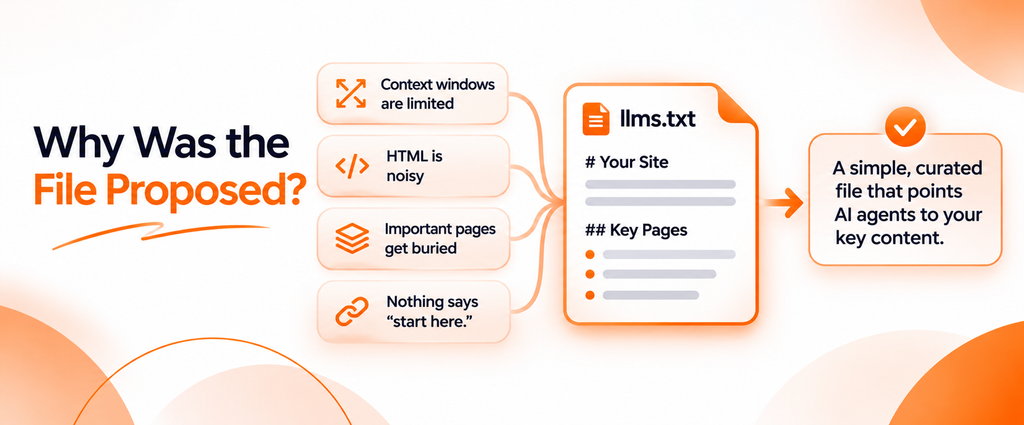
    The proposal points to a handful of problems, which boil down to this:

    • Context windows are limited. Most websites are too large to load into a model in one go.
    • HTML is noisy. Turning a complex page into clean text is hard, and wasted tokens cost time and money.
    • Important pages get buried. A model doesn’t know which of your 400 help articles are the canonical ones.
    • Nothing says “start here.” A sitemap lists everything, with no priority.

    The fix it suggests: one curated file, in one place, in Markdown that humans and models can both read.

    Now the honest part. Those are the problems it was designed to solve. Whether AI products actually use it that way is a separate question, and the evidence is thin (more below). Intended benefits aren’t proven outcomes.

    What Does an llms.txt File Look Like?

    The format is deliberately small. Per the llmstxt.org specification, the parts appear in this order:

    Part Required? What it does
    # Name (H1) Yes, the only required part The name of the site or project
    > Summary (blockquote) No A short description with the key facts
    Paragraphs or lists No Extra notes, with no headings
    ## Section (H2) with links No Groups of links, each written as - [name](url): note
    ## Optional No Secondary links an agent can skip

    A few details matter more than they look. Keep one H1 at the very top. Write each link in normal Markdown, followed by a colon and a note that helps a machine decide (“Current plans and what each includes” beats “Click here”). And use full URLs, so links still work if the file is copied into another tool.

    The 2026 revision, listed on the llmstxt.org changes page, added a few extras. Pages can offer a Markdown copy at the same URL with .md added. Pages can point to that copy with rel="alternate" type="text/markdown" and to the covering file with rel="describedby", as HTML <link> tags or an HTTP Link header. “Optional” is now just a convention for secondary links.

    Where Does the File Go?

    At the root of your domain, so it loads at https://yourdomain.com/llms.txt. The proposal also allows files in subpaths, such as /docs/, each covering the pages under that path, and tells agents to use the most specific one. It advises against /.well-known/, because that location can’t describe a subpath.

    What Is llms-full.txt?

    llms-full.txt isn’t part of the proposal. It’s a companion convention, adopted by documentation platforms, that joins the full text of your key pages into one large Markdown file. The 2024 proposal described something similar under other names (llms-ctx.txt and llms-ctx-full.txt), built by a tool the 2026 revision dropped.

    Anthropic’s developer docs show both in practice: their index file ends with a link to an llms-full.txt for readers who want everything. For most business websites, the short index is plenty. The full version mainly suits large technical documentation.

    llms.txt Example: A Practical Website Implementation

    Here’s a complete llms.txt example for a fictional payroll software company. Copy the structure, not the content.

    # Example Payroll
    
    > Example Payroll is cloud payroll software for small and mid sized businesses in the United States. It runs payroll, files payroll taxes and handles employee onboarding.
    
    Key facts:
    
    - Serves businesses with 1 to 500 employees
    - Support is available by chat and email on weekdays
    - Current prices are always on the pricing page, not in this file
    
    ## Product
    
    - [Features](https://example.com/features): What the software does, grouped by payroll, tax and HR tasks
    - [Pricing](https://example.com/pricing): Current plans, what each includes and how billing works
    - [Integrations](https://example.com/integrations): Accounting and time tracking tools that connect to Example Payroll
    
    ## Help center
    
    - [Run your first payroll](https://example.com/help/first-payroll): Setup steps for new accounts
    - [Payroll tax filing](https://example.com/help/tax-filing): Which federal and state filings are handled automatically
    - [Add a new employee](https://example.com/help/add-employee): Onboarding steps and required documents
    
    ## Company
    
    - [About](https://example.com/about): Who runs the company and where it operates
    - [Security](https://example.com/security): How customer and employee data is protected
    
    ## Optional
    
    - [Blog](https://example.com/blog): Guides on payroll rules and small business HR
    - [Changelog](https://example.com/changelog): Recent product updates

    What belongs: core product or service pages, pricing, the help pages people ask about most, policies and an About page.

    What doesn’t: login pages, carts, internal search results, thin tag pages, staging URLs, anything private. Don’t paste prices or claims that change often into the summary. Link to the page that stays current.

    How to prioritize: start with the 10 to 30 pages you’d send a new customer to. Put the most important group first. Push nice to have content into ## Optional.

    How to keep links accurate: every URL should return a 200 status, with no redirects and no noindex pages. If you publish Markdown copies, link those. If not, normal page URLs are fine.

    How to update it: review the file whenever you launch, rename or retire a page, and on a fixed schedule. Quarterly works for most sites.

    Real Examples From AI Companies

    Some AI companies publish one for their own developer docs. OpenAI’s crawler documentation and Perplexity’s bot documentation both point readers to a docs index in this format. Notice what that shows. They use the file to help developers and coding tools navigate documentation, while their crawler pages still manage access through robots.txt.

    How to Create an llms.txt File
    You don’t need to be a developer. A text editor and access to your site’s files (or CMS settings) is enough.

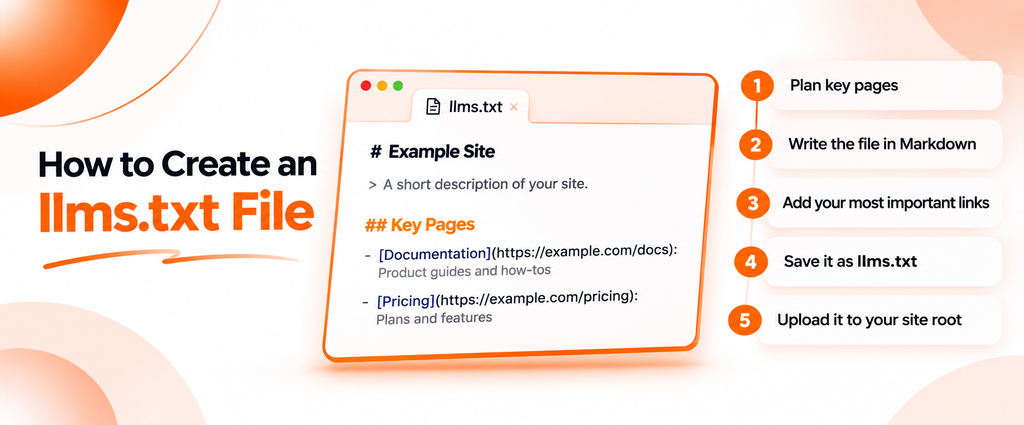
    1. Audit your important pages. List the pages that answer the questions customers ask most. Analytics and your support inbox are the best sources.
    2. Pick your resources. Help articles, guides, policies, pricing. Skip anything thin or out of date.
    3. Group them. Three to six groups usually works: Product, Help, Company.
    4. Write the file. Start with # Your Site Name, then a one or two sentence summary in a > blockquote.
    5. Add the links. One per line, as - [Page name](full URL): what the page covers.
    6. Check the format. One H1 at the top, H2s for groups, valid Markdown links. The validator section below shows how.
    7. Upload it to the root. Save it as UTF8 plain text where /llms.txt resolves on your domain.
    8. Test that it’s public. Open the URL in a private browser window. You should see raw text, not a 404, a login page or your theme’s HTML.
    9. Maintain it. Set a recurring reminder and recheck every link when the site changes.

    How to Create llms.txt for WordPress

    You have two sensible options.

    Upload it manually. Upload the file to your site’s root folder (the one holding wp-config.php) with your host’s file manager or SFTP. Static files there are served directly. This is the most predictable route, and you control every line.

    Use an SEO plugin you already run. The llmstxt.org project lists Yoast SEO and AIOSEO among the tools that can generate the file. Yoast’s version is free and automatic by default, with a manual mode for choosing pages. AIOSEO generates it on free plans, while its llms-full.txt and Markdown options need a paid plan. Check each plugin’s current settings, since features change.

    Two cautions. Don’t add a new plugin just for one small text file; that’s more maintenance than it’s worth. And don’t run two sources at once. If you upload a physical file and enable a plugin version, one will override the other, so pick one and load the URL to confirm which is live.

    How to Create llms.txt for Shopify

    Shopify used to be awkward, because merchants can’t upload arbitrary files to the domain root. That changed. According to Shopify’s developer documentation, Shopify now manages /llms.txt by default, mirroring /agents.md, its main document for shopping agents. /llms-full.txt mirrors it too.

    So your store probably already serves a file. Open it and read what’s there before changing anything.

    To customize it, use theme templates:

    • Change all three files at once: add an agents.md.liquid template. The other two fall back to it.
    • Change only the llms file: in Shopify admin, go to Online Store, then Themes, click the three dots next to your theme and choose Edit code. Add a file named llms.txt.liquid to the Templates folder.

    Know the limits. The template gets a restricted set of Liquid objects, it’s served on your primary domain without market or language prefixes, and once you add it, you maintain it. Shopify recommends keeping the managed default unless you need different content.

    llms.txt Generator: Can You Create the File Automatically?

    Yes. An llms.txt generator usually reads your sitemap or crawls your site, collects page titles and meta descriptions, groups URLs by folder and writes the Markdown. CMS plugins, Shopify’s managed file and documentation platforms all generate one, and there are plenty of free web based tools.

    That’s a fine first draft. It still needs a human edit, because generated files commonly:

    • List everything. A sitemap dump isn’t a curated map.
    • Reuse weak descriptions. Meta descriptions written for clicks rarely explain what a page covers.
    • Include junk URLs. Tag archives, paginated pages, old campaigns, redirects.
    • Go stale. A one time export drifts from the live site within weeks.
    • Group badly. A folder name like /blog/2023/ isn’t a meaningful section.

    Cut the list to what matters, rewrite the notes in plain language and check every link.

    llms.txt Validator: How to Check Your File

    There’s no official llms.txt validator. The proposal publishes a format, not a test suite, and free online checkers interpret it differently (some flag a missing blockquote even though it’s optional).

    The closest official check comes from Google’s Chrome team. Lighthouse includes an audit for the file in its Agentic browsing category. It flags a page when fetching the file returns a server error, and marks a missing file (404) as not applicable, since providing one is optional “at the moment.” It doesn’t grade your content.

    Here’s a free manual method:

    URL=https://example.com/llms.txt
    
    # 1. Status code and content type (expect 200 and text/plain or text/markdown)
    curl -s -o /dev/null -w "%{http_code} %{content_type}\n" "$URL"
    
    # 2. First line (should be your H1)
    curl -s "$URL" | head -n 1
    
    # 3. Every link, with a count to catch duplicates
    curl -s "$URL" | grep -oE 'https?://[^) ]+' | sort | uniq -c

    Then check by hand:

    • Availability: a 200 response, no login, no CDN challenge page.
    • Location: your main domain, not a forgotten subdomain.
    • Format: one H1 first, H2s for groups, links written as [name](url).
    • Broken or duplicate links: every URL returns 200, and none appears twice.
    • Descriptions: each link has a short note after the colon.
    • Freshness: no retired products, old prices or dead campaigns.
    • robots.txt: you aren’t disallowing the file for bots you want to read it.

    For a quick outside check, the free AI Crawler & robots.txt Checker from Spyro AI fetches your robots.txt, sitemap and llms.txt in one pass and shows which AI crawlers your rules allow or block. The free SEO and GEO Audit checks whether the file is present. Neither claims to grade its content, so the manual checks still apply.

    llms.txt vs robots.txt vs XML Sitemap: What’s the Difference?

    All three sit at the root, so people lump them together. They do different jobs.

    Feature robots.txt XML sitemap llms.txt
    Primary purpose Tell crawlers which URLs they may fetch List URLs you want discovered Give AI agents a curated overview of key content
    File format Plain text directives XML Markdown
    What it communicates Access rules per user agent Indexable URLs, sometimes with dates What the site is, plus prioritized links with notes
    How crawlers use it Compliant crawlers read it before fetching Search engines use it as a discovery hint Some agents and tools may read it on demand; major AI search products don’t document using it
    Controls access? Requests it, but isn’t a lock No No
    Helps discovery? Indirectly, via the Sitemap line Yes Possibly, for tools that read it
    Status Established standard (RFC 9309) Long established and widely supported Proposed convention

    Google’s robots.txt introduction says that file mainly manages crawler traffic and isn’t a way to keep a page out of Google. Its sitemap overview says a sitemap doesn’t guarantee crawling or indexing. The proposal itself says its file can complement robots.txt, and that a sitemap serves a different job: listing every indexable page rather than a curated few.

    So in the llms.txt vs robots.txt question, you need robots.txt, and the other one is optional. It can’t block a crawler anyway. It has no allow or disallow syntax at all.

    Does llms.txt Help SEO?
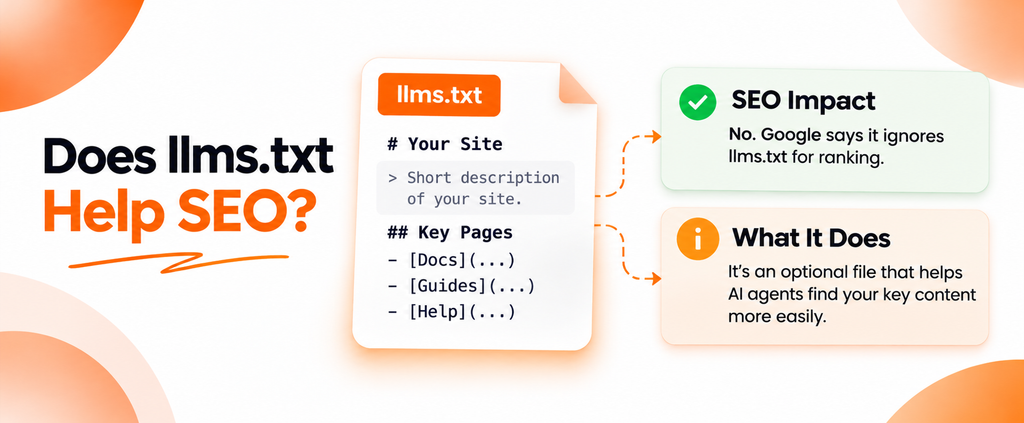
    Not for Google. This is one of the few places in AI search with an official answer.

    Google’s guide to generative AI features in Search says you don’t need machine readable files, AI text files, markup or Markdown to appear in Google Search, because Search doesn’t use them. It adds that keeping such a file is fine, and will neither help nor harm your visibility or rankings, since Google Search ignores it. That includes AI Overviews and AI Mode.

    Google clarified that wording in 2026, as Search Engine Journal reported, to make clear it covers Google Search only and that maintaining the file for other services is acceptable. The position didn’t change.

    Google’s John Mueller has been blunter. In a Reddit thread covered by Search Engine Journal, he called its use “purely speculative for now.” On the Search Off the Record podcast, he argued that LLM systems can’t trust a file a site writes about itself to decide which sites to surface, per Search Engine Journal’s summary.

    What should you do instead? The things Google says it does use: crawlable pages, indexable content with snippets allowed, useful answers, internal links and solid technical SEO. The guide on how to rank in Google AI Overviews walks through that list.

    Does llms.txt Improve AI Search Visibility?

    There’s no reliable evidence that it does. Here’s what each platform documents:

    Platform What the provider documents What that means
    ChatGPT (OpenAI) GPTBot, OAI-SearchBot and ChatGPT-User, all managed through robots.txt No statement that the file affects ChatGPT search or citations
    Claude (Anthropic) Its crawler help article covers ClaudeBot, Claude-User and Claude-SearchBot via robots.txt and doesn’t mention the file Anthropic publishes one for its docs, but doesn’t say Claude uses yours to pick sources
    Gemini and Google AI Overviews Google Search ignores the file No effect on AI Overviews or AI Mode
    Perplexity PerplexityBot and Perplexity-User, managed through robots.txt No statement that the file affects answers

    Independent research points the same way. An SE Ranking analysis of about 300,000 domains, reported by Search Engine Journal, found the file on roughly 10% of sites and no measurable link between having it and how often a domain was cited in LLM answers. A Search Engine Land test followed 10 sites for 90 days before and after adding it. Eight saw no measurable change in AI traffic, and the author tied the two gains to other work.

    None of that proves the file will never matter. Agents change fast. But AI visibility today depends on things you can measure: whether crawlers reach your pages, whether your content answers the question, whether trusted sources mention you, and how each system picks sources. A text file can’t stand in for any of that.

    Does Your Website Actually Need llms.txt?

    Probably not urgently. Here’s how I’d decide:

    Website type Add one? Why
    Small business site Low priority Few pages, already easy to read
    SaaS website Reasonable experiment Docs, pricing and integrations are what agents look for
    Documentation heavy site Yes, if it’s cheap The use case the proposal was built for
    Ecommerce store Check what your platform serves Clean product pages and feeds matter more
    WordPress site Only if your SEO plugin makes it a toggle Not worth a new plugin or custom code
    Shopify store Review the default file It already exists, so make sure it’s accurate
    Publisher or blog Low priority Thousands of articles don’t curate well into one file
    Enterprise website Optional, per section Subpath files for docs or support can make sense

    My rule of thumb: if it takes under an hour and someone will maintain it, go ahead. If it means new software, a developer ticket or a paid service, spend that time on content and crawler access first.

    Common llms.txt Mistakes to Avoid

    • Treating it as a Google ranking factor. Google says it isn’t.
    • Expecting guaranteed AI citations. Nobody can promise that, with or without the file.
    • Listing every URL. A sitemap dump removes the one thing the file is for: curation.
    • Publishing broken links. Redirects, 404s and noindex pages send agents nowhere.
    • Including outdated information. Old prices in the summary can mislead any tool that reads it.
    • Copying another site’s file. Their structure might help. Their content won’t.
    • Confusing it with robots.txt. It can’t block or allow any crawler.
    • Assuming every AI crawler reads it. The major ones don’t document doing so.
    • Never maintaining it. A stale file is worse than none.

    How the File Fits Into a Broader GEO Strategy

    In generative engine optimization (GEO), this file is a small supporting piece at most. It shouldn’t replace:

    • accessible pages that crawlers can fetch without logins or heavy scripts
    • clear information architecture and strong internal linking
    • useful documentation and help content
    • structured data that matches the visible page
    • technical SEO basics like status codes, canonicals and sitemaps
    • content that answers real questions
    • consistent brand information across your site and third party profiles

    To check the first item, the AI crawler checker guide explains how to test whether GPTBot, ClaudeBot and PerplexityBot can actually read your pages. That matters far more.

    Measurement matters too. Spyro AI is one option here: the Spyro AI platform tracks when ChatGPT, Claude, Gemini, Perplexity and Google AI Overviews mention or cite a brand, so you can compare before and after a change. Whatever you use, repeat the same prompts over time, because AI answers vary from run to run. For how this fits with classic SEO, the SEO vs GEO vs AEO pillar guide has the full picture.

    Key Takeaways

    • llms.txt is a proposed Markdown file at your site’s root that gives AI agents a curated map of key pages. It’s a convention, not an established standard.
    • Google Search ignores it, so it won’t help or hurt rankings, AI Overviews or AI Mode.
    • No major AI search provider documents using it to pick sources, and independent studies haven’t found a citation lift.
    • It’s most useful for documentation heavy sites and developer tools. Elsewhere it’s an optional, low effort experiment.
    • If you publish one, keep it short, accurate and maintained, and fix crawler access and content quality first.

    Frequently Asked Questions

    What is llms.txt?

    llms.txt is a proposed Markdown file at a website’s root that gives AI agents a short summary of the site and links to its most useful pages. Jeremy Howard of Answer.AI proposed it in 2024. It’s a convention some tools support, not an official web standard.

    Does Google use llms.txt?

    No. Google’s guide to generative AI features says Google Search ignores these files, so having one will neither help nor harm your rankings or your visibility in AI Overviews and AI Mode. Google also says it’s fine to keep one for other services.

    Does ChatGPT read llms.txt?

    OpenAI hasn’t documented that ChatGPT uses the file to find or cite sources. Its crawler documentation manages GPTBot, OAI-SearchBot and ChatGPT-User through robots.txt. ChatGPT may fetch the file if a user points to it, but that’s not the same as using it to choose sources.

    Does llms.txt improve AI visibility?

    There’s no reliable evidence that it does. An analysis of about 300,000 domains found no measurable link between having the file and AI citation frequency, and a 10 site test saw no AI traffic change it could attribute to it. Crawler access and content quality matter far more.

    What’s the difference between llms.txt and robots.txt?

    robots.txt tells crawlers which URLs they may fetch and is an established standard. llms.txt is a proposed Markdown overview that points AI agents to useful content. It can’t allow or block anything, so it doesn’t replace robots.txt.

    Where should I put the file?

    Put it at the root of your main domain so it loads at /llms.txt, for example https://yourdomain.com/llms.txt. The proposal also allows extra files in subpaths, such as a docs folder. It should return a 200 status as plain text, with no login.

    How do I create one?

    List your most useful pages, group them into a few sections, and write a Markdown file with an H1 site name, a short blockquote summary and H2 sections of links with brief notes. Upload it to your site root, then check that every link works.

    My Recommendation: Should You Create One?

    If you run a documentation site, a developer tool or a SaaS help center, yes. Write a tight file, link your best pages and give it an hour a quarter.

    If you run a small business site, a store or a blog, it’s optional. Create one if your CMS makes it a toggle, review what Shopify already serves, then move on. Your time is better spent on pages that answer customer questions, and on making sure AI crawlers can reach them.

    Before you write a single line of llms.txt, run the free AI Crawler & robots.txt Checker on your domain. It shows whether AI crawlers can reach your site at all. That’s the bigger question, and it takes a minute to answer.
  • How to Track AI Traffic in GA4 (ChatGPT, Perplexity, Gemini and More)

    How to Track AI Traffic in GA4 (ChatGPT, Perplexity, Gemini and More)

    Quick Answer: How Do You Track AI Traffic in GA4?

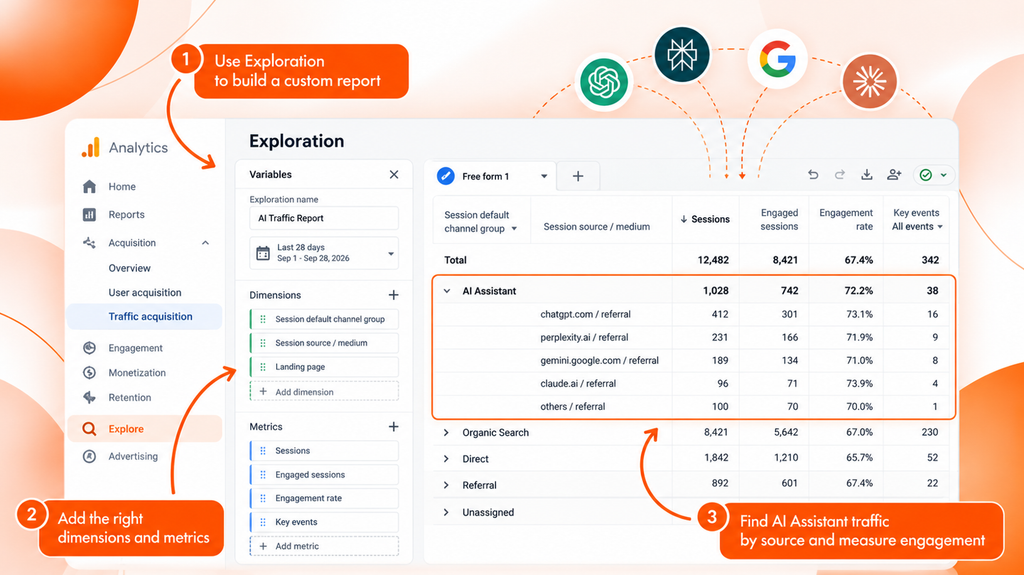
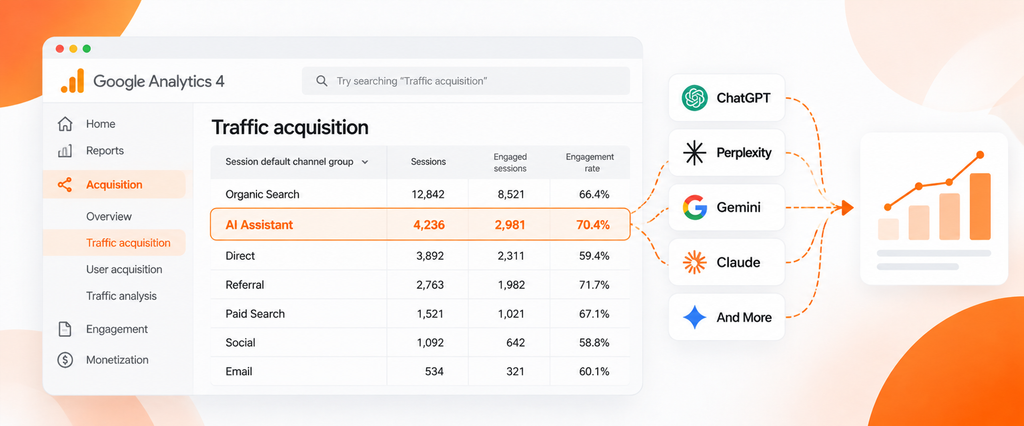
    • The fast route: Reports > Acquisition > Traffic acquisition, then scan the Session default channel group for an AI Assistant row. Honestly, that’s the whole one minute method to track AI traffic in GA4. Then add Session source / medium as a second dimension to see which assistant sent each visit.
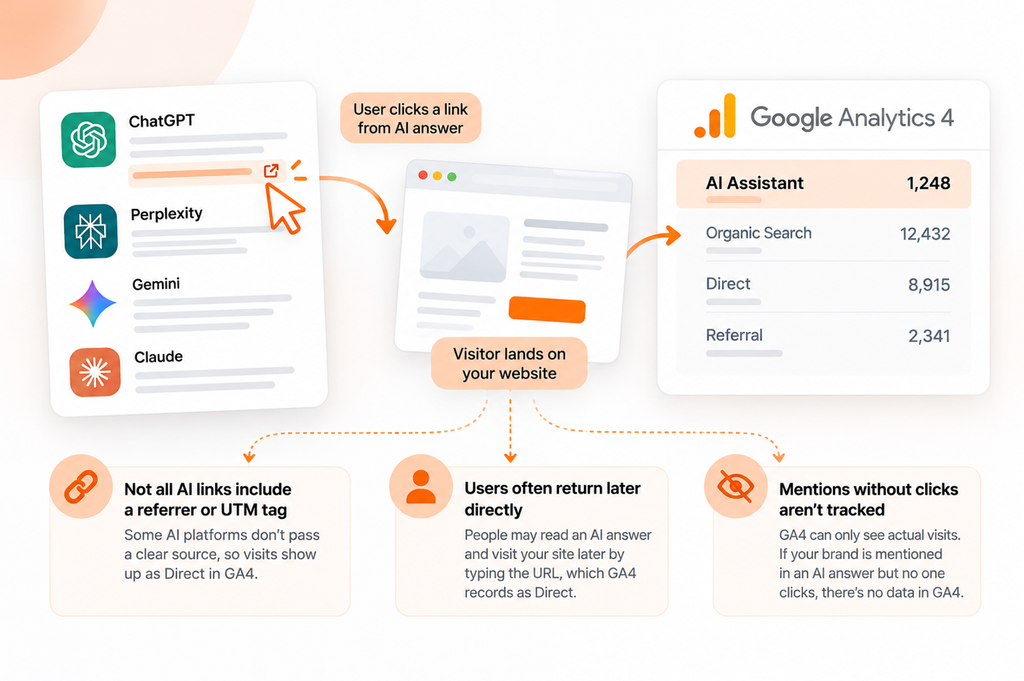
    • The catch: GA4 labels a visit only if the click brings a referrer or a tag with it. No signal? The visit lands in Direct. So treat what you see as a floor.
    • The upgrade: Save an Exploration or a custom channel group that also catches assistants Google’s list misses, then read sessions, engagement rate and key events next to Organic Search.
    • The limit: GA4 can’t tell you which prompt or answer sent a visitor. Mentions and citations need a separate AI visibility monitoring routine.

    Good news first. You can track AI traffic in GA4 with much less setup than before, since Google added a dedicated AI Assistant channel in 2026 (see its release notes). It’s a head start, nothing more. Below you’ll find the exact reports to open, a source table to check against your own data, a reusable custom report, a way to group the traffic, and a blunt look at what GA4 misses. Curious about the other half, whether AI answers mention you at all? The guide to tracking whether AI answers mention your brand has it.

    Who Needs to Track AI Traffic in GA4?

    Anyone curious whether ChatGPT, Perplexity, Gemini or Claude send real visitors. That’s startups looking for early signals, SMBs and mid sized companies defending content spend, and agencies reporting to clients. For a first pass you don’t need a new tool. You can track AI traffic in GA4 with the right report, as long as you know what it can’t show.

    What Is AI Traffic in GA4?

    Put simply, AI traffic in GA4 is whatever sessions GA4 can pin on an AI assistant or AI search product. Someone clicks a link in an answer, and the browser passes a referrer or a tag along with them. I’ll call it AI referral traffic. Two ideas get mixed up here, so let’s split them before you track AI traffic in GA4.

    The second idea, AI influenced traffic, is wider. Picture someone who reads an answer naming your company, closes the tab, and types your address in two days later. GA4 records a direct visit. The answer did the work, and nothing in your data says so.

    TermWhat GA4 can seeExample
    AI referral sessionA visit with a recognizable source, medium or referrerA reader clicks a citation inside an assistant
    Tagged AI visitA URL carrying tags the AI product addedOpenAI says ChatGPT adds utm_source=chatgpt.com to referral URLs
    Direct visit after AI exposureSource (direct), medium (none)Someone pastes your URL from an answer
    Mention with no visitNothingAn answer names your brand and nobody clicks

    You’ll work with a handful of fields. GA4 groups them under traffic source dimensions: Session source, Session medium, Session source / medium (both together), Session default channel group (Google’s rule based bucket) and First user source / medium (how a person first arrived). Add Landing page, plus the metrics Sessions, Engaged sessions, Engagement rate, Key events and Session key event rate. Help pages say both “channel grouping” and “channel group”. Same thing, two labels.

    Can GA4 Track ChatGPT, Perplexity, Gemini and Other AI Traffic?

    Yes, partly. GA4 tracks the clicks that arrive with a usable signal and nothing that doesn’t. Here’s what that means when you track AI traffic in GA4:

    QuestionWhat GA4 can doWhat it depends on
    Did an assistant send a click?Often yesThe click passing a referrer or a tag
    Which assistant?SometimesThe source being recognized by Google or matched by your filter
    Did those visitors engage and convert?YesYour key events being set up
    Did Google AI Overviews or AI Mode send it?Not separatelyGoogle files both under Organic Search
    Which prompt led to the visit?NoGA4 never receives it

    Google’s channel definitions describe the AI Assistant channel as users arriving from AI chat tools such as ChatGPT, Gemini, Deepseek, Copilot or Grok. Google won’t promise that every assistant is on its list. Test the ones it doesn’t name.

    How to Track AI Traffic in GA4 Step by Step

    Here are five steps to track AI traffic in GA4 in a standard property. Menu labels shift a little between properties and updates, so I’ve flagged where.

    Step 1: Open the Traffic Acquisition Report

    1. Open Google Analytics and choose your property.
    2. From the left menu: Reports, Acquisition, Traffic acquisition.
    3. Pick the last 90 days, because small channels need room to show up. If the report isn’t in your menu, Google says editors and administrators can add it back.

    Step 2: Select the Correct Session Dimension

    The first column’s drop down arrow switches the dimension.

    • Session default channel group is the starting point. It carries the AI Assistant channel.
    • Session source / medium shows the values behind the channels, which you need to tell one assistant from another.
    • First user source / medium belongs in the User acquisition report. Reach for it when you’re asking which assistant brought in new people, not which one drove this visit.

    Don’t mix session and user dimensions, or the totals will disagree.

    Step 3: Find AI Referral Sources

    1. Start with Session default channel group and find the AI Assistant row. When the referrer matches Google’s assistant list, GA4 stamps the medium as ai-assistant.
    2. Click the plus icon next to the first column header and add Session source / medium as a secondary dimension. Rows like chatgpt.com / ai-assistant should appear under that channel. (Older data may show chatgpt.com / referral, according to Loves Data.)
    3. Then make Session source / medium the first dimension and use the search box above the table, one term at a time: chatgpt, openai, perplexity, gemini, claude, copilot.
    4. Check the Referral and Unassigned rows too. An assistant missing from Google’s list can sit in Referral.

    No AI Assistant row? Maybe nothing matched your date range. Or the channel hasn’t reached your property yet. Either way, the custom report further down doesn’t need it, so you can still track AI traffic in GA4.

    Step 4: Compare AI Traffic Performance

    Raw session counts mean little alone. Put each AI source next to Organic Search over the same dates:

    • Sessions for volume.
    • Engaged sessions and Engagement rate for quality. Google counts a session as engaged if it runs past 10 seconds, includes a key event, or has at least two page or screen views.
    • Key events and Session key event rate for outcomes.
    • Landing pages. Open Reports > Engagement > Landing page, click Add comparison, pick Session default channel group and match AI Assistant. Which pages do assistants send people to?
    • Date ranges. Use the date picker’s compare option with equal lengths.

    Small samples bite. Take 40 AI sessions: three or four visits move the rate ten points.

    Step 5: Save or Reuse the Report

    To track AI traffic in GA4 over time, save the view so you aren’t rebuilding it monthly. Three ways to do that, and the first two need editor access:

    1. Customize the report. In Traffic acquisition, use Customize report (the pencil icon), add a filter and save it as a new report. Analytics Mania walks through it.
    2. Create a detail report in the Library. Go to Reports > Library > Create new report > Create detail report and start from the Traffic acquisition template, as Loves Data documents.
    3. Build an Exploration. That’s next.

    Which Sources Should You Look For When You Track AI Traffic in GA4?

    Don’t trust any fixed list, including this one. AI products change links and referrer behavior without notice, and most don’t document it. So the table separates what’s documented from what’s only reported.

    AI servicePossible source or referrer patternHow to verifyImportant caveat
    ChatGPTchatgpt.com, with utm_source=chatgpt.com documented by OpenAI. Older chat.openai.com appears in practitioner listsSearch for chatgpt and openai, then inspect landing page URLsOpenAI’s FAQ ties the tag to ChatGPT search results for sites that allow OAI-SearchBot. App visits are reportedly Direct
    Perplexityperplexity.ai as a referral (reported)Search for perplexitySearchPilot reports it, but Perplexity doesn’t document it. Its app reportedly splits between referral and Direct
    Geminigemini.google.com (reported). SEJ reports that Gemini quietly added UTM parameters to outgoing linksSearch for gemini, then check landing page URLs for tagsGoogle hasn’t documented the tags or values. The Gemini app reportedly shows as Direct more often
    Claudeclaude.ai, named in Google’s release notesSearch for claudeSearchPilot rates referrer reliability as low
    Microsoft Copilotcopilot.microsoft.com, which appears in Google’s custom channel exampleSearch for copilotBehavior depends on the surface, so test it
    Google AI Overviews and AI Modegoogle / organicSearch Console, since GA4 has no separate valueGoogle counts both in Organic Search, and AI Mode clicks often lack a referrer, per SearchPilot

    The table mixes three levels of certainty. A recognizable source value is something you can see in your own report. A possible referrer hostname is what practitioners have observed. A verified reporting dimension is a field Google documents, like Session source. Only the last is guaranteed.

    The test I’d run: sort your Referral rows by sessions for the last 90 days and read every source name. Any assistant you don’t recognize is a candidate for your filter.

    How to Build a Custom Report to Track AI Traffic in GA4

    For flexibility, nothing beats an Exploration when you track AI traffic in GA4. Pick your own dimensions, add a filter, keep the result. It also catches assistants that the built in channel misses. Google’s free form guide sets the limits: up to 5 dimensions in rows, 2 in columns, 10 metrics in values, and filters that combine with AND logic.

    1. In the left menu, select Explore, then start a Blank or Free form exploration. Name it “AI traffic”.
    2. In the Variables column, click + next to Dimensions, tick Session source, Session source / medium and Landing page, then Import.
    3. Click + next to Metrics and import Sessions, Engaged sessions, Engagement rate, Key events and Session key event rate.
    4. In Tab Settings, drag Session source / medium into Rows and the metrics into Values.
    5. Under Filters, add Session source, choose matches regex and paste a pattern like this:
    ^(chatgpt\.com|chat\.openai\.com|perplexity\.ai|gemini\.google\.com|claude\.ai|copilot\.microsoft\.com|deepseek\.com|grok\.com)$
    1. Click Apply. Then swap Session source / medium for Landing page in Rows to see where each group lands.

    This pattern is my starting list, not an official one. Loves Data has an example it builds on, and Analytics Mania publishes a much longer one. Because of the anchors, chatgpt.com matches but www.chatgpt.com won’t. Add variants when they appear in your data.

    A simpler filter also works. Set Session medium to exactly matches ai-assistant and you’ll see only what Google already classifies. Run both, and the gap shows what Google’s list misses.

    To read the result, check which sources have meaningful volume, which landing pages get the visits, and whether engagement and key events hold up against Organic Search. Explorations only use data within your property’s retention settings, so their history can differ from standard reports.

    How Do You Group AI Traffic in GA4 Into Its Own Channel?

    You have three options, and they do different jobs.

    OptionWhat it doesLimit
    Default AI Assistant channelClassifies recognized assistants automaticallyGoogle’s list isn’t fully published, and its release note doesn’t say whether older data was reclassified
    Reporting filter (report or Exploration)Narrows one view to chosen sourcesChanges nothing anywhere else
    Custom channel groupAdds your own channel and rules, reusable across reportsTwo custom groups per standard property, and it needs editor access

    A filter is a lens. A GA4 custom channel group is a classification. Filter for ChatGPT in one report and every other report still shows it as before. A custom group applies your rules wherever you pick that group.

    Can you track AI traffic in GA4 without a custom channel group? Yes, with filters. But a group is worth building when you want one definition across reports. Follow Google’s custom channel group steps:

    1. Go to Admin, then under Data display select Channel groups.
    2. Click Create new channel group and name it.
    3. Add a channel called “AI assistants” with a condition on Source that matches regex. In Google’s example, the regex covers OpenAI, ChatGPT, Gemini, Copilot and Perplexity domains.
    4. Click Reorder, drag the new channel above AI Assistant and Referral, and save.

    Order matters. GA4 puts each session in the first channel whose rule fits. Google says custom groups apply to reports retroactively, and a standard property gets two.

    Google also added a Source group field in 2026 that merges messy spellings of one source. Its release note names ChatGPT and Perplexity among the emerging sources it groups, so check whether your property shows it. And one more thing: a custom group can’t recover anything. All it does is sort visits that arrive with a source it recognizes.

    How to Measure Conversions When You Track AI Traffic in GA4

    Start with key events. Google’s page on key events explains that any event can be marked as one: a form submit or booked demo for lead generation, a purchase for a store. No key events, and all you’re counting is clicks.

    Next, set the AI Assistant channel (or your custom group) beside Organic Search over equal date ranges. Sessions show volume, Engagement rate shows quality, Key events show total outcomes and Session key event rate gives a fair comparison between channels. Add Landing page to see which pages earn the AI click and which convert.

    The formula for engagement rate is engaged sessions ÷ sessions × 100. With made up numbers, 260 engaged sessions out of 400 gives 65%. Google defines it as the percentage of engaged sessions, so the arithmetic is safe.

    Two cautions. I wouldn’t assume AI visitors convert better or worse than organic ones. Check your own numbers. And on a longer sales cycle, look at Direct too, since someone who met you in an assistant may come back that way.

    Why Can’t You Track AI Traffic in GA4 Completely?

    AI traffic attribution rests on a signal. GA4 reads it, then files the visit. No signal, and the visit goes to Direct, which Google describes as typed URLs and bookmarks. The main gaps:

    • No click, or a pasted URL. Someone sees your brand in an answer and never clicks, or copies the address. A pasted URL has no referrer.
    • Stripped referrers. Some apps and links opened with a no referrer setting pass nothing. SearchPilot says several AI apps show up as Direct.
    • Privacy and consent. Some browsers and consent banners quietly limit what an analytics tag can collect.
    • A later or different visit. The assistant introduced you, and the purchase came from a branded search a week later, or from another device.
    • Crawlers. AI bots that fetch your pages usually don’t run your analytics tag. Server logs and the AI crawler checker guide cover that side.

    A recent case shows how fragile the signal is. In 2026, after a ChatGPT model rollout, SEJ reported that ChatGPT attributed sessions fell sharply in several datasets while Direct rose, because links lost both the UTM tag and the referrer. SEJ says Adobe’s Cedric Huesler relayed that OpenAI called it a bug and that a fix began rolling out within days. OpenAI hadn’t published a statement, and several of the people quoted sell AI search tools, so take the percentages loosely. What matters is the lesson. Visitors didn’t vanish. They moved to Direct.

    How Do You Track AI Traffic in GA4 When the Referrer Is Missing?

    You can’t get that signal back. You can shrink the blind spots, though:

    • Annotate changes. Mark dates when tracking behavior shifts, so a dip doesn’t read as lost demand.
    • Watch Direct on deep pages. Direct visits landing on a specific article are less likely to be typed addresses.
    • Ask people. Add “How did you hear about us?” to forms, with an AI assistant option. Self reported answers are rough, and they catch what GA4 can’t.

    When Do UTM Parameters Help?

    When you control the link. A newsletter, partner placement, social post or your own ad all let you pick the URL. Tag those and GA4 credits the source you choose. Google’s page on how traffic source dimensions are updated says that in some cases GA4 derives all cross channel values from UTMs exclusively, and that missing parameters produce (not set), so set source, medium and campaign together.

    For links inside someone else’s AI answer, UTMs are no use if you want to track AI traffic in GA4. The assistant builds that URL, not you. If those visits carry a tag (utm_source=chatgpt.com, say), the AI product added it.

    Two warnings. Don’t tag internal links. That can distort the original source. And skip the medium ai-assistant in your own campaigns, since Google’s channel rule matches that exact value.

    GA4 AI Traffic Tracking vs. AI Visibility Tracking

    These answer different questions. GA4 tells you what happened after a click. AI visibility tracking tells you whether your brand appeared in the answer at all.

    MeasurementWhat it answersWhat it cannot tell you
    GA4 AI referral trafficHow many identifiable visits came from AI sources, and what they didWho saw your brand but didn’t click, or which prompt sent the visit
    AI visibility monitoringWhether answers mention or cite your brand, and who they name insteadHow many visits or conversions followed
    Server logsWhich bots and requests reached your siteWhether a human read an answer first

    Plenty of sites get mentioned all the time and still see few referral visits, since a lot of answers settle the question without anyone clicking. A session isn’t a citation. A citation isn’t a session either.

    Spyro AI covers the visibility side. It checks whether ChatGPT, Gemini, Claude, Perplexity and Google AI Overviews mention or cite your brand (Pro and Agency plans cover all five), on a daily or weekly schedule you set. It isn’t a GA4 reporting tool, and this guide assumes no GA4 connection. For a quick baseline, the free AI Visibility Checker runs 5 buyer style prompts on ChatGPT and Google AI Overviews, and the post on the free AI visibility checker explains how to read the report. If you’re weighing tools, the AI visibility tools pricing comparison lays out what plans include.

    Common Mistakes When You Track AI Traffic in GA4

    Most skewed numbers trace back to a few repeat errors when people track AI traffic in GA4.

    MistakeWhy it hurtsFix
    Treating every AI influenced visit as a referralYou undercount and misjudge impactReport referrals as a floor
    Counting all Direct as AIYou overstate itLook at deep landing pages and trends only
    Putting UTMs on links you don’t controlTags on internal links distort sourcesTag only links you publish
    Ignoring conversions and landing pagesTraffic without outcomes proves littleCompare key events
    Comparing uneven date rangesTrends look bigger or smaller than they areUse equal periods

    Key Takeaways

    • To track AI traffic in GA4, start with Session default channel group in Traffic acquisition, find the AI Assistant row, then break it down by Session source / medium.
    • Google’s AI Assistant channel only covers referrers it recognizes, and the full list isn’t published. So test each assistant you care about before you track AI traffic in GA4 with it.
    • A saved Exploration or custom channel group catches assistants the default misses. A filter changes one view; a channel group changes how traffic gets classified.
    • Referral sessions are a floor. Copy and paste, apps, stripped referrers and later visits through other channels push AI influence into Direct.
    • Prompts, answers and citations are invisible to GA4. Visibility monitoring handles those. GA4 picks up once the visitor has clicked.

    Frequently Asked Questions

    How do I track AI traffic in GA4?

    Open Reports > Acquisition > Traffic acquisition, set the dimension to Session default channel group and read the AI Assistant row. Add Session source / medium to see each assistant, then build a filtered Exploration for sources Google doesn’t classify.

    Can GA4 track ChatGPT traffic?

    ChatGPT traffic in GA4 shows up for clicks that arrive with a referrer or a tag. Per OpenAI, ChatGPT appends utm_source=chatgpt.com to the referral URLs it shows in search results. App visits and links without either signal usually land in Direct.

    Can GA4 track Perplexity and Gemini traffic?

    Often, with caveats. Perplexity referral traffic is reported to arrive as perplexity.ai, and Gemini as gemini.google.com, so you can track AI traffic in GA4 from both, though neither owner formally documents it. Check your own source report, and expect some mobile app visits to show as Direct.

    Why is AI traffic showing as direct traffic in GA4?

    Because the click carried no referrer and no tag. Copied URLs, some apps and links opened with a no referrer setting all do this, and GA4 files them as Direct. Watch Direct visits to deep pages as a rough proxy, and annotate any date when tracking behavior changed.

    Can I create a separate AI traffic channel in GA4?

    Yes. GA4 has a default AI Assistant channel for recognized referrers. You can also track AI traffic in GA4 as your own channel with a custom channel group (Admin > Data display > Channel groups) that uses a Source regex and sits above Referral.

    Is AI referral traffic the same as AI visibility, and do I need another tool?

    No, and for most teams yes. Referral traffic counts identifiable visits. Visibility measures whether and how your brand appears in answers, including when nobody clicks. GA4 can’t show prompts, mentions or citations, so pair it with AI visibility monitoring.

    How can I measure conversions from AI search?

    First mark your important actions as key events. Once you track AI traffic in GA4, put the AI Assistant channel next to Organic Search over equal date ranges and compare Engagement rate, Key events and Session key event rate. Add Landing page to see which pages convert. Small samples need care, and later direct visits won’t be credited to the assistant.

    Measure the Click, Then Check the Mention

    Here’s the workflow I’d follow. Read the AI Assistant row, build one Exploration for the assistants Google misses, compare engagement and key events with Organic Search and annotate changes. Then accept that you’re seeing the clicks, not the whole influence.

    To see the other half, run the free AI Visibility Checker and find out whether ChatGPT and Google AI Overviews mention your brand at all. It’s a baseline, not a guarantee. When you want to keep tracking more prompts and engines over time, the plans are on the pricing page. And if you want to track AI traffic in GA4 well, repeat the checks above every month, not once.

  • Can AI Crawlers Read Your Site? How to Check GPTBot, ClaudeBot and PerplexityBot Access

    Can AI Crawlers Read Your Site? How to Check GPTBot, ClaudeBot and PerplexityBot Access

    Quick Answer: How Do You Know If AI Bots Can Read Your Site?

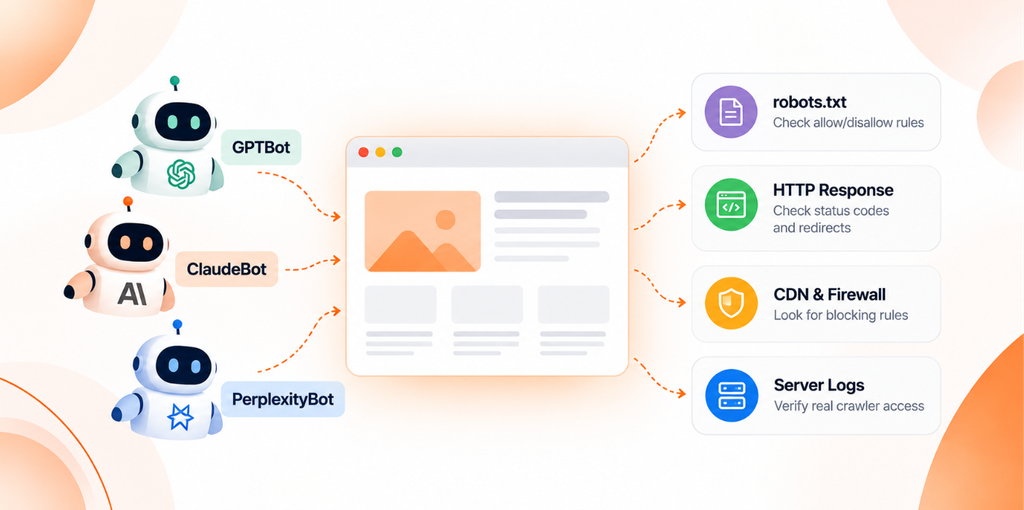
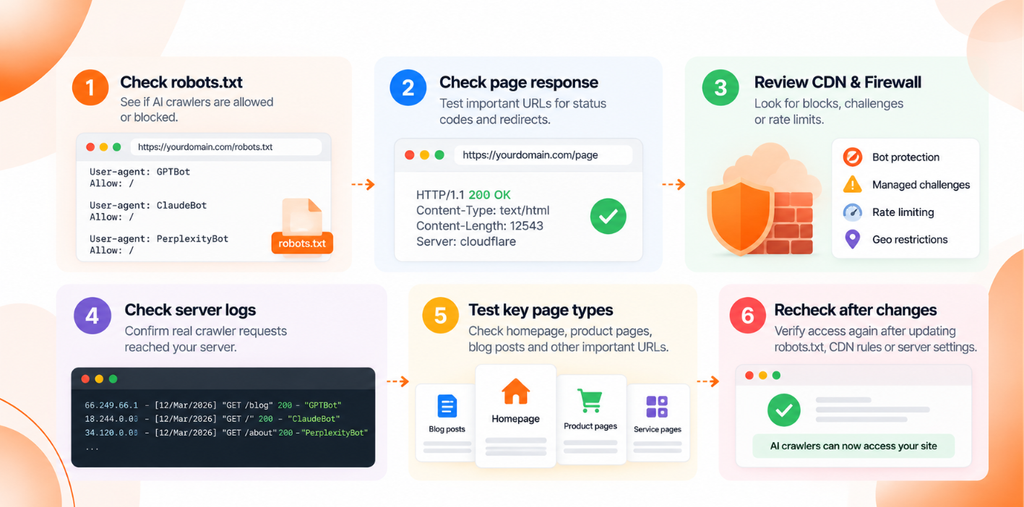
    An AI crawler checker tells you whether bots like GPTBot, ClaudeBot and PerplexityBot are allowed to read your site, and where they might get stopped. Check five layers: robots.txt rules, the HTTP response each key page returns, CDN and firewall settings, server logs, and whether pages load without a login or heavy scripts.

    No single check proves every bot can read every page. Access depends on the bot, the URL, your network rules, the server’s response and what that bot is for.

    • Why it matters: if a search or retrieval bot can’t fetch a page, that service can’t quote it from a fresh visit.
    • robots.txt is one layer: a bot your rules allow can still hit a 403 from a web application firewall or a CDN challenge.
    • Access isn’t visibility: an open door doesn’t mean ChatGPT or Perplexity will cite you. Measure mentions separately.
    • User agents can be faked: anyone can send a request that says “GPTBot”. Verify identity with the vendor’s published method.
    • No guarantees: allowing a crawler makes a citation possible. Never certain.

    Written for site owners, SEO teams, developers and agencies. For the bigger picture of how AI answers differ from Google rankings, see the SEO vs GEO vs AEO guide.

    What Is an AI Crawler Checker?

    An AI crawler checker is a tool or process that tests whether named AI bots are allowed to fetch your pages, and whether anything on the way blocks them. A useful one looks at:

    • whether robots.txt is reachable and which status code it returns
    • the user agent groups that apply to each AI bot
    • wildcard rules, and which rule wins when Allow and Disallow overlap
    • sitemap declarations
    • HTTP status codes and redirect chains for important URLs
    • access denied responses such as 403 and 429
    • signs of CDN or firewall blocking, when it can see enough evidence

    Here’s the catch. A typical AI crawler checker works from the outside. It can read your rules and request your pages, but it can’t open your firewall dashboard or prove the real GPTBot visited.

    What Can Each Type of Test Prove?

    AI crawler testing comes in four forms, and each proves something different.

    Test typeWhat it doesWhat it can tell youWhat it can’t tell you
    robots.txt analysisParses your rules for each user agentWhether a bot is allowed by policyWhether your server actually lets it in
    HTTP fetch testRequests a URL, sometimes with a bot’s user agent stringStatus code, redirects, headers and bodyHow your firewall treats the bot’s real IP addresses
    Server log auditReads requests that reached your originWhich URLs got which responsesRequests stopped earlier at the CDN
    Verified crawler visitA log entry confirmed against the vendor’s IP list or DNSThat the genuine bot fetched the pageWhether that page will ever be cited

    I’d treat a clean robots.txt result as step one. Not the finish line.

    What Are GPTBot, ClaudeBot and PerplexityBot?

    They’re the best known crawlers from OpenAI, Anthropic and Perplexity. They do different jobs, and each company runs several bots.

    CrawlerDocumented purposeUser agent identifierWhat website owners should verifyImportant caveats
    GPTBot (OpenAI)Crawls content that may be used to train OpenAI’s generative AI foundation modelsToken GPTBot; the full string contains GPTBot/ plus a version numberYour GPTBot group, and that requests come from OpenAI’s published IP listBlocking GPTBot doesn’t block OAI-SearchBot, the crawler behind ChatGPT search
    ClaudeBot (Anthropic)Collects web content that could contribute to model trainingToken ClaudeBotYour ClaudeBot group, any Crawl-delay line, and source IPs against Anthropic’s listClaude-SearchBot and Claude-User are separate bots with separate rules
    PerplexityBot (Perplexity)Surfaces and links websites in Perplexity search results; Perplexity says it isn’t used to crawl content for AI foundation modelsMozilla/5.0 AppleWebKit/537.36 (KHTML, like Gecko; compatible; PerplexityBot/1.0; +https://perplexity.ai/perplexitybot)Your PerplexityBot group, and firewall rules against Perplexity’s published IP rangesPerplexity-User, which fetches pages for user questions, generally ignores robots.txt according to Perplexity

    Sources: OpenAI’s crawler overview, Anthropic’s help article on its crawlers and Perplexity’s bot documentation. Version numbers change, so match on the token.

    Training Crawlers, Search Crawlers and User Triggered Fetchers

    Training crawlers collect content that may train models. Search crawlers handle AI search indexing, so a product can show and link pages. User triggered fetchers visit a page because a person asked a question. The other bots from these three companies:

    BotJobrobots.txt note from the vendor
    OAI-SearchBot (OpenAI)Surfaces websites in ChatGPT searchSites that opt out won’t be shown in ChatGPT search answers, though they can still appear as navigational links
    ChatGPT-User (OpenAI)Visits pages when a user asks ChatGPT or a custom GPTBecause the action is user initiated, robots.txt rules may not apply
    Claude-SearchBot (Anthropic)Improves the quality of Claude’s search resultsBlocking it may reduce visibility in search results
    Claude-User (Anthropic)Fetches pages when a Claude user asks a questionBlocking it may reduce visibility in user directed web search
    Perplexity-User (Perplexity)Supports user actions inside PerplexityGenerally ignores robots.txt, since a user requested the fetch

    So you can block training and still allow search. OpenAI says each setting is independent: a site can allow OAI-SearchBot and disallow GPTBot. A good AI crawler checker reports each bot separately for that reason.

    Where Does Google-Extended Fit?

    Google-Extended isn’t a crawler. It’s a robots.txt product token. Google’s crawler documentation says it controls whether content Google crawls may be used to train future Gemini models and for grounding in Gemini Apps and Vertex AI. It has no separate user agent string, and Google says it doesn’t affect inclusion in Google Search or act as a ranking signal. If an AI crawler checker lists Google-Extended, read it as a policy token, not a visiting bot.

    For AI Overviews and AI Mode, Google’s page on AI features in Search points to robots.txt rules for Googlebot plus snippet controls like nosnippet and noindex. Not to Google-Extended.

    How Do You Check Whether AI Crawlers Can Access Your Website?

    Six steps. Run them in order, because each one rules out a layer.

    Step 1: Check robots.txt

    Open https://example.com/robots.txt with your own domain. (example.com is a placeholder throughout.)

    Check the status code first. Under RFC 9309, the robots.txt standard behind search engine crawlers, a 4xx response lets crawlers act as if no rules exist. A 5xx response tells them to assume everything is disallowed. So a broken robots.txt can quietly block your whole site.

    Then read the User-agent, Allow, Disallow and Sitemap lines. RFC 9309 sets the matching logic:

    • A crawler follows the group that names its product token (case doesn’t matter). It falls back to the * group only when no group names it.
    • Several groups naming the same bot are combined.
    • Inside the group, the longest matching path wins. If an Allow and a Disallow match equally, Allow should win.

    File order doesn’t decide the outcome. Specificity does.

    text

    # Illustrative example only. Not a recommended policy.
    User-agent: *
    Disallow: /admin/
    Disallow: /cart/
    
    User-agent: GPTBot
    Disallow: /
    
    User-agent: OAI-SearchBot
    User-agent: PerplexityBot
    Allow: /
    Disallow: /admin/
    
    Sitemap: https://example.com/sitemap.xml

    How to read it:

    • GPTBot is explicitly disallowed across the whole site.
    • OAI-SearchBot and PerplexityBot are explicitly allowed except /admin/. Notice /cart/ is open to them, because a named group doesn’t inherit wildcard rules.
    • ClaudeBot isn’t named, so the * group applies and it can fetch everything except /admin/ and /cart/.

    Precedence inside one group:

    text

    # Illustrative example only
    User-agent: ClaudeBot
    Disallow: /blog/
    Allow: /blog/guides/

    Here /blog/guides/robots-basics/ is allowed, since the Allow path is longer. /blog/news/ stays blocked.

    For each bot, note one verdict: explicitly allowed, explicitly disallowed, or covered by a broader rule. An AI crawler checker does this in seconds, but read the file once yourself.

    Before you open everything up, pause. Allowing AI bots is a business, legal, privacy and content licensing decision. And robots.txt is a request, not a lock. RFC 9309 says the rules “are not a form of access authorization”, so private content belongs behind authentication.

    Step 2: Check the Actual Page Response

    Rules are policy. Responses are reality. This is where an AI crawler checker and a real crawler can disagree, so test important URLs directly:

    bash

    # Status code and final URL after redirects
    curl -s -o /dev/null -L -w "%{http_code} %{url_effective}\n" https://example.com/pricing/
    
    # Headers for every hop, sent with PerplexityBot's published user agent string
    curl -s -L -D - -o /dev/null \
      -A "Mozilla/5.0 AppleWebKit/537.36 (KHTML, like Gecko; compatible; PerplexityBot/1.0; +https://perplexity.ai/perplexitybot)" \
      https://example.com/pricing/

    Check the status code, redirect chain, headers such as X-Robots-Tag, and whether the body is your real page or a challenge screen.

    CodeCommon meaningWhat it suggests
    200Request succeededGood sign, but confirm the body is your content
    301 or 302RedirectThe final URL must also return 200
    403ForbiddenThe server or a security layer refused the request
    404Not foundWrong URL or missing page
    429Too many requestsRate limiting; check for a Retry-After header
    5xxServer side failureOrigin, proxy or hosting problem

    MDN’s HTTP status reference explains each code in detail.

    Treat these codes as clues. Your laptop sending a PerplexityBot user agent isn’t PerplexityBot, and firewalls often judge requests by IP address or behavior. A 200 in your browser doesn’t prove a crawler gets a 200.

    Step 3: Inspect CDN and WAF Rules

    Between a bot and your app there might be a CDN, a bot management product, a web application firewall, a reverse proxy or a hosting security plugin. Any of them can say no through managed challenges, CDN bot protection scores, IP reputation rules, rate limiting, geo restrictions, custom security rules or access control like password protected staging.

    Nobody has to touch robots.txt for this kind of AI bot blocking to happen. In 2025, Cloudflare announced that new domains would be asked whether to allow AI bots, with blocking as the default. And Anthropic says its bots won’t try to bypass CAPTCHAs, so a challenge page works as a block.

    If your AI crawler checker says a bot is allowed but your tests fail, open your security events. Filter by user agent and path, and note which rule fired.

    Want that traffic? Confirm it’s genuine, then create the narrowest exception you can: the specific verified bot, public paths only, rate limits still on. Cloudflare’s verified bots documentation shows one approach, validating bots through IP lists, reverse DNS or cryptographic signatures. Don’t switch off bot protection site wide, and never allowlist by user agent string alone.

    Step 4: Check Server Logs

    Logs show what reached your server, which no outside AI crawler checker can see. For each request attributed to an AI bot, check the timestamp, requested URL, status code, user agent string, request frequency and response size. Watch for repeated failures. A tiny 403 response often means a block page.

    bash

    # Illustrative: count status codes for requests claiming to be AI bots.
    # Field $9 is the status in the common "combined" log format; adjust for yours.
    grep -E "GPTBot|OAI-SearchBot|ClaudeBot|Claude-SearchBot|PerplexityBot" access.log \
      | awk '{print $9}' | sort | uniq -c | sort -rn

    text

    # Illustrative log line. 203.0.113.0/24 is a documentation range, not a crawler IP.
    203.0.113.24 [2026-01-10T08:14:02+00:00] "GET /blog/guides/ HTTP/1.1" 403 1520 "<user agent containing ClaudeBot>"

    No entries at all? Either the bot hasn’t come by, or something upstream stopped it. Check CDN logs too.

    Now the part people skip. A user agent string is a label, and labels can be faked. Before you treat a request as a real crawler visit, verify it the vendor’s way:

    • OpenAI publishes IP lists for GPTBot, OAI-SearchBot and ChatGPT-User.
    • Anthropic publishes its crawler IP addresses and says a source IP on that list indicates Anthropic.
    • Perplexity publishes IP ranges for PerplexityBot and Perplexity-User as JSON files.
    • Google recommends a reverse DNS lookup followed by a forward DNS lookup, or matching against its published ranges (Google’s verification guide).

    Always pull current lists from the vendor, never from a blog post.

    Why so strict? In 2025, Cloudflare alleged that undeclared crawlers it linked to Perplexity posed as ordinary browsers to get past blocks, and Perplexity disputed it (TechRepublic). Either way, a user agent alone doesn’t tell you who’s visiting.

    Anthropic also advises against blocking its bots by IP, since that stops them reading robots.txt. Use robots.txt for opt outs.

    Step 5: Check Important Page Types

    Your homepage passing tells you about one URL. Treat this step as a small crawlability audit and sample main service pages, top blog articles, product pages, category pages, key landing pages and docs. Disallow rules often target directories, firewall rules often target paths, and templates render differently.

    Feed that sample to your AI crawler checker and record each URL, page type, robots.txt verdict per bot, status code and notes.

    Then view the raw HTML with curl. If the main text only appears after scripts run, some crawlers may never see it. Rendering support varies and isn’t always documented, so test the specific service, and server render key content where you can.

    Step 6: Recheck After Changes

    Changed robots.txt, a CDN rule or a server setting? Rerun the AI crawler checker and the same manual tests on the same URLs. Record the URL, crawler, response, date and change made.

    Expect a lag. OpenAI and Perplexity both cite about 24 hours for robots.txt updates, and RFC 9309 lets crawlers cache the file that long. AI answers may take much longer to change. Or not change at all.

    AI Crawler Access Checker Checklist

    Use this alongside any AI crawler checker, once per site:

    • robots.txt is reachable
    • Relevant crawler specific directives are understood
    • Important URLs return expected HTTP responses
    • Redirects don’t lead to inaccessible destinations
    • CDN and WAF rules have been reviewed
    • Server logs have been checked
    • Crawler identity has been verified where possible
    • Important page types have been sampled
    • Sitemap and canonical behavior are consistent where relevant
    • Access has been rechecked after changes
    • AI visibility is measured separately from technical accessibility

    Why Can’t AI Bots Read a Site? 12 Common Causes

    When an AI crawler checker flags a problem, it’s usually one of these.

    CauseHow to investigateSafe next step
    Explicit robots.txt DisallowRead the bot’s group, then the * groupChange it only if your policy wants that bot in
    Incorrect bot specific directivesCompare tokens with vendor docs (ChatGPT isn’t a crawler token; GPTBot is)Fix the token and repeat any wildcard rules the group needs
    Login required or private contentTest in a logged out browserKeep it private; publish a public summary if you want it citable
    HTTP 403 responsesCompare browser and bot user agent requests, then check security eventsAdd a narrow exception for verified bots
    CDN managed challengesThe body shows a challenge pageExempt verified bots on public paths
    WAF rules and rate limitsLook for 429s and rate limit eventsAdjust limits for verified crawlers
    Server errorsLook for 5xx codes, especially on robots.txtFix the origin, then monitor
    Redirect loops or inaccessible destinationsFollow the chain with curl -LOne redirect to a URL that returns 200
    Incorrect DNS or TLS configurationCheck records and certificates from outside your networkFix records or renew certificates
    Content only after client side renderingCompare raw HTML with the rendered pageServer render key content
    Regional or network restrictionsReview geo and network blocksNarrow exceptions for verified crawler ranges
    A crawler fetching a different URLLogs show http vs https, www vs non www or old URLsAlign canonicals, redirects and sitemap URLs

    Does Allowing AI Crawlers Improve AI Search Visibility?

    Sometimes it removes a barrier. Think of access as AI search accessibility: needed, but not enough on its own.

    • Access can be a prerequisite. OpenAI says sites that opt out of OAI-SearchBot won’t be shown in ChatGPT search answers, apart from navigational links. Anthropic says blocking Claude-SearchBot may reduce visibility.
    • Training isn’t search. Allowing or blocking GPTBot is a training decision. It doesn’t control OAI-SearchBot.
    • Blocking one bot doesn’t block all AI access. User triggered fetchers may not follow robots.txt, and AI Overviews rely on Googlebot controls rather than Google-Extended.
    • Content still decides. Once a page is reachable, relevance, quality, trust and each product’s own systems decide whether it’s used. See how AI search engines cite sources and the guide to getting cited in ChatGPT and Perplexity.
    • Different policies are reasonable. A publisher might block training and allow search, while a software company allows everything public.

    An AI crawler checker can’t measure citations. That takes prompt tracking over time, because AI answers change from run to run.

    robots.txt vs llms.txt vs sitemap.xml: What’s the Difference?

    These files get lumped together, but they do different jobs.

    FilePurposeStatusWhat it can’t do
    robots.txtCrawler access directivesStandardized as RFC 9309 in 2022It isn’t access control, and user triggered fetchers may not follow it
    sitemap.xmlURL discovery and site structure signalsWidely supported sitemaps protocolIt doesn’t grant or deny access
    llms.txtProposed Markdown file giving language models context and links to key contentA proposal published at llmstxt.org in 2024It doesn’t override robots.txt, and not every AI bot reads it

    Google updated its guide to generative AI features in Search in 2026 to say Google Search doesn’t use llms.txt. Its changelog adds that these files won’t help or hurt Google rankings, and that keeping them for other services is fine. So treat llms.txt as optional. For access, robots.txt and server responses matter far more.

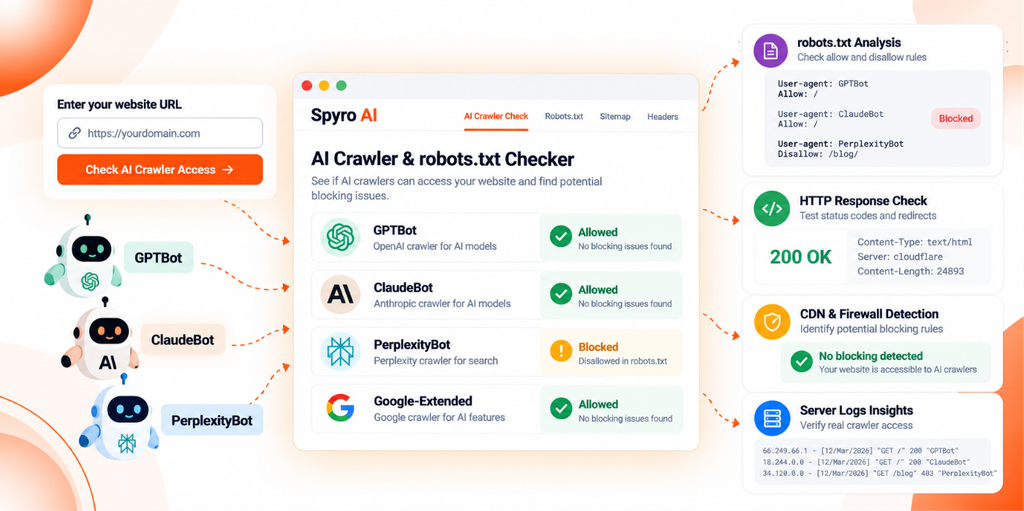
    How Can Spyro AI’s AI Crawler Checker Help?

    The free AI Crawler & robots.txt Checker from Spyro AI is a quick first pass. According to the tool page, you enter a domain and the AI crawler checker:

    • fetches your robots.txt, sitemap and llms.txt
    • resolves the exact rule that allows or blocks each AI user agent it tests, including GPTBot, ClaudeBot, PerplexityBot and Googlebot
    • flags bots that seem to be turned away by your server or firewall even though robots.txt allows them
    • suggests robots.txt rules you can review before pasting

    Know its limits. It doesn’t crawl every page, the tool page doesn’t describe how it detects silent blocks, and it doesn’t claim to read server logs, verify crawler IPs or confirm a real bot visit. Steps 3 and 4 still happen on your side.

    For a wider view, the free SEO and GEO Audit covers up to 20 pages, including AI crawler access, llms.txt presence and technical issues like robots rules, sitemaps and redirects. To measure visibility itself, the free AI Visibility Checker shows whether ChatGPT and Google AI Overviews mention your brand.

    What Do AI Bot Access Problems Look Like? Three Examples

    These are illustrative scenarios, not real customer cases.

    Example 1: HTTP 200 in a Browser, 403 for Automated Requests

    The guide page loads in a browser. An AI crawler checker run from outside gets a 403, and so does a plain curl request. The body is a short challenge page, and security events show a bot management rule matching automated traffic on that path.

    text

    # Illustrative output only
    $ curl -s -o /dev/null -w "%{http_code}\n" https://example.com/guides/
    403

    Likely next step: decide whether you want that bot. If yes, confirm real crawler requests in your logs against the vendor’s IP list, then add a narrow exception for that verified bot on public paths.

    Example 2: robots.txt Allows PerplexityBot, but a CDN Challenge Stops It

    The AI crawler checker shows PerplexityBot allowed by robots.txt. Origin logs show no PerplexityBot requests at all. CDN logs show challenges issued to requests from Perplexity’s published ranges.

    Likely next step: allow the verified bot category or the vendor’s current ranges for public paths, then recheck after 24 hours.

    Example 3: The Homepage Works, but the Articles Directory Is Blocked

    The homepage passes every AI crawler checker test. A sample of article URLs shows “disallowed” for every AI bot, because robots.txt still carries a rule left over from a migration:

    text

    # Illustrative example only
    User-agent: *
    Disallow: /resources/

    Likely next step: narrow the rule to what really needs blocking, such as Disallow: /resources/drafts/, then retest the sample.

    Key Takeaways

    • An AI crawler checker is a starting point. It reads policy and sends test requests, but it can’t prove a real crawler visit.
    • GPTBot and ClaudeBot are training crawlers. Search and user triggered bots have different names and rules.
    • Google-Extended controls Gemini training and grounding, not Google Search or AI Overviews.
    • CDN challenges, firewall rules and 5xx errors can block bots that robots.txt allows.
    • Allowing a crawler never guarantees a citation, so measure AI visibility separately.

    Frequently Asked Questions

    What is an AI crawler checker?

    An AI crawler checker is a tool or process that tests whether AI bots such as GPTBot, ClaudeBot and PerplexityBot are allowed to read your site. It usually reads robots.txt rules for each bot and requests key URLs to check status codes and redirects. It can’t prove a genuine crawler visit without server log evidence.

    How do I check whether GPTBot or ClaudeBot can access my website?

    Run an AI crawler checker or open robots.txt and find the groups for GPTBot and ClaudeBot, or the wildcard group if they aren’t named. Then request important URLs and confirm they return 200. Finally, search your server logs for those user agents and verify source IPs against the lists OpenAI and Anthropic publish.

    How do I know whether PerplexityBot is blocked?

    Check the PerplexityBot group in robots.txt, then test key URLs for 403, 429 or challenge pages. Review CDN and firewall events for requests from Perplexity’s published IP ranges. An AI crawler checker can flag rule level blocks, but firewall blocks often only show up in security logs.

    Does robots.txt control all AI bots?

    No. robots.txt only works for bots that choose to follow it. OpenAI says robots.txt rules may not apply to ChatGPT-User because its visits are user initiated, and Perplexity says Perplexity-User generally ignores robots.txt. It also isn’t access control, so private content needs authentication.

    Can a website allow Googlebot but block GPTBot?

    Yes. Each bot reads its own robots.txt group, so you can allow Googlebot and add a separate group that disallows GPTBot. Blocking GPTBot doesn’t affect Google Search. OpenAI also lets you allow OAI-SearchBot for ChatGPT search while disallowing GPTBot for training.

    Does allowing AI crawlers guarantee citations in AI answers?

    No. Allowing a crawler removes one barrier. Whether a page is indexed, cited or mentioned depends on relevance, quality, trust and each AI product’s own systems. Track citations and mentions across many prompts over time.

    What should I do if an AI crawler receives a 403 response?

    Find out which layer returned the 403 by checking CDN, firewall and server logs. Confirm the request came from the vendor by checking its IP against the published list. If you want that bot, add a narrow exception for the verified crawler on public paths, then rerun your AI crawler checker.

    Start With an AI Crawler Checker, Then Verify What It Can’t See

    The full process in one place:

    1. Inspect robots.txt.
    2. Test representative URLs.
    3. Review CDN and firewall controls.
    4. Examine server logs.
    5. Verify crawler identity where possible.
    6. Recheck access after changes.
    7. Measure AI visibility separately.

    An AI crawler checker covers the first two steps fast. The rest needs your own logs.

    For a quick baseline, run the AI Crawler & robots.txt Checker on your domain and fix anything it flags before moving on to logs. It won’t guarantee a single citation. It will tell you whether the door is open.

  • How to Get Cited in ChatGPT & Perplexity: 2026 Guide

    How to Get Cited in ChatGPT & Perplexity: 2026 Guide

    Quick answer: To get cited in ChatGPT and Perplexity, your page must be discoverable by their retrieval systems, competitive in mainstream web search, and structured so a specific passage directly answers a query. Add clean FAQ, HowTo, and Article schema, keep content fresh, and write self-contained answers near the top of each section. Both engines pull from a filtered pool of top-ranking, well-formatted, recently updated pages rather than the open web at large.

    Why Do ChatGPT and Perplexity Cite Some Pages and Ignore Others?

    Citation isn’t a lottery, and it isn’t purely a ranking contest either. It’s the output of a retrieval pipeline that filters out most of the web before a model ever references anything. Understanding that pipeline changes how you think about optimization, because by the time relevance and writing quality matter, a huge share of pages have already been eliminated on technical grounds.

    Perplexity’s own help documentation describes the process in plain terms: it runs a web search, filters the results, and cites only a small subset of what it finds, so it is never reading “the whole internet” for a given question (Perplexity’s help center). ChatGPT’s browsing behavior follows a related but distinct logic. Rather than running its own independent crawl-and-rank system, its source pool is shaped heavily by an underlying web search index, and a page has to already be indexed and competitive in ordinary web search before ChatGPT can retrieve it at all (OpenAI’s documentation on ChatGPT search). An analysis of retrieval traffic by Ahrefs found that ChatGPT sources roughly 88% of the URLs it ends up citing from its general search index, well ahead of Reddit, YouTube, news, and academic sources combined (Ahrefs’ analysis of ChatGPT citation data). If you’re not in that search selection pool, structure and freshness never get the chance to matter.

    How Does Perplexity Decide Which Sources Make the Citation List?

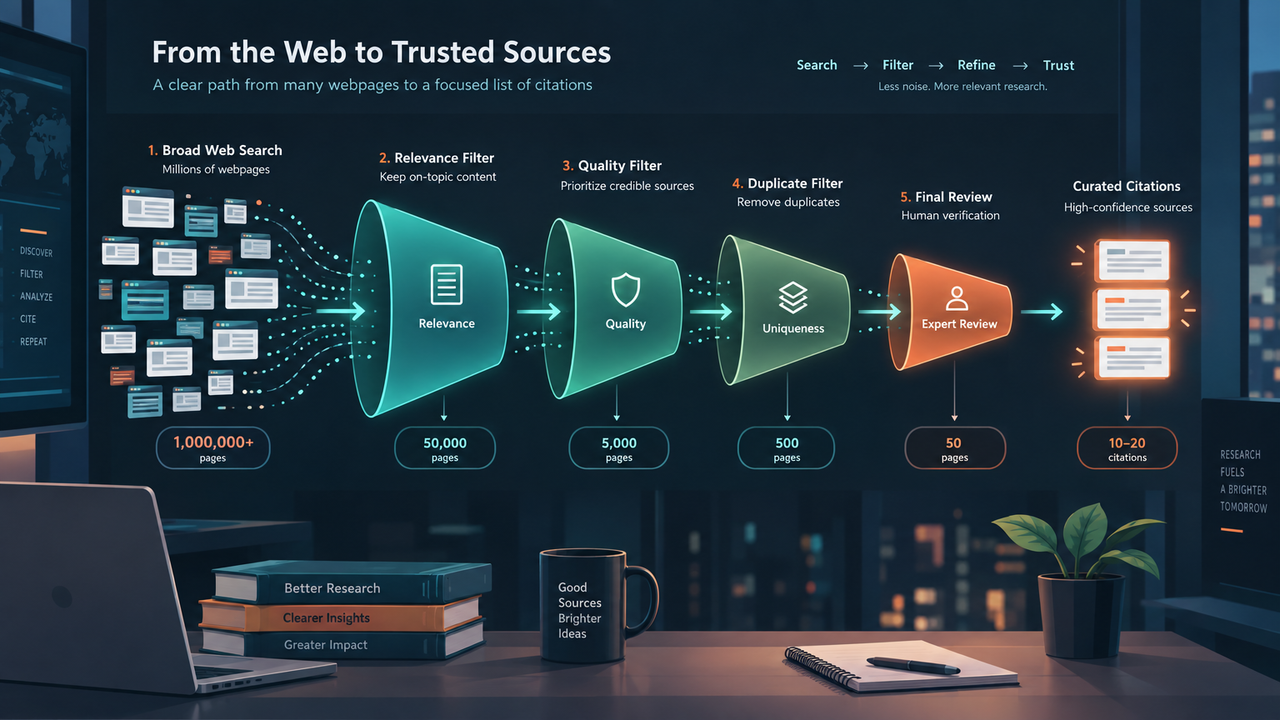
    Perplexity doesn’t rank sources the way Google ranks a results page. It runs a filtering pipeline that starts broad and narrows aggressively, and most of the pages that get retrieved never make it into the final answer. Getting cited in ChatGPT and Perplexity comes down to surviving that pipeline, which asks for different signals than classic search ranking does.

    The Retrieval Funnel: From Sub-Queries to 3-4 Citations

    Perplexity breaks a single question into several sub-queries, runs each one separately, and only carries the strongest passages forward into the final answer, so a page can rank well for one sub-query and still get cut before the answer is assembled (Perplexity’s help center). Ranking first in Google is a starting condition for citation, not a guarantee of it. AI search visibility depends on surviving multiple filtering passes, not a single ranking signal.

    Source Quality Labels: What Perplexity Checks at the Site Level

    Beyond the query-matching stage, Perplexity applies quality evaluation at the site level rather than the page level. Its help documentation describes checking whether a site corrects mistakes, identifies its authors, and separates news reporting from opinion or sponsored content, treating those as trust signals independent of any single page’s wording (Perplexity’s help center).

    Diagram of Perplexity's retrieval pipeline narrowing from broad web results to final cited sources

    What Structural Fixes Actually Get You Cited in AI Answers?

    AI citation engines respond to specific structural signals, and most of them can be verified or fixed in an afternoon. Here’s what actually moves the needle, in order of impact.

    1. Lead with a self-contained answer, not a windup. For a page to be cited, it first has to be retrieved for the query, then selected because it contains a clear passage that directly answers the question rather than diffuse or buried information. Practically, this means the first 40-60 words under any H2 or H3 should stand alone as a complete answer, with no throat-clearing and no “in this section we’ll explore.”
    2. Support that answer with clearly labeled subsections. Place the concise, direct answer near the top of the page, then back it with deeper context organized under clearly labeled headings. Headings act as retrieval anchors: they help the AI’s decomposition step match a sub-query to the right chunk of your page.
    3. Add structured data that names your content type. Structured data types like Article, FAQPage, HowTo, and DefinedTerm give AI systems a machine-readable signal for what kind of information sits on the page, making it easier to extract citation-friendly facts. A DefinedTerm block around a glossary term, for instance, tells the crawler exactly what’s being defined without forcing it to parse surrounding prose.
    Diagram showing structural fixes on a webpage that help AI engines cite it, including a self-contained answer block, clear headings, and schema markup

    Does Content Freshness Really Change Whether You Get Cited?

    Yes, and it works as a moving target rather than a one-time badge. A page optimized once in January and left untouched won’t hold its citation share through the year, because freshness is evaluated relative to what else is available at query time, not as a fixed score attached to your URL.

    A page that was accurate and well-cited six months ago can quietly drop out of the filtered set simply because a competing page was updated more recently and now looks like the more current answer. That’s a relative comparison, not a penalty: nothing about the older page changed, but its position in the ranking did. Treat this as a maintenance cadence rather than a launch task. Revisit your highest-intent pages on a fixed schedule, update figures and examples that have aged, and refresh the publish date only when the content itself actually changed.

    Freshness alone doesn’t guarantee selection, either. Fast loading times and clean indexation are baseline requirements Perplexity’s own documentation names as part of what makes a page eligible for retrieval in the first place (Perplexity’s help center). A recently updated page that loads slowly or sits behind indexation problems can still lose out to an older but technically clean competitor, so content freshness and technical health work best as a paired maintenance task rather than two separate projects.

    ChatGPT vs. Perplexity: Which Citation Signals Matter Most?

    ChatGPT and Perplexity don’t weigh the same signals equally, so treating them as one target wastes effort. Understanding where each engine puts its emphasis lets you prioritize fixes instead of chasing every optimization tactic at once, which is the practical core of answer engine optimization versus generic SEO.

    SignalChatGPTPerplexity
    Primary mechanismRetrieval from underlying web search index, then selection based on passage clarityNumbered citations tied to specific claims, drawn from its own filtered retrieval pipeline
    What matters mostConcise, self-contained answers near the top of the pageDiscrete, attributable facts rather than vague claims
    GatekeeperMust already rank competitively in mainstream web searchAI crawler access to the page, plus site-level trust signals
    • ChatGPT prioritizes passage clarity. For ChatGPT to cite a page, it must first be retrieved for the query, then selected because it contains a clear, self-contained passage that directly answers the question rather than diffuse or buried information. Place concise, direct answers near the top of the page, supported by deeper context in clearly labeled sections underneath.
    • Perplexity prioritizes attributable facts. Because Perplexity ties numbered citations to specific claims rather than to a page as a whole, content built around discrete, checkable statements gets pulled into answers more often than content that makes the same point in one long, unbroken paragraph.

    Key Takeaways: How to Get Cited in ChatGPT and Perplexity

    Everything in this guide reduces to a small number of repeatable actions. None of them guarantee a citation, since no one outside Perplexity or OpenAI knows the exact selection formula, but each one improves your odds based on observed behavior.

    • Audit crawler access before touching content. Check robots.txt and server configs to confirm AI crawlers can actually reach your pages; a page that’s technically blocked from retrieval will never be eligible for citation, regardless of quality. Spyro’s AI crawler robots checker is built for exactly this pre-flight check.
    • Get indexed and rank competitively in mainstream web search. Since both ChatGPT’s browsing feature and Perplexity’s retrieval layer lean on general web indexes, invisibility in traditional search means invisibility in AI answers too.
    • Lead with a direct, self-contained answer. Place the concise response near the top of the page, then support it with structured context underneath using clear headings and lists.
    • Treat freshness as ongoing maintenance, not a one-time fix. Stale pages lose ground to more recently updated competitors even when nothing else about them changes, so revisit high-intent pages on a set schedule.
    • Add structured data deliberately. Article, FAQPage, HowTo, and DefinedTerm markup help AI systems parse content type and extract citation-friendly facts rather than guessing at structure.
    • Fix the boring technical stuff. Slow load times and indexation gaps quietly disqualify pages before content quality ever enters the equation.
    • Build topical authority over time. Repeated, in-depth coverage of a niche makes it more likely that AI systems encounter, and trust, your domain across multiple queries, not just one lucky page.

    FAQ

    How do I get cited by AI search tools like ChatGPT and Perplexity?

    Make sure your page is indexed and competitive in mainstream web search, structure a clear self-contained answer near the top, add FAQ and HowTo schema, and keep the content updated so freshness signals stay strong.

    Is Perplexity AI free to use?

    Yes, Perplexity offers a free tier with limited daily searches, alongside a paid Pro plan that unlocks additional models and higher usage limits.

    How do I appear in ChatGPT’s browsing answers specifically?

    Since ChatGPT’s browsing source pool is shaped largely by the underlying web search index, your page needs strong organic rankings first, plus a concise passage that directly answers the likely query.

    Is Perplexity considered an LLM, or something else?

    Perplexity is an AI answer engine that combines large language models with real-time web retrieval; it is not itself a foundation LLM but a product layered on top of one or more models.

    Does adding schema markup guarantee a citation in AI answers?

    No single tactic guarantees citation, but structured data like FAQPage, HowTo, and Article schema helps AI systems parse and extract citation-ready facts, improving your odds meaningfully.

    Conclusion

    Getting cited in ChatGPT and Perplexity comes down to being retrievable, being readable at the passage level, and staying fresh enough to keep beating stale competitors. Start by auditing crawler access and schema on your highest-intent pages, then track whether citations actually appear. Run a free SEO and GEO audit to see exactly where your site stands before making changes.